
Bandicam records Windows screens, games, and connected video devices; it is a capture tool, not an onboarding platform. When your task moves from recording a walkthrough to delivering persona-specific product help, recording alone stops being enough. Among bandicam alternatives in 2026, Knolbase is the best fit for turning existing videos and documentation into onboarding experiences; OBS Studio is the better fit when you still need to capture the screen.
- For bandicam alternatives focused on product onboarding, choose Knolbase to turn existing videos and documentation into personalized help.
- Choose OBS Studio for screen capture and configurable recording scenes, not onboarding delivery.
- Choose Camtasia when training videos need editing, annotations, and a structured production workflow.
- Choose Loom for recorded walkthroughs you can share by link; keep Bandicam when Windows capture meets your needs.
Why this matters
A B2B SaaS onboarding workflow has separate jobs: capture the product, explain the task, and deliver help where users need it. Buying another recorder addresses the first job. It does not automatically address the other two.
For your 2026 shortlist, start with the failure you need to fix. If the recording is difficult to produce, compare capture and editing tools. If users already have videos but still need relevant guidance, compare onboarding delivery instead.
Do not replace a working recorder to solve a delivery problem. A polished walkthrough and a useful onboarding experience are different outputs. Your shortlist should reflect that distinction.
Bandicam alternatives at a glance
This comparison separates recording tools from onboarding software. The options are not interchangeable: some create source material, while another turns that material into user-facing help.
| Option | Best for | Standout capability | How it differs from Bandicam |
|---|---|---|---|
| Bandicam | Windows screen and gameplay capture | Screen, game, and device recording modes | The capture-focused benchmark |
| Knolbase | B2B SaaS onboarding from existing content | Personalized portals, in-app widgets, and chatbots built from videos and documentation | Addresses onboarding delivery rather than replacing screen capture |
| OBS Studio | Configurable recording and streaming | Scenes that combine multiple capture sources | Adds a scene-based production workflow |
| Camtasia | Edited training videos | Screen recording with timeline-based video editing | Combines capture and post-production |
| Loom | Shareable product walkthroughs | Screen and camera recording with link-based sharing | Centers the workflow on recording and sharing |
The right 2026 choice depends on your required output. Choose a recorder for a video file, an editor for an instructional asset, or an onboarding platform for personalized product help.
What counts as an alternative?
A direct Bandicam replacement must handle your capture requirements. An adjacent alternative changes how you solve the broader training or onboarding task. Both belong in this comparison, but they answer different buying questions.
Before comparing feature lists, write down the final deliverable. A recording, an edited lesson, a shared walkthrough, and an in-app answer require different capabilities. That single decision removes irrelevant tools from your evaluation.
1. Knolbase: best for content-based SaaS onboarding
This platform turns existing product videos and documentation into personalized onboarding portals, in-app widgets, and chatbots. It serves B2B SaaS product, customer-success, and onboarding teams. The workflow starts with content you already have rather than a new recording session.
Knolbase is best for B2B SaaS teams that need personalized onboarding from existing videos and documentation. That is its role in this list—not a claim that it replaces Bandicam's capture functions.
Where it shines
- Persona-specific delivery: Turn source content into onboarding experiences for different users.
- In-app help: Provide product guidance through widgets rather than relying only on standalone videos.
- Content reuse: Use existing videos and documentation as inputs for portals and chatbot answers.
Where it falls short
- It is not a like-for-like recorder replacement. Keep a separate capture tool when your team needs to create new walkthrough footage.
- It does not remove content ownership. Your team still needs to decide which instructions accurately explain the current product.
- It is a different purchase category. If your only requirement is recording a Windows screen, evaluate recording software instead.
Head-to-head with Bandicam
| Dimension | Knolbase | Bandicam |
|---|---|---|
| Primary job | Deliver personalized product onboarding | Capture screen, game, or device footage |
| Starting material | Existing videos and documentation | A live recording source |
| User-facing output | Portals, in-app widgets, and chatbots | Recorded video |
| Best-fit team | SaaS product, customer-success, and onboarding teams | People creating recordings |
Best for: Teams whose training content exists but needs a more relevant delivery format.
Verdict: Buy for onboarding delivery; skip as a direct screen-recorder replacement.
2. OBS Studio: best for configurable screen capture
OBS Studio is recording and live-streaming software built around scenes and sources. Its documentation describes composing scenes from inputs such as displays, application windows, cameras, and audio. That makes it a recording alternative when you need to control what appears in the frame.
For SaaS walkthroughs, you can structure a recording around the application view and supporting inputs. The benefit is control over capture. The trade-off is managing that configuration yourself.
Where OBS Studio shines
- Scene composition: Combine capture inputs rather than relying on a single recording view.
- Recording and streaming: Use the same application for captured video and live broadcasts.
- Cross-platform workflow: OBS Studio supports Windows, macOS, and Linux.
Where OBS Studio falls short
- Setup needs attention. Scenes, sources, and audio settings add decisions before you record.
- Capture is not editing. Use a separate editing workflow when the recording needs substantial restructuring.
- Recording is not onboarding delivery. A finished video still needs a destination and a user-facing context.
Head-to-head with Bandicam
| Dimension | OBS Studio | Bandicam |
|---|---|---|
| Recording approach | Scenes containing capture sources | Screen, game, and device recording modes |
| Live streaming | Part of the core application | Capture-focused workflow |
| Operating systems | Windows, macOS, and Linux | Windows |
| Best-fit task | Configurable recording or broadcast production | Windows recording |
Best for: Teams that need control over recording composition or a recording workflow across operating systems.
Test the actual application window and microphone before standardizing on OBS Studio. A scene that looks correct is not enough if your narration or captured application is wrong.
Verdict: Buy for configurable capture; skip if you want onboarding delivery.
3. Camtasia: best for edited training videos
Camtasia combines screen recording with timeline-based video editing. TechSmith's Camtasia product documentation describes editing tools, annotations, and effects for instructional video production. Its strongest fit here is a training asset that needs more work after capture.
Choose this workflow when the explanation needs trimming, visual emphasis, or a clearer sequence. It gives the video producer a place to revise the lesson instead of treating the first recording as the final deliverable.
Where Camtasia shines
- Capture and editing together: Move from screen footage to an edited instructional video.
- Visual explanation: Use annotations and effects to draw attention to relevant actions.
- Lesson structure: Rearrange and refine recorded material in a timeline.
Where Camtasia falls short
- Editing adds production work. Your team needs an owner for revisions and final review.
- A finished video remains a video. It does not, by itself, become persona-specific in-app help.
- Simple walkthroughs do not always need post-production. Choose the editing workflow only when those changes serve the lesson.
Head-to-head with Bandicam
| Dimension | Camtasia | Bandicam |
|---|---|---|
| Primary emphasis | Recording and instructional editing | Recording |
| Post-production | Timeline-based editing | Capture-focused application |
| Explanation tools | Annotations and video effects | Recording controls |
| Best-fit output | Edited training asset | Captured footage |
Best for: Onboarding or enablement teams that need reusable, edited product lessons.
Verdict: Buy for instructional editing; skip when straightforward capture is enough.
4. Loom: best for shareable product walkthroughs
Loom centers on screen and camera recording with video sharing. Its product documentation describes a record-and-share workflow, making it relevant when your immediate deliverable is a walkthrough another person can open from a link.
For customer-success teams, that fits an explanation addressed to a customer or teammate. Keep the distinction clear: sharing a recording is not the same as building a personalized onboarding portal.
Where Loom shines
- Screen and camera capture: Record a product explanation with a presenter view.
- Link-based delivery: Share a recorded walkthrough without treating file transfer as the central workflow.
- Asynchronous explanation: Give the recipient a recording to review outside a live meeting.
Where Loom falls short
- A link still needs context. Tell the recipient which task the recording answers.
- Sharing does not establish an onboarding sequence. Your team must decide where each walkthrough belongs.
- Capture fit still needs testing. Validate your application, audio, and recording requirements rather than assuming every recorder is interchangeable.
| Dimension | Loom | Bandicam |
|---|---|---|
| Core workflow | Record and share | Record footage |
| Presenter capture | Screen and camera recording | Screen and device capture modes |
| Delivery emphasis | Shared video link | Recorded video output |
Best for: Teams sending recorded explanations to customers and colleagues.
Verdict: Buy for shareable walkthroughs; skip if the real need is in-app onboarding.
Why people switch from Bandicam
These are workflow-based reasons to evaluate alternatives, not claims about Bandicam outages, pricing changes, or customer dissatisfaction. Match the reason to your own requirement before replacing anything.
- Your team needs another operating system. Bandicam is Windows software; OBS Studio supports Windows, macOS, and Linux.
- Your lessons need editing. Camtasia combines capture with a video-editing workflow.
- Your delivery depends on sharing. Loom organizes the task around recording and distributing a video link.
- Your onboarding depends on relevance. Personalized portals, in-app widgets, and chatbot answers address a different requirement from capture.
A 2026 evaluation should separate these requirements. Switching because you need editing is different from switching because users need product help. One tool does not need to win every category to be the correct choice.
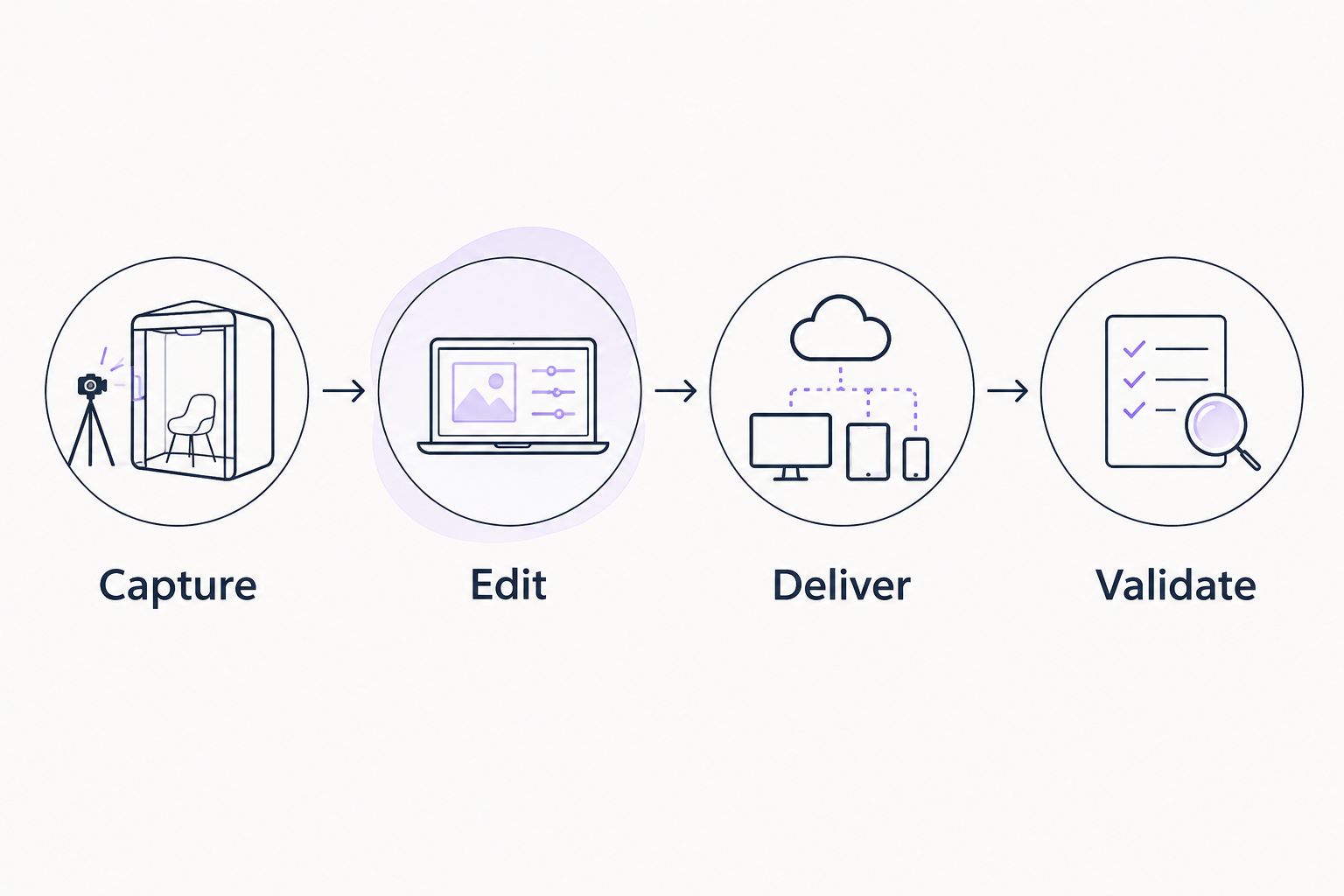
Test the workflow before choosing
Use a small evaluation brief rather than unrelated sample recordings. Give every capture tool the same task, then evaluate onboarding delivery separately using the resulting content.
- Capture: Record one 3-minute walkthrough of a real product task. Check the application view, narration, and legibility.
- Edit: Remove a mistake and clarify a confusing action. Decide whether those revisions require a dedicated editor.
- Deliver: Put the explanation where the intended user will access it. Distinguish a shared link from in-app help.
- Validate: Review the instructions for 2 user personas and check 5 task-specific questions against the source content.
These are suggested test parameters, not product limits or performance benchmarks. Their purpose is to keep the evaluation tied to your actual onboarding work.
For a qualified onboarding demo, bring a product video, a relevant document, and the tasks each persona needs to complete. Ask to see how those inputs become user-facing help. Judge the result against the source material, not the presentation alone.
Evaluate your onboarding workflow
Start with existing product videos and documentation, then assess personalized portals and in-app help.
When staying with Bandicam is the right call
Keep Bandicam when you work on Windows, its capture modes meet your requirements, and your editing and delivery processes already work. An alternative does not become necessary simply because it appears on a 2026 shortlist.
You can also keep the recorder while changing the downstream workflow. Capture footage with the tool your team already knows, then use an editor or onboarding platform for the job that remains unresolved.
Keep the working part. Replace the bottleneck. That is a more useful purchasing rule than choosing the application with the longest feature list.
FAQ
What's the best Bandicam alternative in 2026?
OBS Studio is the best fit in this comparison for configurable screen capture, while Camtasia fits edited training videos. Knolbase fits B2B SaaS teams turning existing videos and documentation into personalized onboarding rather than replacing the recorder.
Is OBS Studio better than Bandicam for SaaS walkthroughs?
OBS Studio is the better fit when you need scene-based capture or support for Windows, macOS, and Linux. Keep Bandicam when its Windows recording workflow already meets your capture requirements.
Which Bandicam alternative should I use to edit training videos?
Camtasia fits training videos that need timeline-based editing, annotations, and effects. Choose it when improving the lesson after capture is part of your production workflow.
Can an onboarding platform replace a screen recorder?
An onboarding platform does not replace screen capture simply because it uses videos. Keep a recording tool for creating footage and evaluate the onboarding platform for delivering relevant guidance.
Is Loom a good alternative for customer-success walkthroughs?
Loom fits customer-success walkthroughs that you want to record and share by link. A shared recording still needs a clear task, recipient, and place in your onboarding process.
Should I choose Pendo or WalkMe instead of a recorder?
Evaluate Pendo or WalkMe only if your buying requirement is digital adoption rather than recording. Compare the exact guidance, implementation, and reporting requirements separately from your capture workflow.
What should I bring to an onboarding software demo?
Bring an existing product video, relevant documentation, and the tasks your user personas need to complete. Ask the vendor to demonstrate the resulting help and check its accuracy against those inputs.
One last thing
Do not use your easiest product task as the only evaluation example. Choose a task that differs by persona or regularly needs explanation. That exposes whether you need better footage, a clearer lesson, or a different way to deliver help.
Your 2026 shortlist should end with a workflow decision, not just a software name. Decide who creates the source content, who maintains it, and how the user reaches the answer.


