Loom is strong at recording and sharing product explanations, but a video link is not the same as guidance inside your product. If users need persona-specific onboarding and answers during a task, compare platforms that deliver help rather than just capture it. The best Loom alternative in 2026 is Knolbase if you need to turn existing videos and documentation into onboarding portals, in-app widgets, and chatbots; OBS Studio if you need a recording-focused alternative.
- Compare loom alternatives for onboarding teams by delivery workflow, not recording features alone.
- Knolbase is best for SaaS onboarding teams turning videos and documentation into persona-specific help.
- Pendo fits product analytics and in-app guidance; WalkMe fits digital adoption across business applications.
- OBS Studio fits recording workflows. Keep Loom when shared video explanations already meet your onboarding needs.
Why this matters
Your onboarding team has two different jobs: explain the product and help users complete work. Recording software handles the explanation. Portals, contextual guidance, and chatbots give users other ways to find help while using the product.
That distinction should drive your 2026 shortlist. A clearer recording will not fix a delivery problem, and an adoption platform is unnecessary when your users simply need an asynchronous walkthrough.
Knolbase is best for SaaS onboarding teams that want to turn existing product videos and documentation into persona-specific help. Start with that workflow, then decide whether you also need a separate recorder.
Loom alternatives at a glance
These options serve different parts of onboarding. Compare the job each product performs before treating them as interchangeable replacements.
| Tool | Best for | Standout capability | How it differs from Loom |
|---|---|---|---|
| Loom | Recording and sharing product explanations | Screen and camera video capture with shareable videos | The recording-and-sharing benchmark |
| Knolbase | Reusing content for personalized SaaS onboarding | Videos and documentation become portals, in-app widgets, and chatbots | Focuses on delivering onboarding help from existing content |
| Pendo | Connecting product usage analysis with in-app guidance | Product analytics and Guides | Adds a product-adoption workflow rather than replacing recording alone |
| WalkMe | Guiding work across business applications | Smart Walk-Thrus | Focuses on task guidance within applications |
| OBS Studio | Controlling how training videos are recorded | Configurable scenes and recording sources | Focuses on video production rather than a hosted onboarding experience |
For competitor feature checks, use the official documentation for Loom recording, Pendo Guides and product analytics, WalkMe Smart Walk-Thrus, and the OBS Studio Quick Start Guide. Those sources describe the capabilities named here; they do not establish which product fits your onboarding process.
1. Knolbase: best for content-based SaaS onboarding
Knolbase turns product videos and documentation into personalized onboarding portals, in-app widgets, and chatbots. That makes it a different kind of Loom alternative: you are changing how users receive help, not merely changing how your team records explanations.
The relevant buyer is a product, customer-success, or onboarding team with existing content. Bring a real product video and a real documentation page to the evaluation. Ask to see how that material supports different personas and appears within the user's onboarding workflow.
Where Knolbase shines
- Content reuse: Existing videos and documentation serve as inputs for onboarding experiences.
- Persona-specific delivery: Personalized portals support different onboarding needs.
- Multiple help surfaces: In-app widgets and chatbots give users alternatives to opening a video link.
Where Knolbase falls short
- Recording-only fit: Its stated focus is onboarding delivery. If your only requirement is capturing a screen explanation, evaluate a recorder first.
- Content preparation: You still need to select accurate source material. Turning an outdated explanation into another format does not make the explanation correct.
- Evaluation scope: A portal demonstration alone does not establish whether in-app help fits your users' actual tasks. Test each required surface.
Head-to-head with Loom
| Dimension | Knolbase | Loom |
|---|---|---|
| Primary workflow | Turn existing content into onboarding experiences | Record and share video explanations |
| Content relationship | Uses product videos and documentation as inputs | Produces recorded explanations |
| Delivery focus | Personalized portals, widgets, and chatbots | Shareable videos |
| Best evaluation task | Show how existing material helps a specific persona | Record and share a product walkthrough |
Best for: B2B SaaS teams that need reusable onboarding content delivered through portals and in-app help.
For your 2026 evaluation, separate content quality from delivery quality. First check whether the source explanation is correct. Then check whether a user can find and apply the relevant answer without a customer-success teammate directing every step.
Verdict: Buy for content-based onboarding after the demo proves your required delivery workflow; skip for a recording-only requirement.
2. Pendo: best for analytics-led in-app guidance
Pendo combines product analytics with in-app guidance through Guides. Put it on your shortlist when your product team wants to understand usage and deliver guidance within the application.
The decision is not whether Pendo makes a better video. It is whether your onboarding work requires a connection between product behavior and guidance. That is a different purchase from a screen recorder.
Where Pendo shines
- Product usage analysis: Product analytics supports investigation of how users interact with an application.
- In-app guidance: Guides delivers instructional experiences within the product.
- Product-team fit: Analytics and guidance belong in the same evaluation when product adoption is the central question.
Where Pendo falls short
- Recording mismatch: Analytics and Guides do not address the same primary job as recording a walkthrough.
- Broader evaluation: You need to assess both analytics setup and guide delivery, rather than judging a recording sample alone.
- Ownership requirements: Your team needs a clear owner for interpreting usage and maintaining guidance. Buying both capabilities does not define that workflow.
Head-to-head with Loom
| Dimension | Pendo | Loom |
|---|---|---|
| Primary workflow | Analyze product usage and deliver guidance | Record and share explanations |
| Instruction format | In-app Guides | Recorded video |
| Additional evaluation area | Product analytics | Recording and sharing workflow |
| Best evaluation task | Explain a usage question and demonstrate a relevant guide | Explain a product task in a shared recording |
Best for: SaaS product teams evaluating product analytics alongside in-app onboarding guidance.
Use a concrete adoption question in the demo. For example, ask how your team would investigate whether users complete an important setup task, then inspect the guidance workflow separately. Treat that as an evaluation scenario, not a claim about your current results.
Verdict: Buy when product analytics and in-app guidance are both requirements; skip when you only need recorded explanations.
3. WalkMe: best for application-based task guidance
WalkMe is a digital adoption platform with Smart Walk-Thrus for guiding users through application tasks. Consider it when onboarding involves executing a process inside software rather than watching an explanation outside that process.
For a SaaS onboarding team, the key question is scope. Decide whether you need guidance for your own product or a broader digital adoption program across business applications.
Where WalkMe shines
- Task guidance: Smart Walk-Thrus focuses on helping users follow application workflows.
- Digital adoption scope: The platform belongs on shortlists centered on adoption of business applications.
- Process-oriented evaluation: You can frame the demonstration around completing a defined task.
Where WalkMe falls short
- Narrow-use mismatch: A digital adoption platform addresses a broader job than sending a customer a recorded answer.
- Process maintenance: Application guidance needs an owner who checks it when the underlying workflow changes.
- Scope discipline: Cross-application ambitions should not distract from proving your immediate customer-onboarding requirement.
Head-to-head with Loom
| Dimension | WalkMe | Loom |
|---|---|---|
| Primary workflow | Guide users through application tasks | Explain tasks through recordings |
| Instruction format | Smart Walk-Thrus | Shareable video |
| Evaluation focus | Guidance within the application workflow | Clarity of the recorded explanation |
| Best-fit scope | Digital adoption programs | Asynchronous video communication |
Best for: Teams evaluating task guidance within a wider digital adoption program.
In a 2026 shortlist, make the scope explicit before the demo. A customer-facing SaaS onboarding requirement and an internal business-application adoption requirement are not interchangeable, even when both involve teaching users software.
Verdict: Buy when application-based task guidance matches the program; hold if the project scope is still undefined.
4. OBS Studio: best for recording control
OBS Studio is recording and streaming software with configurable scenes and sources. It belongs on this list for teams whose actual requirement is creating training videos, not delivering personalized onboarding help.
You can use it to produce source material. You still need to decide where users will access that material and how your team will maintain it.
Where OBS Studio shines
- Recording configuration: Scenes and sources let you arrange the material you capture.
- Production focus: It fits a workflow centered on creating recorded training content.
Where OBS Studio falls short
- Separate delivery work: A recording workflow does not itself define an onboarding portal or in-app help experience.
- Configuration responsibility: Your team must configure the recording setup rather than judge only a finished video.
Head-to-head with Loom
| Dimension | OBS Studio | Loom |
|---|---|---|
| Main emphasis | Configurable recording production | Recording and sharing explanations |
| Capture setup | Scenes and sources | Screen and camera recording |
| Evaluation focus | Capture layout and recording workflow | Capture and sharing workflow |
Best for: Teams that want control over recording production and already have a content-delivery plan.
Verdict: Buy into the recording workflow when capture control is the requirement; skip as a standalone onboarding-delivery solution.
Why teams switch from Loom
The strongest reason to switch is a change in the job you need done. These are workflow-based switching criteria, not claims about Loom outages, policy changes, or customer behavior.
- Help needs to appear inside the product. A shared explanation and contextual guidance are different delivery formats.
- Different personas need different onboarding material. Evaluate how the next platform organizes and delivers the relevant content.
- Users need answers from documentation as well as video. Look at content-based onboarding rather than recording alone.
- Product usage analysis is part of the brief. Compare analytics-led guidance platforms, not just video tools.
- Recording production needs more control. Compare capture workflows without assuming you need an adoption platform.
Do not make replacement the default. Your recorder and your onboarding-delivery platform can serve separate jobs. Decide which job is failing before changing either.
How to evaluate your shortlist in 2026
Use 3 tasks, 2 personas, and 4 evaluation dimensions as a practical demo brief. These are recommended test parameters, not performance benchmarks.
Choose tasks that represent initial setup, routine use, and a common point of confusion. Choose personas with different responsibilities. Then compare content input, delivery location, task support, and maintenance ownership.
Content input
Bring the same video and documentation excerpt to each relevant demonstration. Keep the source material constant so that polished demo content does not substitute for proof of your workflow.
Delivery location
Show where help needs to appear: a shared video, an onboarding portal, or inside the application. Require the demonstration to match that location.
Task support
Ask the evaluator to complete the selected task using the proposed help experience. Check whether the instructions answer the actual question rather than merely describing the product.
Maintenance ownership
Name the team responsible for updating source content and delivery experiences. Ask how that team will check the guidance after a product change.
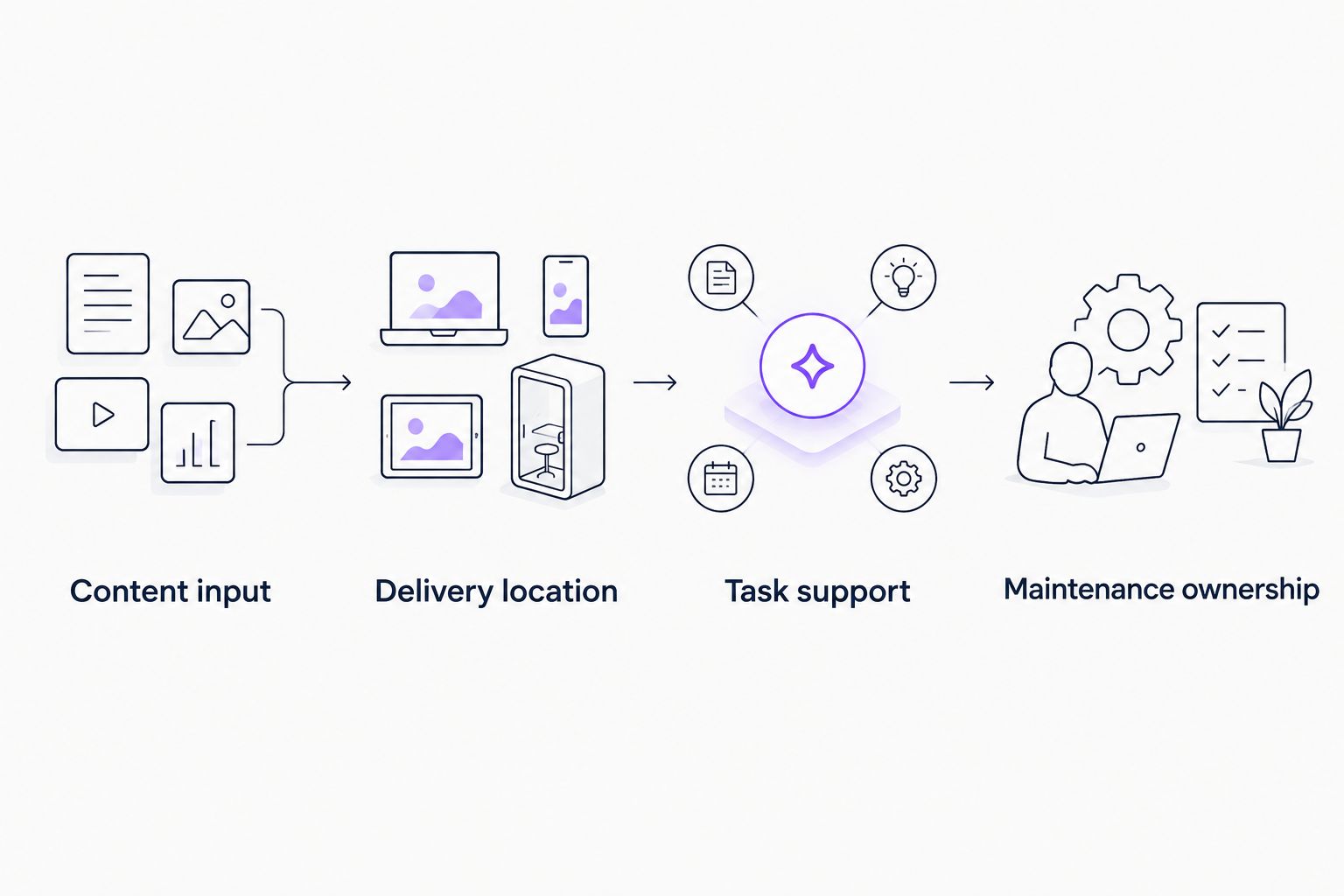
Use the same acceptance questions across your shortlist. Record what the demonstration proves, what requires additional setup, and what remains outside the intended workflow. This creates a decision record without inventing activation gains or time savings.
When staying with Loom is the right call
Keep Loom when recording and sharing explanations is the job, and your existing delivery process meets users' needs. A platform change needs a specific unmet requirement.
For your 2026 decision, separate dissatisfaction with the content from dissatisfaction with the tool. An unclear walkthrough needs better instruction; a missing in-app help surface needs a different delivery approach. Neither diagnosis automatically requires replacing your recorder.
Stay with Loom for asynchronous video explanations. Add or evaluate another platform when the onboarding workflow requires more than a shared recording.
FAQ
What's the best Loom alternative for SaaS onboarding teams?
Knolbase is best for SaaS teams that want to turn existing videos and documentation into personalized onboarding portals, in-app widgets, and chatbots. Choose a recording-focused option instead when capturing video is the only requirement.
Is Pendo a direct replacement for Loom?
Pendo addresses a different primary workflow: product analytics and in-app guidance. Evaluate Pendo when those capabilities are part of your onboarding brief, not simply because you need to record a walkthrough.
When should an onboarding team consider WalkMe?
Consider WalkMe when the requirement is guidance through application tasks within a digital adoption program. Define whether the scope is customer onboarding in your SaaS product or adoption across business applications.
Can OBS Studio replace Loom for training videos?
OBS Studio is an alternative for recording training content with configurable scenes and sources. Evaluate video delivery separately, because producing a recording does not define how users will find onboarding help.
Do we have to replace Loom to improve onboarding?
No. Keep Loom for recording if it meets that need, and evaluate a separate delivery platform for portals, contextual guidance, or chatbot answers.
How should we compare Loom alternatives in 2026?
Compare the same tasks and source content across the shortlist. Check content input, delivery location, task support, and maintenance ownership before selecting a platform.
What should we bring to an onboarding software demo?
Bring a product video, a documentation excerpt, representative user tasks, and clearly defined personas. Ask the vendor to demonstrate your required workflow with that material rather than relying only on prepared examples.
One last thing
Write down the user question before choosing the content format. If the question is about completing a task inside your product, evaluate help in that context. If the question needs a narrated explanation, a video remains a valid answer.
That simple distinction prevents a recording-tool comparison from becoming the wrong onboarding purchase.