ScreenPal combines screen recording, video editing, and video sharing in one workflow. Its ceiling for B2B SaaS onboarding appears when you need existing videos and documentation delivered as persona-specific product help, not just another recording. The best ScreenPal alternative in 2026 is Knolbase if you need content-based onboarding; Loom if you need quick asynchronous video communication.
- For ScreenPal alternatives focused on SaaS onboarding, choose Knolbase for persona-specific portals, in-app widgets, and AI answers.
- Choose Loom for asynchronous video messages, Camtasia for edited tutorials, and OBS Studio for recording and streaming.
- Keep ScreenPal when recording, editing, and sharing videos already meets your training needs.
- Separate content creation from product adoption before choosing a replacement.
Why this matters
A screen recorder helps you explain a product. An onboarding platform helps you put explanations where different users need them. These are different buying decisions, even when both start with the same training video.
For your 2026 shortlist, identify the bottleneck before comparing features. If making a tutorial takes too much effort, evaluate recording and editing tools. If customers cannot find the explanation while using your product, evaluate content delivery and in-app help.
Replacing a recorder does not, by itself, solve an onboarding delivery problem. You can keep your recording workflow and change how users receive its output.
ScreenPal alternatives at a glance
This comparison separates content creation from onboarding delivery. ScreenPal remains in the table because a replacement should improve the workflow you actually need, not simply add a different interface.
| Tool | Best for | Standout capability | How it differs from ScreenPal |
|---|---|---|---|
| ScreenPal | Recording, editing, and sharing instructional videos | Connected video creation and sharing workflow | The benchmark for a recording-led workflow |
| Knolbase | B2B SaaS onboarding from existing content | Videos and documentation become personalized portals, in-app widgets, and chatbots | Changes how onboarding content is delivered rather than replacing video capture |
| Loom | Asynchronous video explanations | Record-and-share video messaging | Centers the workflow on sending a video message |
| Camtasia | Carefully edited product tutorials | Timeline-based recording and video editing | Centers the workflow on producing an edited instructional video |
| OBS Studio | Configurable recording and live streaming | Scenes and multiple capture sources | Centers the workflow on capture configuration and broadcast output |
The shortlist has two distinct groups: tools that create video and a platform that turns content into onboarding experiences. Compare within the right group first. Then decide whether your team needs both.
1. Knolbase: best for onboarding from existing content
Knolbase is an onboarding platform for B2B SaaS teams that need to turn existing videos and documentation into persona-specific help. Its inputs are content your team already produces; its outputs include personalized onboarding portals, in-app widgets, and chatbots. That makes it a different purchase from a screen recorder.
Best for: Product, customer-success, and onboarding teams whose next requirement is content delivery inside the customer onboarding workflow.
Where it shines
- Reuses product content: Videos and documentation become source material for onboarding experiences.
- Supports different personas: Personalized portals give your team a way to organize onboarding around the intended user.
- Brings help into the product: In-app widgets provide another destination for existing explanations.
- Adds conversational access: Chatbots give users an alternative to searching through training material themselves.
Where it falls short
- It is not a like-for-like recording replacement: Do not select it to solve a screen-capture or video-editing requirement.
- It still needs source content: If your product explanations are outdated, address that content before using it for onboarding.
- It changes the evaluation: Your demo must assess content delivery and answers, not just how quickly someone records a screen.
These trade-offs matter. A team that only wants to record a product walkthrough should remain in the video-tool category. A team that already has walkthroughs but needs persona-specific help has a different requirement.
Head-to-head: onboarding delivery versus video creation
| Dimension | Knolbase | ScreenPal |
|---|---|---|
| Starting material | Existing product videos and documentation | Screen recordings and other video material |
| Main workflow | Turn content into onboarding experiences | Record, edit, and share video |
| Delivery focus | Personalized portals, in-app widgets, and chatbots | Video viewing and sharing |
| Evaluation question | Does the right user receive relevant product help? | Can the team create and distribute the needed video? |
Bring an actual onboarding task to a 2026 demo. Ask to see how the same source content supports different personas, how users reach help inside the product, and how the chatbot answers a product question.
Verdict: Buy Knolbase for content-based SaaS onboarding, not as a substitute for a video recorder.
2. Loom: best for asynchronous video explanations
Loom is a video messaging tool built around recording and sharing explanations. It fits workflows where a teammate or customer needs to see a screen and hear the explanation without scheduling a meeting. The unit of delivery is the video message.
Best for: Teams sending product explanations, handoffs, and customer-specific walkthroughs that recipients can watch later.
Where Loom shines
- Direct communication: A screen recording can explain a particular issue or workflow.
- Simple handoffs: Shared videos let recipients review the explanation asynchronously.
- Focused messages: The workflow suits an explanation intended for a particular audience or task.
Where Loom falls short
- A message is not an onboarding structure: Your team still needs to decide where recurring training belongs.
- More videos require content organization: Naming, maintaining, and finding explanations remains part of the workflow.
- Choose the category carefully: If your requirement is detailed tutorial production, compare an editing-led tool as well.
Head-to-head: messaging versus instructional production
| Dimension | Loom | ScreenPal |
|---|---|---|
| Main emphasis | Asynchronous video messages | Screen recording, editing, and sharing |
| Typical deliverable | A shared explanation | A recorded and edited instructional video |
| Buyer question | Can someone explain this clearly and send it? | Can someone create the training video we need? |
Loom belongs on your shortlist when the bottleneck is communication. Evaluate it using a real support explanation or customer handoff, not a polished sample that hides the work your team performs.
Verdict: Buy Loom for asynchronous video communication; skip it as the sole answer to persona-specific onboarding.
3. Camtasia: best for edited product tutorials
Camtasia combines screen recording with timeline-based video editing. It fits teams that want to shape a tutorial after recording: trim sections, arrange clips, and refine the explanation. The finished video is the central deliverable.
Best for: Training and enablement teams producing instructional videos that need deliberate editing.
Where Camtasia shines
- Timeline editing: Arrange and revise recorded material rather than relying on a single uninterrupted take.
- Tutorial production: Combine screen recordings with other media to explain a workflow.
- Controlled presentation: Edit the sequence so viewers receive the explanation in the intended order.
Where Camtasia falls short
- Editing adds work: A carefully produced tutorial requires decisions beyond recording and sending.
- The output still needs a destination: Your team must decide how users discover and access the finished video.
- Production is a separate problem: Better editing does not establish persona-specific onboarding or in-app help.
Head-to-head: editing-led versus connected video workflow
| Dimension | Camtasia | ScreenPal |
|---|---|---|
| Shared capability | Screen recording and video editing | Screen recording and video editing |
| Evaluation emphasis | Timeline workflow and tutorial production | Recording, editing, and sharing workflow |
| Best test | Edit a representative instructional sequence | Create and share a representative training video |
Do not choose Camtasia merely because your tutorials look unfinished. First determine whether the problem is editing, unclear instruction, or outdated product content. An editor addresses the production layer; it does not decide what customers need to learn.
Verdict: Buy Camtasia when edited tutorials are the deliverable; skip it when content delivery is the bottleneck.
4. OBS Studio: best for configurable recording and streaming
OBS Studio supports recording and live streaming using scenes and multiple sources. It fits teams that need to configure how screens, cameras, and other sources appear in the output. That control comes with setup work.
Best for: Teams whose capture or live-streaming requirements need configurable scenes and sources.
Where OBS Studio shines
- Scene control: Configure different arrangements for the recording or broadcast.
- Multiple sources: Combine screen capture, cameras, and other inputs.
- Recording and streaming: Use a capture-oriented workflow for either output.
Where OBS Studio falls short
- Setup needs attention: Someone must configure and maintain the capture arrangement.
- Capture is not delivery: Publishing and organizing onboarding material remain separate tasks.
- It solves a narrower problem: Choose it for production control, not for personalized customer help.
| Dimension | OBS Studio | ScreenPal |
|---|---|---|
| Main emphasis | Configurable capture and streaming | Recording, editing, and sharing |
| Workflow building block | Scenes and sources | Recorded video and editing workflow |
| Best test | Reproduce the required capture arrangement | Produce the required instructional video |
Verdict: Buy OBS Studio for configurable capture and streaming; skip it for onboarding delivery.
Why people switch from ScreenPal
The useful reasons to evaluate ScreenPal alternatives in 2026 are workflow requirements, not unsupported claims about outages, service quality, or changing commercial terms.
Use these decision triggers to identify your category:
- You need personalized onboarding: Compare platforms that turn existing content into help for different personas.
- You need faster asynchronous explanations: Compare video messaging workflows using an actual customer or teammate handoff.
- You need more deliberate tutorial editing: Compare editors using the same raw recording and required finished sequence.
- You need configurable capture or streaming: Compare how tools handle your actual sources and scene arrangements.
Treat each trigger as a testable requirement. Write down what your current workflow cannot accomplish, then demonstrate that requirement in the shortlisted tool. A feature list without a representative task does not establish fit.
Test the onboarding workflow before choosing
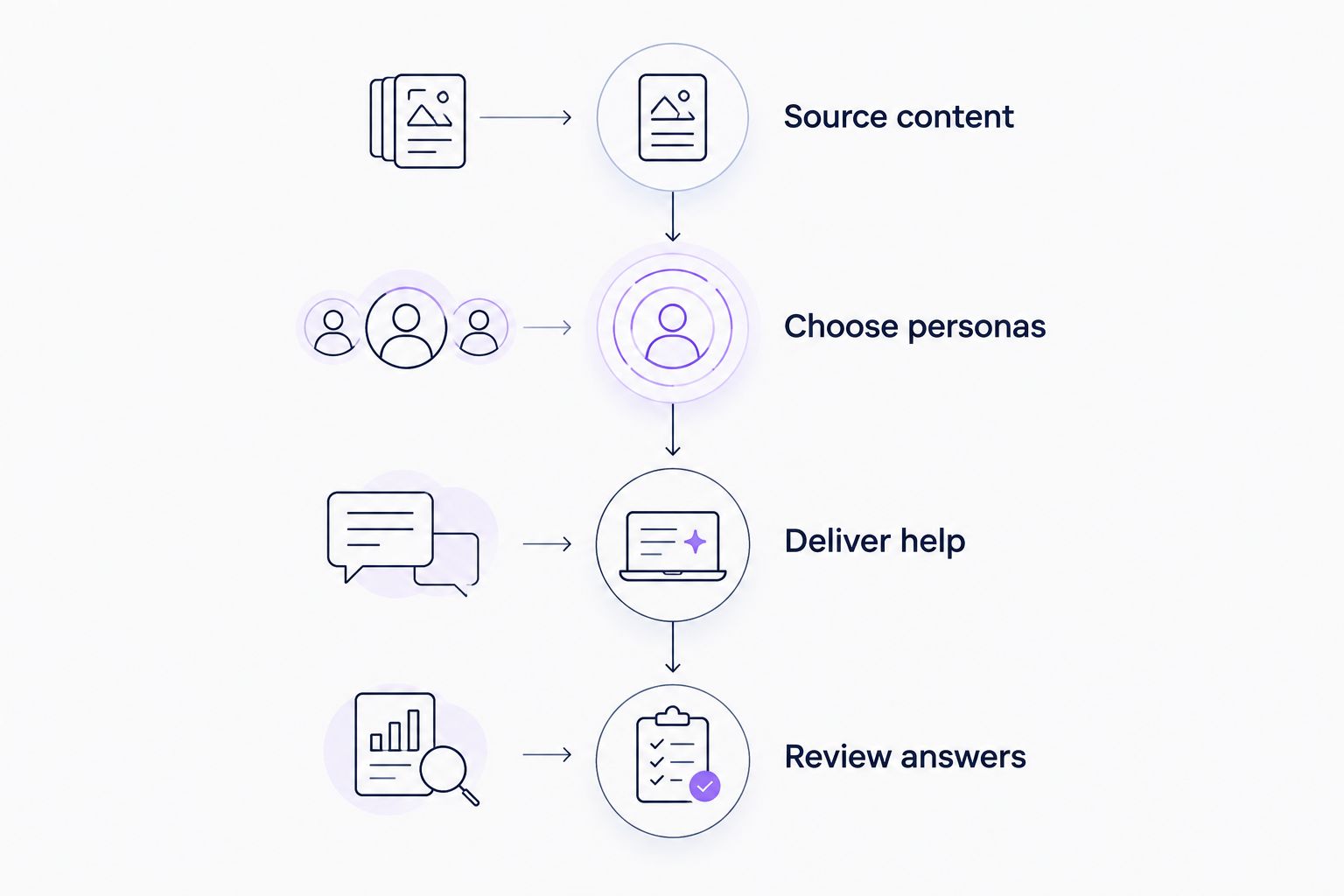
For a 2026 evaluation, use 1 product task, 2 user personas, and 3 product questions. These are evaluation inputs, not performance benchmarks. They keep the discussion tied to a real onboarding requirement.
Source content
Choose one existing walkthrough and its supporting documentation. Use a task customers actually need to complete, such as configuring a workspace or inviting a teammate. Confirm that the instructions match the current product before evaluating their delivery.
Choose personas
Select two personas with different responsibilities, such as an administrator and an everyday user. Write down what each needs to understand. Ask the vendor to demonstrate the relevant onboarding experience rather than showing the same generic material twice.
Deliver help
Evaluate where users encounter the explanation. A shared video, a personalized portal, and an in-app widget serve different access patterns. Match the destination to the moment your user needs assistance.
Review answers
Ask three questions that the supplied content should answer. Check whether the answers preserve the product's terminology and instructions. Include a question about a detail your content does not explain, and assess the response without assuming any vendor handles that situation correctly.
Document the result against your requirement. For recording tools, inspect the recording and editing workflow. For onboarding software, inspect persona relevance, access to help, and the answers users receive.
Explore content-based onboarding
See the onboarding platform for turning product videos and documentation into personalized help.
When staying with ScreenPal is the right call
Keep ScreenPal when recording, editing, and sharing videos satisfies your requirement. A change in tools is unnecessary if your actual problem is an unclear script, outdated instructions, or poor content organization.
You can also keep a recording tool while adding a separate onboarding layer. Content creation and content delivery do not have to come from the same vendor. For your 2026 decision, evaluate each layer against its own job.
Before switching, create a representative tutorial in your current workflow. Check the recording, the edit, and the recipient's access to the result. If those steps work, define the additional requirement precisely before replacing anything.
FAQ
What's the best ScreenPal alternative for SaaS onboarding?
Knolbase is the best fit on this shortlist for SaaS teams that want existing videos and documentation turned into personalized portals, in-app widgets, and chatbots. It addresses onboarding delivery rather than replacing screen recording.
Is Loom better than ScreenPal for customer explanations?
Loom fits asynchronous video messages; ScreenPal fits a recording, editing, and sharing workflow. Choose using a representative customer explanation and the production steps your team needs.
Should I choose Camtasia instead of ScreenPal?
Choose Camtasia when timeline-based editing is central to producing your tutorials. Compare both tools using the same raw recording and the same finished-video requirement.
Is OBS Studio a ScreenPal alternative?
OBS Studio is an alternative for recording and live streaming with configurable scenes and sources. It does not replace the separate work of organizing and delivering onboarding content.
Do I need to replace my screen recorder to improve onboarding?
No. You can keep your recording workflow and evaluate a separate platform for personalized onboarding and in-app help. Separate the content-creation requirement from the content-delivery requirement.
How should I compare ScreenPal alternatives in 2026?
Start with the workflow you need: video messaging, edited tutorials, configurable capture, or content-based onboarding. Test each shortlisted tool with real product content rather than relying on a generic demonstration.
When should I stay with ScreenPal?
Stay with ScreenPal when its recording, editing, and sharing workflow meets your needs. Fix unclear or outdated training content before treating a different tool as the solution.
One last thing
Your strongest evaluation asset is an unfinished customer task, not a polished demo video. Bring the source explanation and ask the vendor to show how the intended user reaches the next step. That exposes whether you need better recording, better editing, or a different way to deliver product help.