Kommodo serves the screen-recording workflow: showing someone how to complete a product task. A recording alone is not a persona-specific onboarding portal or an in-app help experience. The best Kommodo alternative in 2026 is Knolbase if you need to turn existing videos and documentation into personalized onboarding; Loom if you need to record and share video explanations.
- Compare kommodo alternatives by workflow: screen recording, product onboarding, or in-app guidance.
- Knolbase fits B2B SaaS teams turning existing videos and documentation into personalized onboarding experiences.
- Loom fits video explanations; OBS Studio fits recording and streaming workflows.
- Pendo and WalkMe belong on your shortlist when evaluating product adoption and in-app guidance.
Why this matters
Your onboarding team faces two different jobs: creating an explanation and delivering it when a customer needs help. Choose software for the job that is blocking progress, not for the longest feature list.
If your team needs a clearer demonstration, evaluate a recorder. If your demonstrations already exist but customers cannot find the relevant explanation, evaluate onboarding delivery. If you need to understand product behavior or guide users through an interface, evaluate adoption platforms.
For a 2026 shortlist, define the required output before scheduling demos. A video link, a personalized portal, an in-app answer, and a guided product task are different outputs. Compare each candidate against the same customer task so the distinction stays visible.
Kommodo alternatives at a glance
This comparison separates recording tools from onboarding and adoption platforms. The alternatives are not interchangeable: choose the category first, then assess the product.
| Tool | Best for | Standout capability | How it differs from Kommodo |
|---|---|---|---|
| Kommodo | Showing a workflow through a screen recording | Screen recording | The recording-focused benchmark |
| Knolbase | Reusing existing content for B2B SaaS onboarding | Personalized portals, in-app widgets, and chatbots built from videos and documentation | Changes the evaluation from content capture to onboarding delivery |
| Loom | Recording and sharing video explanations | Screen and camera recording | Another option for the recording-and-sharing job |
| OBS Studio | Controlling a recording or live broadcast | Scenes and multiple audio/video sources | Focuses on recording production and streaming |
| Pendo | Connecting product behavior with in-app guidance | Product analytics and in-app guides | Adds an adoption measurement and guidance evaluation |
| WalkMe | Guiding users through software workflows | Digital adoption and in-app guidance | Focuses on software task assistance rather than recording explanations |
Treat the table as a routing decision, not an overall ranking. A recorder can remain part of your workflow after you adopt an onboarding platform. Replacing content delivery does not necessarily mean replacing content creation.
1. Knolbase: best for content-led SaaS onboarding
Knolbase is a product onboarding platform for B2B SaaS product, customer-success, and onboarding teams. It turns existing product videos and documentation into personalized onboarding portals, in-app widgets, and chatbots. Evaluate it when the source material exists and your next job is making that material useful inside the onboarding experience.
Knolbase is best for B2B SaaS teams turning existing videos and documentation into persona-specific onboarding. That is a different buying decision from choosing a screen recorder.
Where the platform shines
- Reusing existing content: Start the evaluation with the videos and documentation your team already maintains.
- Persona-specific delivery: Assess how the onboarding experience changes for different users and responsibilities.
- In-app help: Evaluate access to relevant assistance while a user is working in the product.
- Multiple help formats: Compare the portal, widget, and chatbot experience against the same onboarding task.
Where the platform falls short
- Wrong scope for recording-only needs: Its stated purpose is onboarding delivery. Do not select it solely because you need a different way to capture a screen.
- Source quality remains your responsibility: Reusing documentation is not a substitute for checking that the instructions match your current product.
- Personalization needs a clear brief: Define the personas and tasks you want to support before judging a personalized experience.
Head-to-head: onboarding delivery versus recording
| Dimension | This onboarding platform | Kommodo |
|---|---|---|
| Primary evaluation | Turn existing content into onboarding experiences | Record a product explanation |
| Content starting point | Product videos and documentation | A workflow you want to demonstrate |
| Output to inspect | Personalized portal, in-app widget, chatbot | Recorded explanation |
| Demo question | Can the user find help relevant to their task? | Does the recording explain the task clearly? |
Best for: Teams evaluating a new way to deliver onboarding content, rather than a new recording interface.
Verdict: Buy for the onboarding-delivery job after a task-based demo; skip for a recording-only replacement.
2. Loom: best for recording and sharing explanations
Loom supports screen and camera recording for video communication. It belongs on your shortlist when your team wants to explain a product task, share a walkthrough, or provide asynchronous feedback. Keep the evaluation focused on the recording and viewing workflow.
A useful test is simple: record a real onboarding task, share it with a teammate, and ask that teammate to follow the explanation. This tests whether the video communicates the task, not whether the recording looks polished.
Where Loom shines
- Visual explanations: Show the interface and narrate the action rather than describing every step in text.
- Asynchronous communication: Give the recipient a recorded explanation to review separately from the person creating it.
- A familiar evaluation task: Your team can compare the same walkthrough across Loom and Kommodo without changing the brief.
Where Loom falls short
- A recording is not the whole onboarding experience: You still need to decide where the video belongs and when users should encounter it.
- Video needs editorial discipline: A long explanation can bury the specific action the user came to understand.
- Recording does not resolve task ambiguity: Your team still needs to define the intended audience and desired next action.
Head-to-head: compare the same recording job
| Dimension | Loom | Kommodo |
|---|---|---|
| Evaluation category | Video communication and recording | Screen recording |
| Test material | A narrated product task | The same narrated product task |
| Quality check | Can the recipient follow the explanation? | Can the recipient follow the explanation? |
| Onboarding decision | Decide where to deliver the video | Decide where to deliver the video |
For your 2026 evaluation, compare the creator experience and the recipient experience separately. A recorder must work for the person explaining the task and the person trying to complete it.
Best for: Teams whose immediate requirement is recording and sharing an explanation.
Verdict: Buy for video communication; skip as a substitute for an onboarding-delivery strategy.
3. OBS Studio: best for recording production control
OBS Studio is open-source software for video recording and live streaming. Its scenes and source controls make it relevant when your training workflow needs control over what appears in a recording. Evaluate it as a production tool, not as a customer onboarding destination.
Where OBS Studio shines
- Combines multiple audio and video sources within scenes.
- Supports recording and streaming workflows.
- Gives the creator direct control over the recording composition.
Where OBS Studio falls short
- Scene and source configuration adds work before recording.
- A finished video still needs a destination and an onboarding context.
- Production control is unnecessary complexity if your only requirement is a straightforward walkthrough.
Best for: Teams creating training content that needs deliberate scene and source control.
Verdict: Buy for production control; skip when recording setup is the problem you want to remove.
4. Pendo: best for product analytics and guidance
Pendo combines product analytics with in-app guides. Include it when your evaluation spans understanding product behavior and delivering guidance inside the interface. That is a broader question than choosing how to record an explanation.
Where Pendo shines
- Connects a product analytics evaluation with an in-app guidance evaluation.
- Makes product behavior part of the adoption discussion.
- Fits a shortlist where guidance and measurement are both required.
Where Pendo falls short
- Its scope exceeds a recording-only requirement.
- Analytics requires your team to define the behavior that matters.
- Guidance still needs an owner responsible for content and product changes.
Best for: Product teams evaluating analytics alongside in-app adoption guidance.
Verdict: Buy for the combined analytics-and-guidance requirement; skip for screen capture alone.
5. WalkMe: best for software workflow guidance
WalkMe is a digital adoption platform focused on helping users complete software workflows. Include it when the buying requirement is assistance within a software task rather than a recorded explanation of that task.
Where WalkMe shines
- Centers the evaluation on completing software workflows.
- Supports an in-app guidance buying brief.
- Gives your team a different category to assess when a recording is not the required output.
Where WalkMe falls short
- It is a different category from screen recording, not a direct recording replacement.
- Your team must identify the workflows that deserve guidance.
- Product changes require attention to the accuracy of instructions.
Best for: Teams evaluating digital adoption for defined software workflows.
Verdict: Buy for workflow guidance; skip when the requirement stops at recording a video.
Why people switch from Kommodo
The clearest reason to evaluate an alternative is a change in the job your team needs done. These are buying scenarios, not claims about Kommodo customer complaints.
- Your content exists, but delivery is the problem. Evaluate portals, in-app help, and answers based on the material you already have.
- You need a different recording workflow. Compare Loom using the same task and recipient brief.
- Your recordings need production control. Evaluate OBS Studio with the actual sources and scenes your training requires.
- You need adoption measurement or workflow guidance. Evaluate Pendo or WalkMe against that requirement rather than against a recording checklist.
For 2026, keep the business requirement separate from dissatisfaction with an individual feature. Switching recorders will not, by itself, answer where onboarding content should appear or which persona should receive it.
Run a task-based evaluation
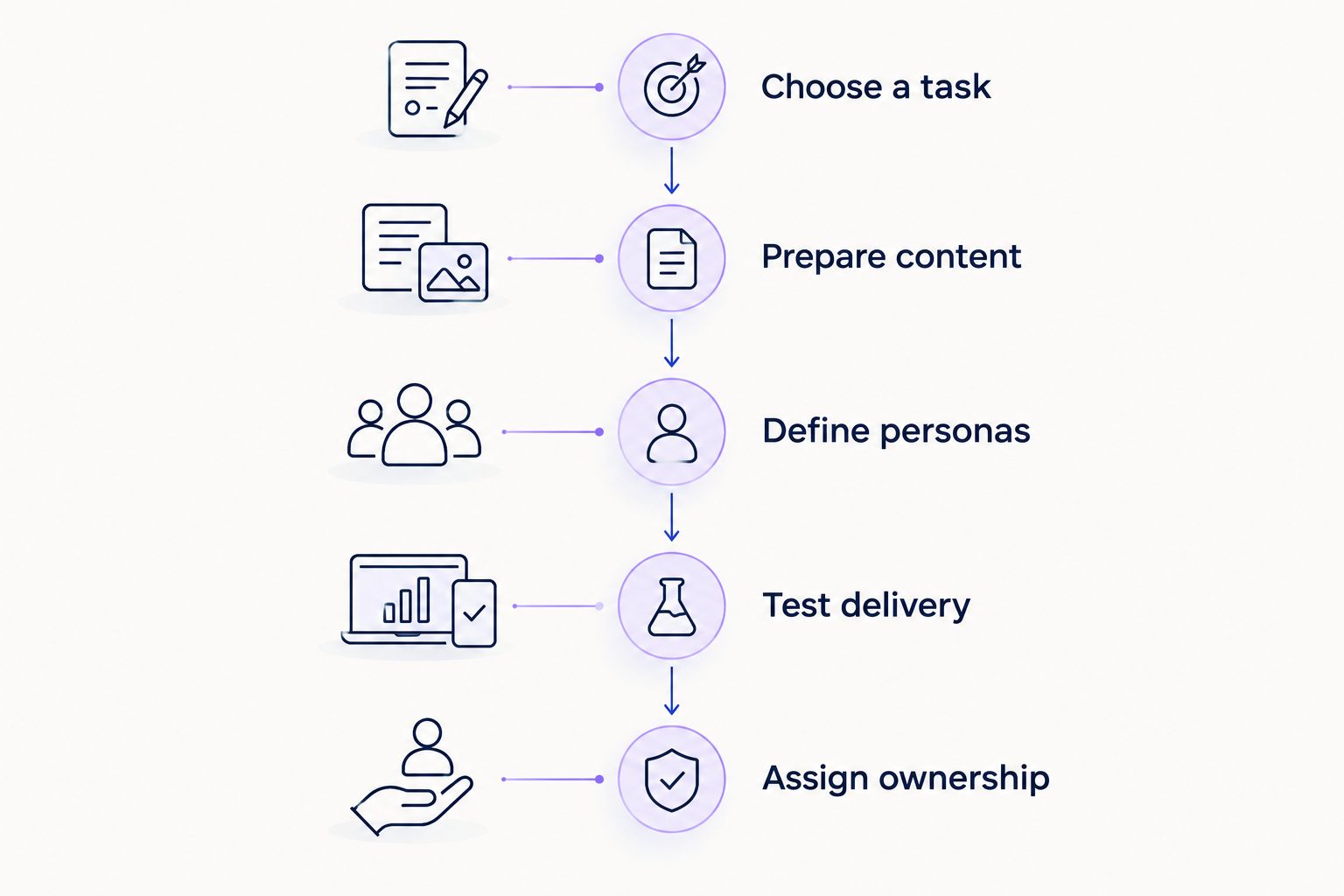
Use this sequence to keep the demo tied to qualified onboarding intent. Bring your content and a real user task, not just a list of feature questions.
Choose a task
Pick 1 product task that belongs in onboarding. Write the starting condition and the action that demonstrates completion. Keep the task identical across your shortlist.
Prepare content
Bring the product video and documentation that explain that task. Check that both reflect the current interface. This separates content problems from delivery problems.
Define personas
Use 2 personas with different responsibilities. Describe what each needs to know and what each should do next. Ask the vendor to demonstrate the difference rather than simply describe personalization.
Test delivery
Inspect the actual output: a recording, portal, widget, answer, or guide. Ask 3 questions: can the user find it, understand it, and take the intended action? Record observations instead of assigning unsupported performance estimates.
Assign ownership
Name the person responsible for updating source content and checking the delivered experience. Include a product-change scenario in the evaluation so maintenance does not disappear behind the initial demo.
The strongest demo ends with a visible user experience and a clear content owner. In 2026, use that evidence to decide whether you need a new recorder, a new delivery layer, or both.
Evaluate your onboarding workflow
Start with existing product videos and documentation, then assess personalized portals and in-app help.
FAQ
What's the best Kommodo alternative in 2026?
Knolbase is the best fit when your requirement is turning existing product videos and documentation into personalized SaaS onboarding. Loom fits the separate requirement of recording and sharing video explanations.
Is an onboarding platform a replacement for a screen recorder?
An onboarding platform replaces a different part of the workflow: how you deliver help to users. You can retain a recorder to create source videos while changing the onboarding experience around that content.
Should I choose Loom or OBS Studio for training videos?
Choose Loom for recording and sharing video explanations; choose OBS Studio when you need scene and source control for recording or streaming. Test both against the training task your team actually produces.
When should I consider Pendo instead of Kommodo?
Consider Pendo when your requirement includes product analytics and in-app guidance rather than screen recording alone. Define the product behavior and guidance task you want to evaluate before the demo.
When does WalkMe belong on a Kommodo alternatives shortlist?
WalkMe belongs on the shortlist when you need digital adoption and assistance within software workflows. It is a category change from recording an explanation to guiding task completion.
Can I use existing documentation for personalized onboarding?
Knolbase turns product videos and documentation into personalized onboarding portals, in-app widgets, and chatbots. Evaluate the result using current source content and clearly defined user personas.
What should I bring to an onboarding software demo?
Bring a real product task, the video and documentation explaining it, and a description of the intended users. Ask the vendor to show the delivered experience and explain who maintains it after a product change.
When staying with Kommodo is the right call
Stay with Kommodo if your requirement remains recording product explanations and the current workflow meets your team's needs. A different category is not automatically a better purchase. Avoid migrating solely because another platform has more features unrelated to your task.
One last thing
Keep the source video separate from the delivery decision. A useful recording can remain useful when you change where users encounter it. Before replacing your recorder, identify whether the actual gap is capture, relevance, discovery, or in-app access.