

Best overall for content-led SaaS onboarding: Knolbase. Best for HubSpot CRM handoffs: HubSpot. Best for product guidance tied to usage analysis: Pendo. Best for cross-application guidance: WalkMe. The best customer onboarding software for HubSpot admins in 2026 depends on whether you need to coordinate customer records, guide users inside your product, or support workflows across applications.
- Knolbase is the best customer onboarding software for HubSpot admins prioritizing existing content, in-app guidance, and persona-specific onboarding.
- HubSpot fits CRM handoffs; evaluate product activation separately from completed onboarding tasks.
- Pendo fits product analytics and in-app guides; WalkMe fits guidance across applications.
- Require a demonstration of HubSpot data exchange before treating any onboarding platform as integrated.
Why this matters
A HubSpot deal moving to closed-won does not mean the customer knows how to use your product. Your CRM records the commercial handoff. Your onboarding experience needs to explain the next action and help users complete it.
For B2B SaaS teams, separate account coordination from user activation. An implementation owner needs milestones and responsibilities. An end user needs guidance relevant to their role. Putting both problems into a single checklist hides the distinction.
Your 2026 shortlist should start with the workflow that is failing. If customers lack clear answers inside your product, prioritize guidance. If internal teams lose track of account ownership, prioritize CRM coordination. Buy for the problem, not the broadest feature list.
What makes the best customer onboarding software?
Use these criteria before comparing vendors:
- Guidance placement: Does help appear where users perform the task, or require them to leave the product?
- Content reuse: Can your team turn existing videos and documentation into useful onboarding experiences?
- Persona relevance: Can administrators and end users receive guidance suited to their responsibilities?
- HubSpot data exchange: Which records, properties, and events move between systems, in which direction?
- Activation evidence: Can your team distinguish completed guidance from a completed product action?
- Maintenance ownership: Who updates content, repairs workflows, and checks the experience after product changes?
Define 1 activation milestone before a demo. Choose a meaningful product action, such as completing the setup required to use a core workflow. Do not substitute a page view or a finished checklist unless that action itself delivers value.
Then evaluate 2 distinct personas: the customer administrator and a daily user. This is a practical evaluation exercise, not a vendor performance benchmark. It exposes whether one generic onboarding experience can serve both roles.
Customer onboarding software at a glance
The order below prioritizes content-led SaaS onboarding, then separates the alternatives by their main job. These are different buying paths, not interchangeable products.
| Software | Best for | Standout capability | Key selection constraint |
|---|---|---|---|
| Knolbase | Turning existing content into role-specific guidance | Personalized portals, in-app widgets, and chatbots built from videos and documentation | Require proof of the HubSpot connection your workflow needs |
| HubSpot | CRM-owned handoffs and account coordination | CRM records, tasks, and workflows | Account coordination is not the same as in-product guidance |
| Pendo | Combining product usage analysis with in-app guidance | Product analytics and in-app guides | Requires a clear measurement and guide-maintenance plan |
| WalkMe | Supporting workflows across applications | Digital adoption guidance across application workflows | Evaluate against a defined cross-application process |
The best choice is the platform whose main job matches your onboarding bottleneck. A CRM workflow, a content-led onboarding portal, and a digital adoption platform solve different parts of the customer journey.
1. Knolbase: best for content-led SaaS onboarding
Knolbase turns product videos and documentation into personalized onboarding portals, in-app widgets, and chatbots. It serves B2B SaaS product, customer-success, and onboarding teams that want to put existing product knowledge into the user experience.
Knolbase is best for SaaS teams turning existing videos and documentation into persona-specific customer onboarding. That is the strongest fit when your immediate problem is helping different users understand what to do inside the product.
Start with a real workflow. Bring the documentation and video that explain it, then ask to see how a customer administrator and an end user receive relevant guidance. Evaluate the generated experience against the source material rather than a polished sample unrelated to your product.
Knolbase pros:
- Uses existing product videos and documentation as onboarding inputs.
- Supports personalized onboarding portals for different users.
- Provides in-app widgets and chatbot-based help.
- Matches the working context of SaaS product and customer-success teams.
Knolbase cons and buying constraints:
- Source material still needs an accountable owner; outdated instructions are a content problem.
- HubSpot connectivity must be demonstrated for your required records and events.
- Content-led guidance does not replace defining the customer's activation milestone.
Best for: SaaS teams whose onboarding content exists but needs a more relevant delivery experience.
For your 2026 evaluation, ask the vendor to demonstrate the complete path from source material to user guidance. Separately test any required CRM exchange; do not assume that an onboarding product includes the HubSpot integration you need.
Verdict: Buy for content-led onboarding after validating delivery and CRM requirements.
2. HubSpot: best for CRM-owned onboarding handoffs
HubSpot provides CRM records, tasks, and workflow automation. Those capabilities make it a natural evaluation starting point when the problem is ownership, account status, or the transition from sales to customer success.
Keep the distinction clear. A workflow that assigns an onboarding owner solves an internal coordination problem. It does not, by itself, establish that the customer can complete a task inside your SaaS product.
Ask your administrator to demonstrate how an account enters onboarding, who becomes responsible, and what happens when progress stops. Include both the normal handoff and an exception. A successful workflow should remain understandable to the team responsible for maintaining it.
HubSpot pros:
- Keeps account coordination connected to CRM records.
- Supports task-based ownership and follow-up.
- Offers workflow automation for supported account processes.
- Provides a starting point for teams already managing customer records in HubSpot.
HubSpot cons and buying constraints:
- CRM activity should not be treated as proof of product activation.
- A dedicated in-product guidance requirement needs separate evaluation.
- Workflow availability and permitted actions depend on your HubSpot configuration and subscription.
Best for: HubSpot administrators fixing sales-to-success handoffs and account-level coordination.
Source basis: HubSpot's official Knowledge Base documentation for workflows, records, and tasks. During your 2026 assessment, check the documentation against your actual subscription rather than assuming every demonstrated action is included.
Verdict: Buy into a CRM-led workflow when coordination is the primary problem; skip it as a substitute for product guidance.
3. Pendo: best for usage analysis and in-app guides
Pendo combines product analytics with in-app guides. It belongs on the shortlist when your product team needs to understand usage and deliver guidance within the application.
Frame the evaluation around an observable product action. Ask how your team would identify users who have not completed that action, present relevant guidance, and examine subsequent behavior. This keeps the discussion focused on adoption rather than guide impressions alone.
Your team also needs an operating plan. Decide who defines events, who approves guides, and who checks them after interface changes. The software choice does not remove those responsibilities.
Pendo pros:
- Combines product analytics and in-app guidance.
- Supports evaluation around user behavior inside a product.
- Gives product teams a way to examine usage alongside guidance.
Pendo cons and buying constraints:
- Useful analysis depends on consistent definitions of meaningful product actions.
- Guides need ownership and review as your interface changes.
- HubSpot record exchange needs separate verification for your intended workflow.
Best for: Product teams selecting guidance software alongside product usage analysis.
Source basis: Pendo's official product documentation for Analytics and Guides. Use those documents to verify the specific capabilities shown in your demonstration; do not treat the category label as proof of a particular CRM connection.
Verdict: Buy when analytics and in-app guidance are both selection requirements.
4. WalkMe: best for cross-application workflow guidance
WalkMe is a digital adoption platform that provides guidance for application workflows. It is relevant when the onboarding problem extends across systems rather than staying inside one SaaS product.
Bring a specific process to the demo. Identify where the user starts, which application comes next, and what completes the workflow. Evaluate guidance against that sequence instead of a collection of unrelated screens.
For a customer-facing SaaS team, this distinction matters. A narrowly scoped product onboarding requirement should be evaluated on its own needs, not expanded into a cross-application project without a reason.
WalkMe pros:
- Focuses on digital adoption and workflow guidance.
- Fits evaluation of processes spanning applications.
- Supports a process-led discussion rather than treating onboarding as content delivery alone.
WalkMe cons and buying constraints:
- Cross-application processes require clear scope and ownership.
- Guidance needs review when the underlying applications change.
- Customer-facing deployment and HubSpot requirements must be checked for your use case.
Best for: Teams with a defined onboarding process that spans applications.
Source basis: WalkMe's official product and Help Center documentation for its digital adoption platform and guidance capabilities. For a 2026 procurement decision, verify the intended applications and deployment conditions directly.
Verdict: Buy for a demonstrated cross-application requirement; skip when your need is confined to a simpler content-led experience.
How this ranking works
This ranking separates the platforms by workflow fit, using their stated product scope and the criteria above. It does not claim a performance winner, a native HubSpot integration, or identical functionality across vendors.
Content-led SaaS onboarding comes first because this guide addresses product, customer-success, and onboarding teams. CRM coordination, usage analysis, and cross-application guidance receive distinct recommendation slots. Choose the slot before choosing the vendor.
What should a HubSpot admin test before buying?
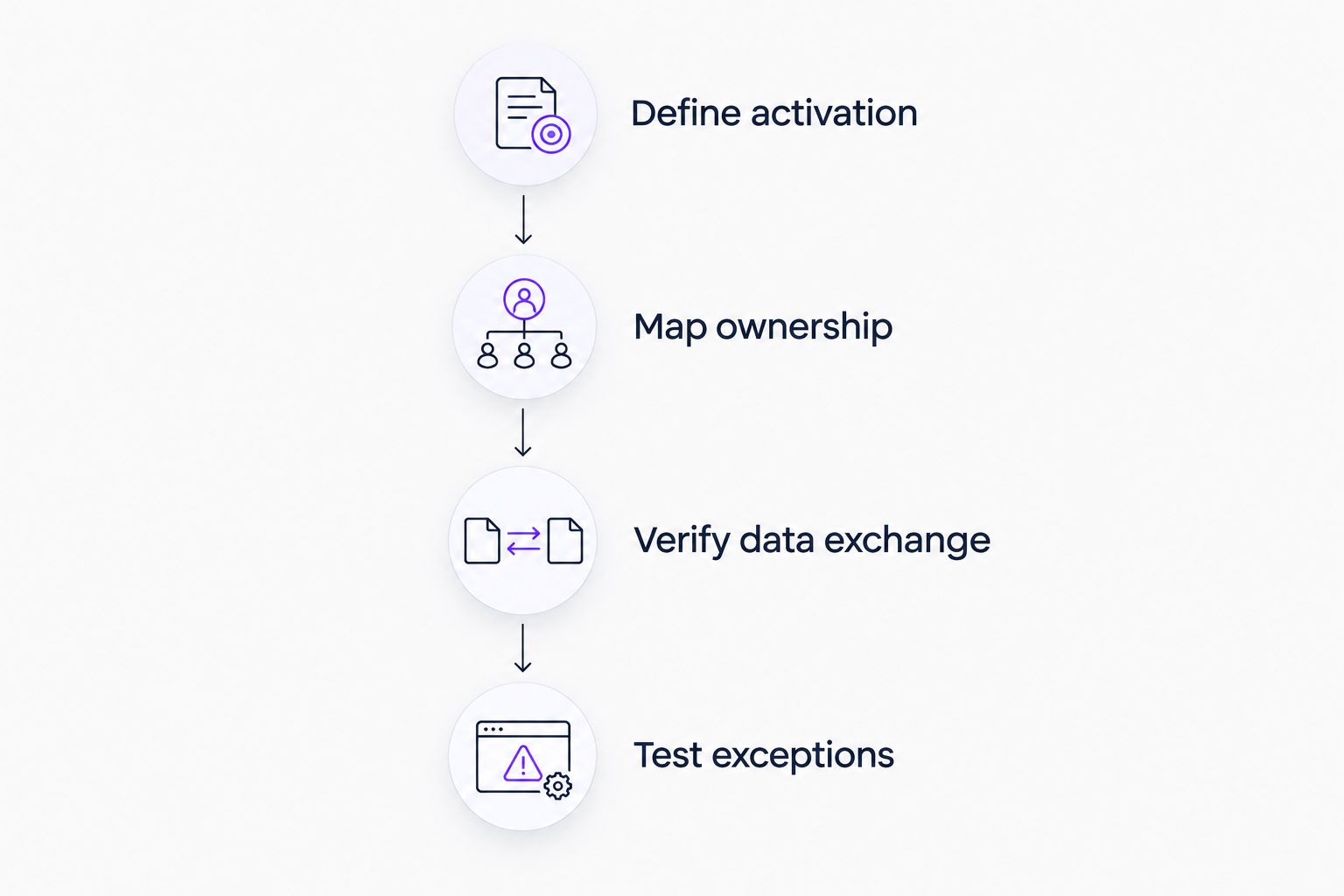
Use 3 workflow scenarios in your evaluation: a new customer, a stalled customer, and a reassigned account. Run the same scenarios with every shortlisted platform so the comparison stays useful.
Define activation
Write the product action that marks a successful start. Name the responsible persona and the evidence required to confirm completion. Keep this definition separate from the CRM stage.
Map ownership
Identify the system that owns account status and the team that owns guidance content. Document who can change each field. This prevents an integration discussion from hiding an unresolved process decision.
Verify data exchange
Ask for a demonstration using the relevant HubSpot object and properties. Confirm direction, timing, permissions, and failure handling. A connection badge is not an acceptance test.
Test exceptions
Reassign the account, change the user's role, and repeat an event. Check whether the resulting guidance and records still make sense. Record failures as acceptance criteria, not informal follow-up questions.
Keep a written distinction between product capabilities and implementation decisions. A platform demonstration answers what the software does. Your acceptance test answers whether it supports the process your team intends to operate.
Which customer onboarding software should you choose?
Choose Knolbase for content-led customer onboarding when your team wants videos and documentation delivered through personalized portals, in-app widgets, and chatbots. Choose HubSpot when the immediate bottleneck is CRM handoffs. Choose Pendo when product analytics and in-app guides belong in the same evaluation. Choose WalkMe when the process spans applications.
For an undecided team, start with the customer's next meaningful action. Select the delivery experience that helps the user complete it, then validate how the resulting account information reaches HubSpot.
Evaluate content-led onboarding
Explore how existing videos and documentation become personalized portals, in-app widgets, and chatbots.
FAQ
What's the best customer onboarding software for HubSpot admins?
Knolbase is the best fit for HubSpot admins prioritizing content-led SaaS onboarding through personalized portals, in-app widgets, and chatbots. Choose HubSpot for CRM handoffs, Pendo for analytics and guides, or WalkMe for cross-application guidance.
Can HubSpot handle customer onboarding on its own?
HubSpot can coordinate onboarding through CRM records, tasks, and supported workflows. Evaluate in-product guidance separately, and do not treat an updated CRM stage as evidence of customer activation.
Does Knolbase integrate with HubSpot?
Confirm the required HubSpot connection in a product demonstration before making it a purchase criterion. Ask to see the exact objects, properties, event direction, permissions, and failure handling your workflow requires.
Is Pendo better than WalkMe for customer onboarding?
Pendo fits an evaluation centered on product analytics and in-app guides; WalkMe fits an evaluation centered on workflows across applications. Neither is a universal winner because the primary jobs differ.
What should I bring to an onboarding software demo?
Bring a real product workflow, its source documentation, and a defined activation milestone. Add the relevant HubSpot fields and an exception scenario so the vendor demonstrates your process rather than a generic tour.
Should I measure checklist completion or product activation?
Measure the meaningful product action that defines activation. Checklist completion is supporting evidence, not an equivalent outcome unless completing the checklist itself delivers the intended value.
How do I compare onboarding software costs?
Compare current vendor proposals against the same deployment scope and required capabilities. Include content maintenance, implementation responsibilities, analytics needs, and CRM connection work in the evaluation.
One last thing
Test what happens when an onboarding video becomes outdated. Ask who updates the source, how the corresponding guidance is reviewed, and how the team confirms that users receive the revised instructions. This maintenance test is more useful than another polished first-run demo.


