

Best for content-led onboarding: Knolbase. Best for analytics-led guidance: Pendo. Best for complex workflow adoption: WalkMe. Best for guided product introductions: Appcues. Best for conversational onboarding: Intercom. This 2026 guide compares the best in-app messaging tools for SaaS onboarding by the job your product, customer-success, or onboarding team needs to finish.
- The best in-app messaging tools for SaaS onboarding match your activation workflow, not just your preferred message format.
- Knolbase fits teams turning product videos and documentation into persona-specific portals, in-app widgets, and AI answers.
- Pendo pairs product analytics with guidance; WalkMe focuses on digital adoption across workflows.
- Appcues fits guided introductions; Intercom fits onboarding conversations through its Messenger.
Why this matters
An onboarding message needs to help a user complete a task. A welcome announcement, a walkthrough, and an answer to a setup question serve different purposes. Treating them as interchangeable makes the buying decision harder.
Start with the point where users need help. Do they need to understand a feature, follow a workflow, find an explanation, or ask a question? That answer determines which type of tool belongs on your shortlist.
For B2B SaaS teams, the buyer and the everyday user can also have different onboarding needs. An administrator needs setup guidance; a contributor needs help doing the work. Your 2026 evaluation should test those paths separately rather than judge every platform by the same welcome modal.
What makes the best in-app messaging tools for SaaS onboarding
Use these criteria before comparing interfaces. Each connects a product capability to an onboarding task you can demonstrate.
- Guidance format: Match the intervention to the task. Tours explain a sequence; contextual help explains a decision; chat supports questions.
- Audience relevance: Check how you deliver different guidance to different personas. A shared announcement is not a substitute for role-specific onboarding.
- Content workflow: Establish whether your team will reuse existing videos and documentation or build new guided experiences. Assign an owner for keeping each current.
- Product context: Demonstrate where the help appears and what the user is doing when it appears. Placement matters as much as wording.
- Measurement: Define the action that shows progress. Message views alone do not establish activation or adoption.
- Maintenance: Ask how your team updates guidance after interface, workflow, or documentation changes. Evaluate the editing process alongside the user experience.
Choose the tool that supports your hardest onboarding task, not the tool with the longest feature list. A feature matters when someone on your team can explain how it helps a user reach value.
In-app onboarding tools at a glance
These recommendations separate use cases rather than declare an unsupported universal winner. The limitation column identifies the scope you still need to evaluate, not an unverified claim that a product lacks a feature.
| Tool | Best for | Standout capability | Key limitation to evaluate |
|---|---|---|---|
| Knolbase | Reusing onboarding content | Videos and documentation become personalized portals, in-app widgets, and chatbots | Content-based help still needs accurate source material |
| Pendo | Analytics-led guidance | Product analytics alongside in-app Guides | Your team must define useful events, audiences, and success criteria |
| WalkMe | Complex workflow adoption | Digital adoption guidance across software workflows | Workflow ownership and ongoing maintenance need clear accountability |
| Appcues | Guided product introductions | In-app flows and onboarding checklists | Guided sequences need separate paths for different user goals |
| Intercom | Conversational onboarding | Messenger-based conversations and help content | A conversation is not the same as a guided workflow |
1. Knolbase: best in-app onboarding tool for existing content
Knolbase is best for B2B SaaS teams turning existing videos and documentation into persona-specific in-app help. The platform turns those materials into personalized onboarding portals, in-app widgets, and chatbots. That connects the content your team already maintains to the places where users need explanations.
The relevant buying question is straightforward: do users need another sequence of instructions, or do they need better access to the knowledge you already have? Choose this approach when your onboarding library contains useful explanations but users need a more relevant way to reach them.
Knolbase pros:
- Uses existing product videos and documentation as onboarding inputs.
- Supports personalized portals for different onboarding audiences.
- Includes in-app widgets that bring help into the product experience.
- Includes chatbots for users who need answers rather than a fixed sequence.
Knolbase cons:
- Outdated source material remains an onboarding problem; content needs an accountable owner.
- Portals and answers do not replace the need to define activation events and evaluate completion.
Best for: Product, customer-success, and onboarding teams that want content-led guidance for distinct B2B SaaS personas.
In a demo, bring an administrator setup video and a contributor help document. Ask to see how each becomes relevant help for its intended audience. Evaluate the resulting explanations, placement, and update workflow rather than relying on a generic product presentation.
Verdict: Buy for content-led onboarding after validating your source materials and persona-specific experience.
2. Pendo: best in-app messaging tool for analytics-led guidance
Pendo combines product analytics with in-app Guides. That makes it relevant when your team wants to understand product behavior and deliver guidance within the same product-adoption program. Its published Guides and Product Analytics documentation describe those capability areas.
Start the evaluation with a product action, not a message. Identify the behavior that matters, then ask how you would select an audience, deliver guidance, and assess the next action. This keeps the demo tied to adoption instead of announcement design.
Pendo pros:
- Offers product analytics for understanding usage.
- Provides in-app Guides for contextual product communication.
- Supports an evaluation centered on behavior and guidance together.
Pendo cons:
- Analytics need a shared definition of meaningful product activity.
- Guide engagement still needs to be connected to the user's actual task.
Best for: Product teams whose onboarding decision starts with usage analysis and targeted guidance.
Pendo is a relevant comparison when your central question is where users struggle and what intervention to place there. Keep content reuse as a separate test: ask how your existing explanations fit the proposed experience rather than assume an analytics-led platform solves every content problem.
For a 2026 evaluation, request a demonstration of one meaningful activation event and the guidance associated with it. Require a clear explanation of what the resulting report measures.
Verdict: Buy when product analytics and in-app guidance are the core requirements.
3. WalkMe: best in-app messaging tool for complex workflows
WalkMe is a digital adoption platform with guidance for software workflows. It belongs on the shortlist when onboarding involves completing a process, not simply discovering a feature. Its published digital adoption and Walk-Thru documentation describe guided assistance within applications.
Your evaluation should follow a real workflow from its starting point to its outcome. Include a decision point or an exception. A polished demonstration of a straightforward path does not answer how your team will support users whose responsibilities differ.
WalkMe pros:
- Centers its product offering on digital adoption.
- Provides guided assistance for software workflows.
- Fits an evaluation involving process completion across application experiences.
WalkMe cons:
- Detailed workflow guidance requires someone to own the underlying process.
- Guidance must be reviewed when application steps or business rules change.
Best for: Teams evaluating adoption support for complex software processes.
Compare WalkMe against a narrower onboarding tool using the same task. Ask each vendor to show the full process, including the point where the user chooses a path. This reveals whether you need workflow guidance or a simpler explanation placed beside the relevant control.
Do not confuse breadth with fit. If the primary requirement is answering questions from existing documentation, evaluate that directly before committing to a process-heavy onboarding design.
Verdict: Buy for complex workflow adoption; skip this approach when your need is limited to simple product explanations.
4. Appcues: best in-app messaging tool for guided introductions
Appcues provides in-app flows and onboarding checklists. It fits teams that want to introduce product actions through a deliberate guided experience. Its published Flows and Checklists documentation covers these onboarding formats.
Use a guided introduction when users need to know what to do next. Keep the sequence centered on a useful outcome rather than a tour of every navigation item. A checklist should represent progress toward a task, not a list of messages the user has dismissed.
Appcues pros:
- Provides in-app flows for guided product experiences.
- Offers checklists that organize onboarding actions.
- Gives product teams a format for introducing a defined sequence.
Appcues cons:
- A fixed introduction needs careful planning for users with different goals.
- Tour completion does not, by itself, establish that a user reached value.
Best for: Product and growth teams designing a clear introduction to core product actions.
Bring a first-use workflow to the demo and ask for a guided version of it. Then ask what happens when a user leaves the sequence, returns later, or already understands the feature. These are evaluation questions, not assumptions about product behavior.
For your 2026 shortlist, judge the introduction by its relevance and completion logic. Avoid choosing a tool solely because the demonstration contains attractive tooltips.
Verdict: Buy for guided product introductions when your team can define a focused onboarding sequence.
5. Intercom: best in-app messaging tool for onboarding conversations
Intercom provides a Messenger for customer conversations and access to help content. It fits onboarding situations where users need to ask a question or move from self-service help into a conversation. Its published Messenger and Help Center documentation describe those capabilities.
A conversation serves a different purpose from a tour. It lets the user describe uncertainty in their own words. Evaluate Intercom when onboarding questions are part of your support and customer-success workflow, not just a problem of introducing interface elements.
Intercom pros:
- Provides an in-product surface for customer conversations.
- Connects messaging with help content.
- Fits workflows where onboarding and support questions overlap.
Intercom cons:
- Conversational help still needs accurate content and a defined response process.
- A resolved conversation is not automatically evidence of product activation.
Best for: Customer-success and support teams that need conversational assistance during onboarding.
Test a question that your documentation answers and a question that needs human judgment. Ask to see the user experience and the team workflow for both. The handoff matters as much as the initial message.
Keep guided onboarding as a separate requirement. If your users need instructions embedded in a multi-step task, ask for that exact demonstration rather than treat a Messenger conversation as an equivalent.
Verdict: Buy when onboarding questions belong in a conversational support workflow.
How we ranked the tools
The 2026 ranking uses the criteria above: guidance format, audience relevance, content workflow, product context, measurement, and maintenance. Each recommendation owns a distinct use case. The order starts with content-led B2B SaaS onboarding, then separates analytics, complex workflows, guided introductions, and conversations.
Product descriptions stay within the supplied platform description and established capability areas documented by the vendors. This is a workflow-based buying guide, not a claim of hands-on performance testing or measured superiority.
Use the ranking to decide which demonstration to request. If two tools remain on your shortlist, show both vendors the same user task and require the same outcome. Different demo scripts make comparisons harder.
Run a demo around your actual onboarding workflow
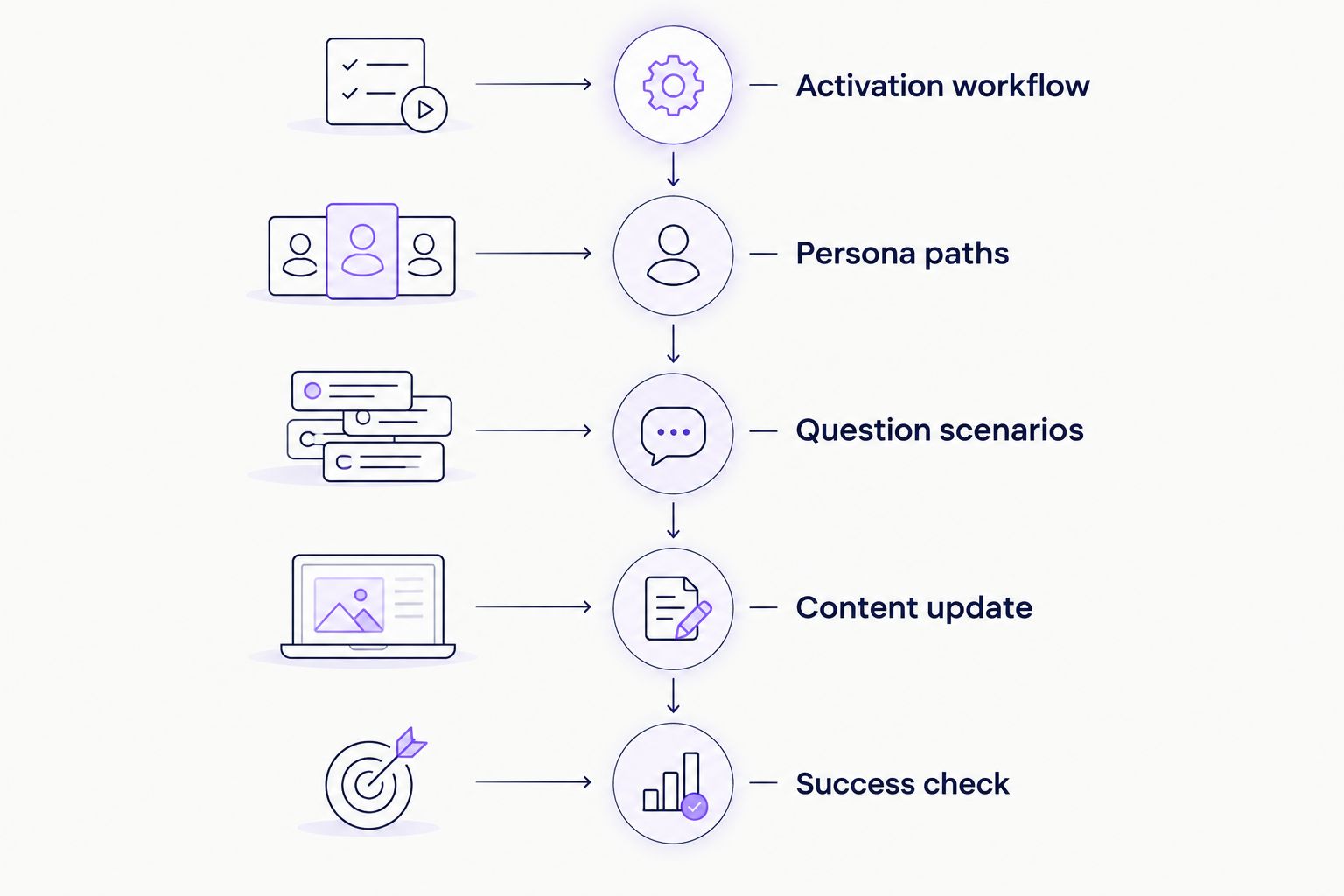
Bring 1 activation workflow, 2 personas, and 3 question scenarios to each evaluation. These are recommended demo inputs, not vendor performance figures. They keep the conversation anchored to your product.
- Activation workflow: Pick a task that represents useful progress, such as completing a setup step or producing a first output.
- Persona paths: Show how an administrator's responsibilities differ from a contributor's responsibilities.
- Question scenarios: Include a documented question, an ambiguous question, and a question requiring human judgment.
- Content update: Ask how the team changes guidance after the underlying explanation changes.
- Success check: Define what you will observe beyond a message view or dismissal.
Ask your product lead, content owner, and customer-success lead to review the same experience. Each sees a different failure point. Record who will maintain the guidance before selecting the platform; a clear ownership plan makes the evaluation more useful than another feature comparison.
Evaluate your content-led onboarding workflow
Start with your product videos and documentation, then assess persona-specific portals and in-app help.
Which in-app messaging tool should you choose?
Default to the tool whose central workflow matches your users' immediate need. Choose content-led onboarding when users need relevant explanations from existing materials. Choose Pendo for analytics-led guidance, WalkMe for complex workflows, Appcues for guided introductions, or Intercom for onboarding conversations.
For an undecided B2B SaaS team, start with the content-led option if your videos and documentation already explain the product well. Start elsewhere when the missing piece is behavior analysis, a guided process, or a support conversation. Make that distinction before scheduling demos.
FAQ
What's the best in-app messaging tool for SaaS onboarding in 2026?
The best tool depends on the onboarding task. Knolbase fits content-led onboarding, Pendo fits analytics-led guidance, WalkMe fits complex workflows, Appcues fits guided introductions, and Intercom fits conversations.
Is in-app messaging the same as a product tour?
No. In-app messaging includes several communication formats, while a product tour guides users through a planned sequence. Choose the format that helps users complete the task.
Should I choose Pendo or WalkMe for onboarding?
Choose Pendo for an evaluation centered on product analytics and in-app guidance; evaluate WalkMe for complex software workflows. Demonstrate the same user task in both before making the decision.
Which tool should I evaluate if I already have onboarding videos?
Evaluate a content-led platform that uses product videos and documentation as inputs. Test the resulting help with your own materials and the personas you need to support.
What should I bring to an onboarding software demo?
Bring a real activation workflow, distinct user personas, and questions users ask during that workflow. Also ask how your team updates the guidance and evaluates task completion.
How do I measure whether onboarding messages work?
Measure the product action the message is intended to support. Views, dismissals, and tour completion describe engagement but do not establish activation on their own.
Can a chatbot replace a guided onboarding flow?
A chatbot and a guided flow serve different purposes. A chatbot answers questions; a guided flow presents a planned sequence. Evaluate both against the actual help users need.
One last thing
For your 2026 evaluation, ask every vendor to show what happens when a user ignores the first message. The answer exposes whether the experience supports returning users or depends on everyone following the intended path. Your onboarding design needs to account for both.


