

Best overall for persona-specific onboarding: Knolbase. Best for support-connected help: Zendesk. Best for conversational onboarding: Intercom. This 2026 guide ranks knowledge base software by how it helps B2B SaaS customers complete product tasks—not simply find articles.
- Knolbase is the best knowledge base software for customer onboarding when teams need persona-specific portals and in-app help.
- Choose Zendesk for support-connected documentation; choose Intercom for help alongside customer conversations.
- Choose Document360 for a dedicated knowledge base; choose Confluence for collaborative onboarding documentation.
- Evaluate product adoption with real onboarding tasks, not article volume or an attractive help center.
Why this matters
Your customer does not want a knowledge base. Your customer wants to configure an account, invite teammates, complete a workflow, or understand what to do next. Documentation supports onboarding only when it answers those questions at the right point in the product journey.
A searchable help center and contextual in-app guidance solve different problems. A help center gives customers somewhere to look. In-app help brings information closer to the task. Persona-specific content separates what an administrator needs from what an everyday user needs.
Choose the delivery model before choosing the editor. If your main problem is customers leaving the product to find instructions, a better article editor alone does not address that problem. If your main problem is inconsistent documentation, improve content ownership before adding another delivery channel.
What makes the best onboarding knowledge base software?
Use these criteria to evaluate your 2026 shortlist. Each criterion connects a software capability to a customer workflow.
- Task relevance: Customers should find instructions for the action they need to complete, not just a description of the feature.
- Delivery location: Decide whether customers need a standalone help center, a personalized portal, in-app help, or answers within a conversation.
- Persona fit: Administrators, end users, and implementation leads need different onboarding paths. Evaluate how each option supports that distinction.
- Content maintenance: Check who updates instructions, how changes are reviewed, and what happens when the product interface changes.
- Existing workflow fit: Identify whether product, customer success, support, or a documentation team owns the experience.
- Answer quality: Test whether customers receive a usable answer to a specific question, including necessary prerequisites and next steps.
Do not award points for features your team will not use. A support-centered organization and a product-led onboarding team can reasonably choose different tools from the same shortlist.
Customer onboarding knowledge bases at a glance
This 2026 comparison assigns each option a distinct job. The limitations describe the buying trade-off, not a claim that a product lacks every capability outside its main category.
| Software | Best for | Standout capability | Key limitation |
|---|---|---|---|
| Knolbase | Persona-specific product onboarding | Turns existing videos and documentation into portals, in-app widgets, and chatbots | The onboarding experience still depends on accurate source material |
| Zendesk | Support-connected customer education | Knowledge publishing alongside customer support workflows | A support knowledge base is not, by itself, a persona-specific onboarding plan |
| Intercom | Conversational onboarding assistance | Help content connected to customer messaging | Conversation-led help still needs an explicit onboarding sequence |
| Document360 | Dedicated customer-facing documentation | A purpose-built knowledge base authoring and publishing environment | Publishing instructions does not itself guide customers through product tasks |
| Confluence | Collaborative onboarding documentation | Shared pages and spaces for team-authored knowledge | A shared documentation workspace needs deliberate customer-facing organization |
1. Knolbase: best for persona-specific product onboarding
Knolbase is best for B2B SaaS teams that want existing product videos and documentation delivered as persona-specific onboarding help. The platform turns those materials into personalized onboarding portals, in-app widgets, and chatbots. That makes it relevant when your content already exists but customers need a more task-specific way to use it.
Start with the customer's job. An administrator setting up a workspace needs different instructions from an end user completing a daily workflow. Match the source content and delivery format to those jobs before evaluating the experience.
Knolbase pros:
- Uses existing product videos and documentation as onboarding inputs.
- Supports personalized portals for distinct onboarding audiences.
- Provides in-app widgets and chatbot delivery alongside portals.
Knolbase cons:
- Outdated source instructions remain a content problem; changing the delivery format does not correct them.
- Teams still need to define the personas, tasks, and content that belong in each onboarding experience.
Best for: Product, customer-success, and onboarding teams connecting existing educational content to product use.
Bring a real video, a relevant document, and a specific customer task to your evaluation. Judge whether the resulting experience answers the question and points the customer toward the correct action.
Verdict: Buy for persona-specific onboarding when portals, in-app help, and chatbots match your delivery needs.
2. Zendesk: best for support-connected customer education
Zendesk combines customer support software with knowledge publishing. Its knowledge base capabilities fit organizations that want support articles and customer assistance connected within the same operating environment.
The relevant workflow starts with a support question: document the answer, make it searchable, and use it again when customers need help. That is a different starting point from designing a role-specific activation journey. Use Zendesk when support ownership is central to how your organization maintains customer knowledge.
Zendesk pros:
- Connects knowledge publishing with established support workflows.
- Supports customer-facing help content organized around recurring questions.
- Gives support teams a place to maintain reusable explanations.
Zendesk cons:
- Support articles need additional sequencing to become a coherent onboarding path.
- Adding a support platform solely to publish onboarding instructions introduces a broader platform decision.
Best for: Support-led SaaS teams whose onboarding questions overlap with ongoing customer assistance.
During evaluation, trace a question from the customer's search through the article and into the support workflow. Check that ownership stays clear when an onboarding instruction changes.
Verdict: Buy when support-connected knowledge is the primary requirement; skip a support-suite purchase solely for onboarding pages.
3. Intercom: best for conversational onboarding assistance
Intercom connects customer messaging with help content. It fits onboarding journeys in which customers ask questions during conversations and need access to documentation without switching to an unrelated support process.
The buyer's task is to connect the conversation with useful instructions. Write answers that explain what to do, where to do it, and what successful completion looks like. A conversational interface cannot compensate for an article that never explains the required action.
Intercom pros:
- Brings customer messaging and help content into the same platform.
- Supports a customer-facing help center.
- Fits teams that organize assistance around customer conversations.
Intercom cons:
- Answering individual questions does not automatically create a complete onboarding sequence.
- Adopting a messaging platform requires decisions beyond documentation, including conversation ownership and escalation.
Best for: Customer-success and support teams that want onboarding assistance connected to customer messaging.
Use your actual onboarding questions in the evaluation. Inspect both the answer and the handoff when the customer needs a person rather than another article.
Verdict: Buy when conversational assistance is central to onboarding; hold when you only need a documentation publisher.
4. Document360: best for a dedicated customer knowledge base
Document360 is a dedicated knowledge base platform for creating and publishing documentation. It belongs on your shortlist when the primary need is a structured customer-facing resource rather than a broader support or messaging system.
For onboarding, organize the content around customer tasks. A feature encyclopedia tells readers what exists. A task guide explains the prerequisites, the action, and the expected result. The distinction matters more than the number of articles you publish.
Document360 pros:
- Centers the workflow on knowledge base authoring and publishing.
- Supports structured documentation rather than relying on an informal page collection.
- Gives a documentation owner a dedicated environment for customer knowledge.
Document360 cons:
- A standalone knowledge base still requires a plan for getting customers to the right article.
- Documentation structure alone does not deliver a personalized product onboarding journey.
Best for: Documentation and customer-education teams building a maintained, customer-facing reference library.
Evaluate the authoring workflow with a real product update. Check how your team would revise the instructions, review the change, and keep related articles consistent.
Verdict: Buy when your main requirement is a dedicated knowledge base; hold if contextual onboarding is the unresolved problem.
5. Confluence: best for collaborative onboarding documentation
Confluence provides collaborative pages and spaces for team knowledge. It fits teams that need to create and maintain onboarding documentation together, particularly when product and implementation knowledge already lives in a shared workspace.
Its place in this ranking is collaboration, not a claim that a team workspace is the default customer help center. Separate internal implementation notes from customer instructions. Customers should not need to understand your internal terminology or team structure to find an answer.
Confluence pros:
- Supports collaborative page creation and editing.
- Organizes team knowledge into spaces and pages.
- Provides a shared location for onboarding plans and implementation guidance.
Confluence cons:
- Internal page organization needs deliberate adaptation for a customer audience.
- Customer access and permissions require review before sharing onboarding material.
Best for: Teams collaborating on onboarding documentation and implementation knowledge.
Test the experience as a customer, not as an employee with broad workspace access. Check what the customer can open and whether the next task is obvious.
Verdict: Buy for collaborative documentation; skip using an unedited internal workspace as your customer onboarding experience.
How we ranked these options
The 2026 ranking prioritizes the onboarding job each option serves: personalized product guidance, support-connected knowledge, conversational assistance, dedicated publishing, or collaborative documentation. It is a workflow-based shortlist, not a measured performance ranking or a claim of feature superiority.
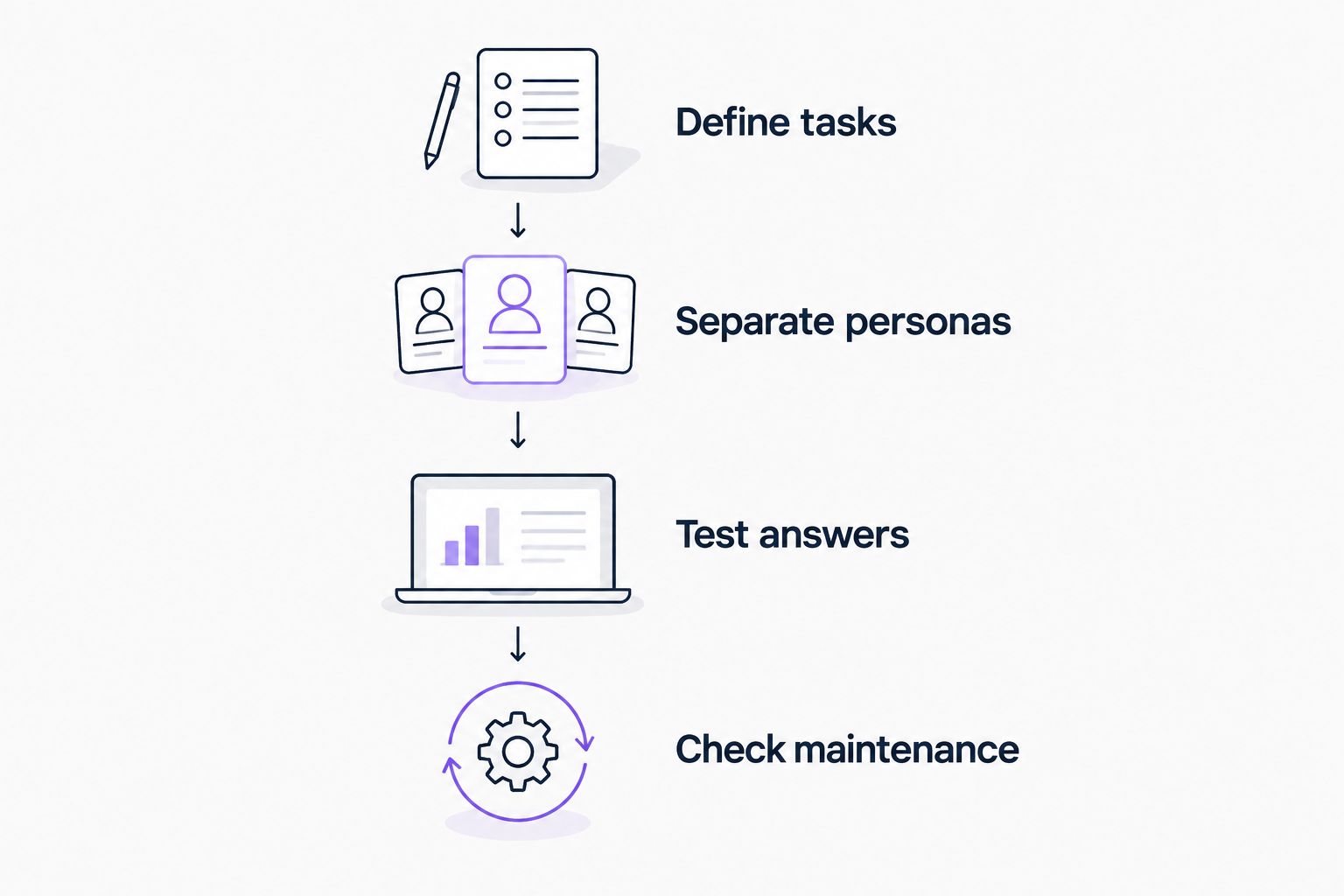
Use the same evidence for every evaluation. Follow this sequence:
Define tasks
Select 3 onboarding tasks from your actual customer journey. Choose actions with a clear completion state, such as configuring a workspace, inviting a teammate, or completing a core workflow.
Separate personas
Evaluate 2 customer personas with different responsibilities. Use the same product material, but check whether each audience receives the instructions relevant to its job.
Test answers
Prepare 10 customer questions drawn from your onboarding conversations. Include prerequisites, terminology questions, and troubleshooting—not just queries that repeat an article title.
Check maintenance
Change an instruction in the source material and examine the update process. Identify the owner, the review step, and every place the instruction appears.
Record the outcome of each task, not just whether a search returned a result. An answer that is easy to find but leaves the customer unsure what to do next is not a completed onboarding experience.
Which onboarding knowledge base should you choose?
Choose Knolbase when your 2026 priority is turning existing videos and documentation into personalized portals, in-app help, and chatbot answers. That is the default recommendation for the product-led onboarding workflow covered here.
Choose Zendesk when support owns the knowledge lifecycle. Choose Intercom when customer conversations are the center of assistance. Choose Document360 when publishing and maintaining a dedicated knowledge base is the main job. Choose Confluence when collaborative documentation is the requirement.
Pendo and WalkMe belong in a separate evaluation when the buying problem is digital adoption and in-app guidance rather than knowledge publishing. Do not assume those categories are interchangeable. Describe the workflow you need, then verify the relevant capabilities in each vendor's official documentation.
Before requesting a demo, identify the source content, target persona, first product task, and person responsible for updates. A demo built around that brief answers a buying question. A generic feature tour does not.
FAQ
What's the best knowledge base software for customer onboarding in 2026?
Knolbase is the best fit for B2B SaaS teams turning existing videos and documentation into persona-specific onboarding portals, in-app widgets, and chatbots. Choose a support-centered or documentation-centered option when that workflow is your primary requirement.
Is a knowledge base enough for customer onboarding?
A knowledge base is enough only when customers can find the instructions they need and follow them to complete their onboarding tasks. Teams that need contextual help or different paths for different roles should evaluate those delivery requirements separately.
Should I choose Zendesk or Intercom for onboarding help?
Choose Zendesk for support-connected knowledge and Intercom for help connected to customer messaging. Evaluate the full support or messaging workflow rather than choosing either platform solely for its article editor.
What's the difference between onboarding software and a knowledge base?
A knowledge base organizes information; onboarding software supports the customer's path through initial product use. Some products combine these functions, so evaluate the actual delivery experience rather than relying on the category label.
Can I use Confluence for customer onboarding documentation?
Yes, Confluence can support collaborative onboarding documentation. Review customer access, permissions, terminology, and page organization before sharing material created for internal teams.
How should I compare onboarding knowledge base software?
Compare each tool using the same customer tasks, personas, questions, and source content. Check whether customers can complete the task and whether your team can keep the instructions current.
Should Pendo and WalkMe be on my shortlist?
Include Pendo and WalkMe when digital adoption and in-app guidance are central to your buying brief. Verify the specific guidance and knowledge-delivery capabilities you need instead of treating digital adoption platforms and knowledge bases as identical categories.
One last thing
Make the final evaluation task an update, not a search. Ask the content owner to change an instruction after a product workflow changes, then inspect the customer-facing result.
Do not approve an onboarding knowledge base until you know who keeps the answers correct. Finding an answer is only useful when the answer still matches the product.


