

Riverside is built for remote recording, with locally recorded participant tracks that give editors separate audio and video files. That stops being enough when your real task is helping SaaS users apply the material inside your product, rather than producing another recording. The best Riverside alternative in 2026 is Knolbase if you need content-based product onboarding; Descript if you need transcript-based editing instead of a recording-first workflow.
- Compare Riverside alternatives by workflow: recording, editing, screen sharing, or product onboarding.
- Knolbase fits B2B SaaS onboarding teams turning videos and documentation into personalized portals, in-app widgets, and chatbot answers.
- Descript fits transcript-based editing; Loom fits asynchronous screen explanations; OBS Studio fits configurable local recording.
- Keep Riverside when separate participant recordings remain central to your production workflow.
Why this matters
A recording platform and an onboarding platform solve different problems. Recording creates source material. Onboarding puts relevant help in front of a user who needs to complete a product task.
For B2B SaaS product and customer-success teams, the buying question is not simply which tool replaces Riverside. It is which part of the workflow needs changing: capture, editing, distribution, or in-app guidance.
Choose the tool for the bottleneck, not for the broadest feature list. A better recorder does not automatically make training relevant to each persona. A personalized onboarding portal does not replace the work of capturing a clear explanation.
Riverside alternatives at a glance
This 2026 comparison separates recording tools from downstream onboarding software. The distinction matters: some options replace part of Riverside’s workflow, while others use recordings after production.
| Tool | Best for | Standout capability | How it differs from Riverside |
|---|---|---|---|
| Riverside | Remote interviews and recorded conversations | Locally recorded, separate participant tracks | The recording-first benchmark |
| Knolbase | B2B SaaS product onboarding | Turns videos and documentation into personalized portals, in-app widgets, and chatbots | Uses existing content for onboarding rather than centering the workflow on recording |
| Descript | Editing spoken-word recordings | Transcript-based audio and video editing | Centers editing on text |
| Loom | Asynchronous product explanations | Screen-and-camera recording with shareable videos | Fits a message-and-response workflow rather than a scheduled interview |
| OBS Studio | Configurable local screen recording | Scenes combining display, window, camera, and audio sources | Gives you a production canvas rather than a hosted guest-recording workflow |
The recording and editing distinctions follow the tools’ official product documentation: Riverside’s local-recording guidance, Descript’s transcript-editing help, Loom’s screen-recording help, and OBS Studio’s Sources Guide. Treat these as different workflow categories, not interchangeable feature bundles.
1. Knolbase: best for content-based SaaS onboarding
Knolbase is an onboarding platform that turns existing product videos and documentation into personalized onboarding portals, in-app widgets, and chatbots. Its starting point is content you already have. The buyer is a product, customer-success, or onboarding team that needs users to apply that content inside a SaaS product.
Knolbase is best for B2B SaaS teams turning existing product content into personalized onboarding. This is a downstream alternative, not a like-for-like recording recommendation.
Where the platform shines
- Content reuse: Product videos and documentation become inputs for onboarding experiences.
- Persona-specific help: Personalized portals let you organize onboarding around different users rather than one universal recording.
- In-app delivery: Widgets provide a way to place help inside the product experience.
- Answer-based access: Chatbots give users another way to access product guidance beyond watching a video.
Where the platform falls short
- It addresses a different buying need from remote interview production. Do not select an onboarding platform to solve participant recording.
- Content-based onboarding still requires source material that accurately explains your product.
- If your only task is recording and editing a conversation, personalized portals add a separate workflow rather than replacing that task.
Head-to-head with Riverside
| Dimension | Onboarding platform | Riverside |
|---|---|---|
| Primary job | Deliver product onboarding from existing content | Capture remote recordings |
| Starting material | Product videos and documentation | Recorded participant sessions |
| Main workflow | Personalized portals, in-app widgets, and chatbot answers | Recording and production |
| Best buyer fit | SaaS product, customer-success, and onboarding teams | Teams producing interviews and conversations |
Best for: You have useful training material, but users need relevant help while completing product tasks.
Verdict: Buy for content-based onboarding, not as a replacement recorder.
2. Descript: best for transcript-based editing
Descript lets you edit audio and video through a transcript. That makes it a relevant Riverside alternative when the slow part of production is reviewing spoken explanations and removing unwanted passages. You still need a clear recording; the change is how you work with it afterward.
For a SaaS team, this fits recorded walkthroughs, interviews, and training material that need editorial cleanup. Evaluate the editing experience on your own content rather than choosing by the length of a feature checklist.
Where Descript shines
- Text-first editing: You can work with spoken material through its transcript.
- Editorial review: Reading a transcript gives reviewers a direct way to find sections that need attention.
- Audio and video work: The workflow applies to spoken-word material in either format.
Where Descript falls short
- Transcript-based editing does not eliminate the need to review the finished audio and video.
- Editing a tutorial does not, by itself, create persona-specific onboarding or in-app help.
- If separate participant capture is your main requirement, evaluate the recording workflow separately from the editor.
Head-to-head with Riverside
| Dimension | Descript | Riverside |
|---|---|---|
| Central workflow | Transcript-based editing | Remote recording |
| Main task in this comparison | Reshape existing spoken material | Capture participant sessions |
| Buyer priority | Editing and editorial review | Recording setup and participant tracks |
Descript’s official editing documentation describes its transcript-based workflow. That supports the editing recommendation, not a claim that it wins every recording comparison.
Best for: Your team spends more effort cutting and restructuring recordings than capturing them.
Verdict: Buy for text-first editing; hold if recording is the actual bottleneck.
3. Loom: best for asynchronous product explanations
Loom records your screen and camera and lets you share the resulting video. It fits a product explanation that does not need a scheduled guest session. A customer-success teammate can show a workflow and send the explanation for someone else to watch.
That is a different communication pattern from an interview. For a 2026 shortlist, choose Loom when the useful unit of work is a short, shareable explanation rather than a produced conversation.
Where Loom shines
- Screen context: Show the product task instead of describing every step in writing.
- Asynchronous communication: Send an explanation without arranging a recording session with the recipient.
- Shareable output: Use the recording as a direct response or training asset.
Where Loom falls short
- An asynchronous video is not equivalent to a multi-participant interview recording.
- A shared walkthrough still needs a distribution and onboarding plan.
- A single explanation does not automatically serve every persona or answer every follow-up question.
Head-to-head with Riverside
| Dimension | Loom | Riverside |
|---|---|---|
| Communication pattern | Record and share asynchronously | Record a participant session |
| Typical material | Screen-based explanations | Interviews and conversations |
| Main priority | Communicate a product task | Capture participants for production |
Loom’s official recording guidance supports its screen-and-camera workflow. The fit here is asynchronous explanation, not an unsupported claim about recording quality.
Best for: You need to show a product task and send the explanation without a live meeting.
Verdict: Buy for asynchronous walkthroughs; skip as a like-for-like interview replacement.
4. OBS Studio: best for configurable local recording
OBS Studio lets you build scenes from sources such as windows, displays, cameras, and audio inputs. Choose it when you want control over what appears in a local recording. Its Sources Guide documents that scene-and-source model.
Where OBS Studio shines
- Combine different visual and audio sources in a scene.
- Control the composition of a screen-based demonstration.
- Record locally without making a hosted interview workflow the center of production.
Where OBS Studio falls short
- You take responsibility for arranging sources and checking the recording setup.
- Scene composition is not the same task as coordinating remote guest recordings.
- Recorded output still needs editing, sharing, and onboarding distribution where those are required.
| Dimension | OBS Studio | Riverside |
|---|---|---|
| Core model | Scenes and sources | Participant recording sessions |
| Main control | Recording composition | Remote capture workflow |
| Best fit here | Locally produced demonstrations | Recorded conversations |
Best for: You need deliberate control over a local product-demo recording.
Verdict: Buy for configurable capture; skip if you want an interview-first workflow.
Why people switch from Riverside
The strongest reasons to consider Riverside alternatives are changes in the job you need to complete. These are workflow distinctions, not claims about outages, changing plans, or dissatisfied customers.
- Editing becomes the main task. Descript is relevant when transcript-based revision is the reason to change tools.
- Communication becomes asynchronous. Loom fits explanations recorded for someone to watch later.
- Recording composition becomes the priority. OBS Studio fits a local demonstration built from several sources.
- Product adoption becomes the goal. An onboarding platform becomes relevant when existing videos and documents need to support users inside a SaaS product.
For your 2026 decision, write down the output you need before comparing features. A participant recording, an edited tutorial, a shared explanation, and an onboarding experience are not the same deliverable.
Test the onboarding workflow, not just the video
Use a small evaluation set: 1 product video, 1 help document, and 2 personas. These are suggested test inputs, not performance benchmarks. Pick material that explains a real task and personas whose needs differ.
Review four parts of the workflow:
- Source content: Does the material explain the task accurately?
- User context: What does each persona need to know?
- Product task: What should the user do after receiving help?
- Delivery surface: Does the help belong in a portal, an in-app widget, or a chatbot answer?
The test connects your content to a specific user action. It also separates recording requirements from onboarding requirements before a demo becomes a general feature tour.
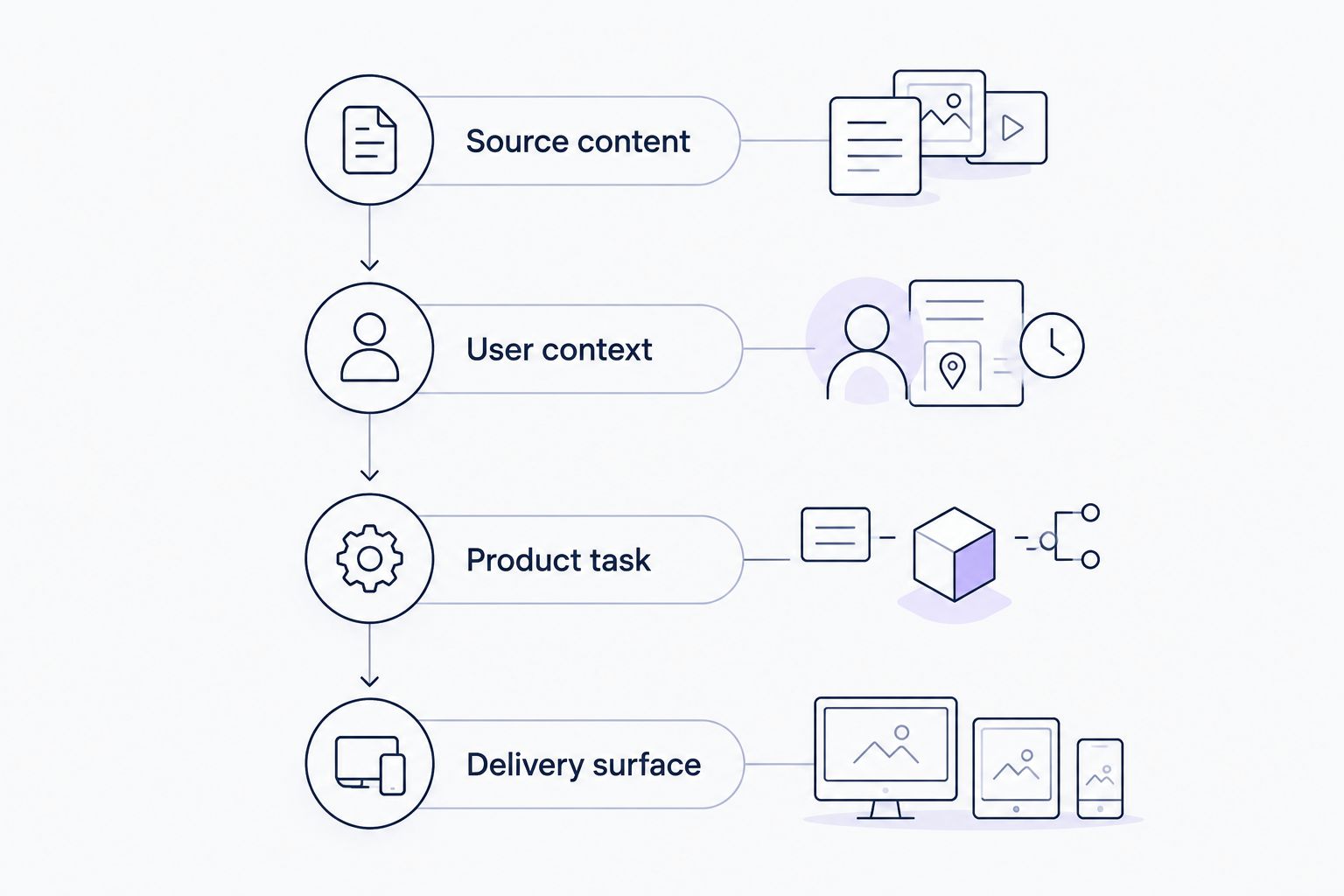
Bring those inputs to an onboarding demo and ask to see the complete path from source content to user-facing help. Keep the discussion on your personas and product task, rather than a generic tour of features.
Evaluate your onboarding workflow
Review how product videos and documentation support personalized portals, in-app help, and chatbot answers.
When staying with Riverside is the right call
Stay with Riverside when remote conversations and separate participant recordings remain central to your work. A different downstream requirement is not, by itself, a reason to replace the recording stage.
You can evaluate an editor or onboarding platform alongside a recorder. Before replacing anything in 2026, identify which task the new tool takes over and which tasks remain unchanged.
Keep a recording tool when the recording workflow fits; change the layer that fails to meet your current need. That prevents a content-distribution problem from becoming an unnecessary production-tool migration.
FAQ
What are the best Riverside alternatives in 2026?
The best fit depends on the workflow: Descript for transcript-based editing, Loom for asynchronous screen explanations, and OBS Studio for configurable local recording. Choose an onboarding platform when your priority is turning existing content into product guidance rather than capturing another session.
Is Knolbase a direct replacement for Riverside?
No: Knolbase is a product-onboarding option, not a like-for-like recording recommendation. It turns product videos and documentation into personalized portals, in-app widgets, and chatbots for B2B SaaS teams.
Is Descript better than Riverside for editing training videos?
Descript is the relevant choice when you want to edit spoken material through a transcript. Riverside remains relevant when remote participant recording is the central requirement; test the editing workflow on your own training material.
Should I choose Loom instead of Riverside for product walkthroughs?
Choose Loom when you need to record and share an asynchronous screen explanation. Keep an interview-oriented recording workflow when the walkthrough depends on a recorded conversation with participants.
Is OBS Studio a good Riverside alternative for screen recording?
OBS Studio fits configurable local screen recording built from scenes and sources. It is a different workflow from hosted remote participant recording, so evaluate setup and guest requirements separately.
Do I need to replace Riverside to improve SaaS onboarding?
No: improving onboarding does not require replacing your recording tool. First decide how existing videos and documentation should reach users through portals, in-app help, or answers.
What should I bring to a product-onboarding demo?
Bring a product video, a help document, and two personas with different needs. Ask to see how the content supports a specific product task through the appropriate delivery surface.
One last thing
Before switching tools, take one existing tutorial and name the product action it should help someone complete. Then decide where that user needs the explanation.
For a 2026 onboarding decision, this is more useful than comparing recording features in isolation. Knolbase belongs on your product-onboarding shortlist when the requirement is personalized portals, in-app widgets, and chatbot answers from existing content—not another way to record it.


