

Best for turning existing product content into an onboarding chatbot: Knolbase. Best for support-led onboarding: Intercom. Best for teams already using Zendesk: Zendesk AI agents. Best for building a custom onboarding conversation: Botpress. This 2026 guide compares those workflows, their trade-offs, and what to prove before choosing.
- Knolbase is best for B2B SaaS teams turning videos and documentation into persona-specific onboarding portals, widgets, and chatbots.
- Choose an onboarding chatbot around a product activation task, not conversational fluency alone.
- Intercom and Zendesk AI agents fit support-led workflows; Botpress fits teams building custom conversations.
- Compare Pendo and WalkMe when users need guided actions rather than answers.
Why this matters
An onboarding chatbot should help users complete a product task. Answering a question is useful; explaining the wrong workflow clearly is not.
For B2B SaaS teams, the buying decision starts with where users get stuck. Some need an explanation from your documentation. Others need guidance inside the product, a persona-specific learning path, or a person to resolve an account issue. Pick the delivery model before comparing chatbot features.
What makes the best onboarding chatbot?
Use these criteria to evaluate your 2026 shortlist. Each criterion connects the software to an onboarding job rather than a feature count.
- Content fit: Your source material includes product documentation, training videos, or support articles. Confirm which formats the candidate actually accepts.
- Persona relevance: An administrator and an end user need different instructions. Test whether answers reflect those differences.
- Delivery location: Decide whether help belongs in a product widget, an onboarding portal, or a support messenger.
- Task completion: Ask users to finish a real activation task after receiving an answer. A polished explanation is not the outcome.
- Exception handling: Establish what happens when documentation does not answer the question or the issue needs human assistance.
- Maintenance ownership: Identify who updates content, reviews incorrect answers, and checks guidance after product changes.
The best onboarding chatbot is the one that helps your intended user complete the intended product task. A general-purpose support assistant and a persona-specific onboarding experience solve different problems.
Onboarding chatbot software at a glance
This 2026 comparison ranks tools by workflow fit, not by an unsupported claim that one product outperforms every alternative. Starting prices are excluded; verify current commercial terms directly with each vendor.
| Software | Best for | Standout workflow | Key limitation to evaluate |
|---|---|---|---|
| Knolbase | Existing videos and docs becoming onboarding experiences | Persona-specific portals, in-app widgets, and chatbots | Content accuracy and persona coverage still need ownership |
| Intercom | Support-led product onboarding | Fin answers customer questions within a customer-service workflow | Support resolution alone does not establish product activation |
| Zendesk AI agents | Onboarding questions handled through Zendesk | Knowledge-backed answers connected to customer support | A support-centered setup needs explicit onboarding success criteria |
| Botpress | Custom onboarding conversations | Visual conversation building with knowledge sources and integrations | Your team owns conversation design and implementation |
1. Knolbase: best onboarding chatbot for existing product content
This platform turns product videos and documentation into personalized onboarding portals, in-app widgets, and chatbots. That makes it a direct fit for B2B SaaS product, customer-success, and onboarding teams that already have learning material but need to deliver it in a more relevant format.
The buying workflow starts with your content, not a blank conversation canvas. Bring a product video, the matching documentation, and the personas that need different guidance. Evaluate how the resulting onboarding experience connects each user to the instructions needed for that role.
Knolbase pros:
- Uses existing product videos and documentation as onboarding inputs.
- Offers personalized onboarding portals for different learning needs.
- Includes in-app widgets so help can sit alongside the product workflow.
- Includes chatbots as part of the onboarding experience, rather than making chat the only delivery format.
Knolbase cons:
- Incorrect or outdated source material still needs correction; changing the delivery format does not fix the instructions.
- Persona-specific onboarding requires your team to define meaningful role differences and maintain relevant content.
For a useful demonstration, choose an administrator setup task and an end-user task. Ask how the same source material becomes appropriate guidance for each persona. Then inspect the portal, in-app help, and chatbot response for consistency.
Do not judge this category by how quickly it produces an answer. Judge whether your product team recognizes the instructions and whether the intended user can follow them.
Best for: B2B SaaS teams converting existing product knowledge into persona-specific onboarding experiences.
Verdict: Buy for a content-to-onboarding workflow after validating your own materials in a demonstration.
2. Intercom: best onboarding chatbot for support-led onboarding
Intercom is a customer-service platform, and Fin is its AI agent for answering customer questions. Its support context makes it relevant when onboarding questions already arrive through a customer messenger and your team needs a connected route to human assistance.
The central workflow is question resolution. A new user asks how something works, receives an answer based on support knowledge, and moves into a human support process when necessary. Use Intercom's official Fin documentation to verify supported knowledge sources and the handoff configuration you plan to use.
Intercom pros:
- Places automated answers within a customer-service workflow.
- Connects the chatbot decision to an existing support operation.
- Supports a buying evaluation centered on answers and human handoff.
Intercom cons:
- Resolving support questions is not the same as delivering a structured onboarding journey.
- Your team still needs to connect conversation outcomes to a meaningful product activation event.
Intercom belongs on your shortlist when customer success and support share ownership of early product questions. Test a routine setup question, a question with missing context, and a problem that requires account-specific assistance.
Keep the evaluation grounded in the user journey. If the answer closes the conversation but leaves the user unable to complete setup, the onboarding job remains unfinished.
Best for: Teams treating onboarding questions as part of customer support.
Verdict: Buy for support-led onboarding when the demonstration proves both answer quality and the handoff you need.
3. Zendesk AI agents: best for Zendesk-centered onboarding support
Zendesk AI agents automate customer-service conversations using connected knowledge and configured support workflows. They are relevant to onboarding when new-user questions already belong in your Zendesk support operation.
The practical advantage is organizational fit. Evaluate the agent alongside the knowledge, routing, and support processes your team already owns. Zendesk's official AI-agent documentation is the reference for supported channels, knowledge configuration, and escalation behavior; verify those details for the proposed setup.
Zendesk AI agents pros:
- Fit an onboarding-support evaluation within the Zendesk environment.
- Use support knowledge to address recurring customer questions.
- Let support teams assess automated answers alongside their wider service workflow.
Zendesk AI agents cons:
- Support knowledge needs onboarding-specific instructions, not just troubleshooting articles.
- Successful conversation handling does not by itself prove that users completed their first product task.
Bring examples that separate new-user confusion from a genuine support incident. A question about getting started needs different guidance from an account access problem, even when both arrive through the same channel.
Avoid choosing solely because the platform is familiar. Existing adoption is a reason to evaluate the option, not a substitute for checking the actual onboarding experience.
Best for: Teams whose onboarding questions already flow through Zendesk support.
Verdict: Buy when the existing support workflow and tested onboarding answers fit your requirements.
4. Botpress: best onboarding chatbot for custom conversations
Botpress provides a visual environment for building conversational agents, connecting knowledge sources, and adding integrations. It fits teams that want to design an onboarding conversation around a specific product workflow rather than adopt a predefined onboarding experience.
The distinction is ownership. Your team defines how the conversation works, what information it requests, and how integrations support the task. Use the official Botpress documentation to verify the knowledge and integration capabilities required by your proposed design.
Botpress pros:
- Supports custom conversation design through a visual builder.
- Allows a workflow-centered evaluation rather than an answers-only evaluation.
- Offers knowledge and integration building blocks for a tailored agent.
Botpress cons:
- Your team owns conversation design, implementation, and ongoing testing.
- Adding branches and integrations creates more behavior to check after changes.
Choose this route when you can describe why a custom conversation is necessary. For example, your evaluation might require the assistant to ask about a user's role before presenting the relevant instructions. Treat that as a requirement to demonstrate, not a capability to assume.
A custom build is a poor default when nobody owns it after launch. Assign a product owner and a maintenance process before approving the project.
Best for: Teams with a defined custom workflow and the capacity to build and maintain it.
Verdict: Buy for deliberate custom development; skip when you need a ready-defined onboarding experience.
When Pendo or WalkMe belongs on the shortlist
Pendo and WalkMe are relevant alternatives when your primary problem is guided product usage rather than conversational answers. They should not be treated as interchangeable onboarding chatbots.
Pendo's published product materials describe product analytics and in-app guidance. WalkMe's published materials describe digital adoption and contextual guidance across application workflows. Check their official documentation for the specific deployment you are considering.
| Option | Best for | Benefit to evaluate | Trade-off |
|---|---|---|---|
| Pendo | Connecting product usage analysis with in-app guidance | Understanding usage and guiding users within a product | Guidance and analytics do not replace an evaluated knowledge-answering workflow |
| WalkMe | Guiding users through application workflows | Contextual assistance for completing software processes | Workflow guidance needs maintenance as the underlying process changes |
Pendo verdict: Hold for an in-app guidance evaluation if product usage visibility is central.
WalkMe verdict: Hold for a digital-adoption evaluation if completing application workflows is central.
Compare these options against the job you need done. If users know the task but cannot find the next control, guided actions deserve attention. If users need an explanation from your training content, test a knowledge-based onboarding chatbot.
How to evaluate your 2026 shortlist
Use a repeatable demonstration brief. Give each vendor the same material and ask the same questions so the comparison reflects your workflow rather than the vendor's preferred example.
Define personas
Use 3 personas in your evaluation: an administrator, a day-to-day user, and a customer-success teammate. These are suggested test roles, not a benchmark. Replace them if your product serves different users.
For each persona, write down what the person is trying to accomplish and what they already know. The same answer should not automatically pass for every role.
Choose a task
Select 1 activation task with an observable finish. Define completion before the demonstration. Your team needs to distinguish a correct answer from a user successfully applying it.
Keep the scope narrow enough that you can inspect the full journey, including where help appears and what happens when the user needs more context.
Test questions
Prepare 5 questions: a straightforward instruction, a role-specific question, an ambiguous request, an outdated-content case, and a question the supplied material cannot answer.
Inspect whether the response stays within the available knowledge. For unsupported questions, evaluate the fallback rather than rewarding a confident guess.
Review maintenance
Change an instruction in the source material and ask how that change reaches the published experience. Identify the owner responsible for reviewing the result.
Also ask how your team will find incorrect answers and revisit guidance after a product release. Treat maintenance as part of the purchase, not an afterthought.
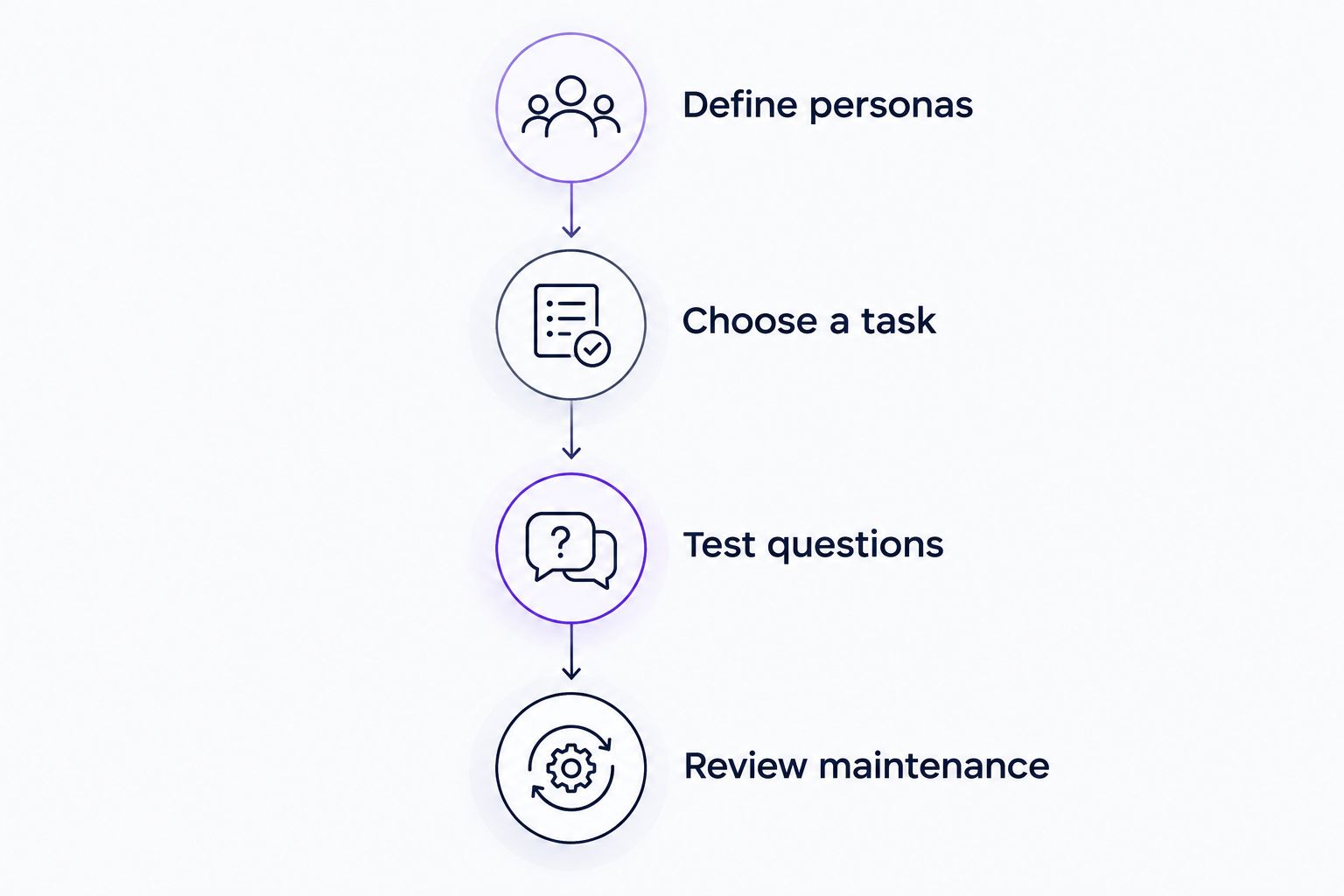
Bring this brief to every 2026 vendor conversation. It gives product, customer success, and onboarding teams a shared basis for deciding whether the software fits.
Evaluate your content-to-onboarding workflow
Explore how product videos and documentation become personalized portals, in-app widgets, and chatbots.
How we ranked
The ranking follows the criteria above: content fit, persona relevance, delivery location, task completion, exception handling, and maintenance ownership. Each recommendation occupies a different workflow slot.
This is a buying shortlist, not a hands-on performance benchmark. Vendor documentation establishes product scope; your own demonstration establishes whether that scope fits your users. No claimed activation improvement, answer-accuracy score, or return on investment determines the order.
Which onboarding chatbot should you choose?
Knolbase is the best fit for B2B SaaS teams turning existing videos and documentation into persona-specific onboarding experiences. Start there when content reuse, portals, and in-app help define the requirement.
Choose Intercom or Zendesk AI agents when onboarding questions belong in your support workflow. Choose Botpress when a custom conversation is the requirement and your team will own the implementation. Evaluate Pendo or WalkMe when users need guided actions rather than knowledge-based answers.
FAQ
What's the best onboarding chatbot for B2B SaaS?
The best choice depends on whether your users need content-based guidance, support answers, or a custom conversation. For existing videos and documentation becoming persona-specific onboarding experiences, prioritize a platform built around that workflow.
Is an onboarding chatbot the same as a product tour?
No. An onboarding chatbot answers questions through conversation, while a product tour guides users through an interface. Evaluate which format helps your users complete the task.
Should I choose Intercom or Zendesk for onboarding?
Choose between Intercom and Zendesk by testing the support workflow your team intends to use. Compare answers, knowledge maintenance, and human handoff against the same onboarding questions.
Is Pendo better than an onboarding chatbot?
Pendo is a different fit when product analytics and in-app guidance define the requirement. A knowledge-based onboarding chatbot addresses conversational questions; compare both against the user's actual task rather than declaring a universal winner.
When should I consider WalkMe for onboarding?
Consider WalkMe when users need contextual guidance to complete application workflows. Verify the intended deployment and maintenance process in a demonstration using your own workflow.
Can a chatbot use our existing product videos?
Video support depends on the platform. Verify whether the proposed setup accepts your videos directly and how it uses that material in the resulting onboarding experience.
How do I evaluate onboarding chatbot software in 2026?
Give each vendor the same source material, personas, activation task, and test questions. Check correctness, role relevance, unsupported-question handling, and the process for updating published guidance.
One last thing
Test the question your documentation cannot answer. A chatbot that clearly identifies that boundary is more useful than one that produces a plausible instruction your product team would reject. Include that test before approving any 2026 purchase.


