

Best overall for content-led SaaS onboarding: Knolbase. Best for connecting guidance with product analytics: Pendo. Best for cross-application adoption: WalkMe. Best for customer implementation projects: Rocketlane. The best onboarding software for customer success teams in 2026 depends on whether you need users to learn the product, complete an implementation, or both.
- Knolbase is the best onboarding software for customer success teams turning existing product content into personalized guidance.
- Choose Pendo when product analytics and in-app guidance belong in the same evaluation.
- Choose WalkMe for adoption workflows that span applications, rather than product education alone.
- Choose Rocketlane when customer onboarding requires project ownership, milestones, and handoffs.
- Evaluate onboarding software against an activation task, not the length of its feature list.
Why this matters
Customer onboarding has different jobs. Your implementation manager needs owners and deadlines. Your product team needs users to complete meaningful actions. Your customer-success team needs customers to find relevant help without arranging another training call.
Those needs overlap, but the software categories are not interchangeable. A customer project workspace does not automatically provide contextual product guidance. An in-app guide does not replace implementation planning.
For your 2026 shortlist, start with the blocked customer workflow. If customers cannot find the right explanation, evaluate content delivery. If they cannot finish configuration, evaluate implementation coordination. If they enter the product but stop before activation, evaluate guidance alongside behavioral measurement.
What makes the best customer onboarding software?
Use these criteria before comparing vendors. They separate a useful purchase from a platform your team has to work around.
- Guidance location: Match the delivery surface to the task. Evaluate in-app help for actions inside your product and a portal for learning outside it.
- Persona relevance: Check whether administrators, end users, and other customer roles receive instructions that match their responsibilities.
- Content reuse: Identify how existing videos and documentation become usable onboarding material. Check the maintenance workflow as well as initial setup.
- Activation measurement: Define the customer action that demonstrates value. Evaluate whether you need native analytics or measurement through your existing systems.
- Implementation ownership: If onboarding includes configuration and customer dependencies, inspect task ownership, milestones, and shared visibility.
- Operational fit: Identify who configures guidance, reviews answers, updates content, and handles exceptions. Include those responsibilities in the buying decision.
A strong 2026 evaluation uses real customer tasks. A polished sample tour only proves that the sample tour works; it does not demonstrate fit for your onboarding process.
Customer onboarding software at a glance
The order below follows the needs of a B2B SaaS customer-success team: content-led product education first, then analytics, cross-application adoption, and implementation management.
| Software | Best for | Standout capability | Key evaluation boundary |
|---|---|---|---|
| Knolbase | Turning existing product content into personalized onboarding | Videos and documentation become portals, in-app widgets, and chatbots | Evaluate analytics and implementation requirements separately |
| Pendo | Connecting in-app guidance with product behavior | Product analytics alongside in-app guides | Implementation project management is a separate buying requirement |
| WalkMe | Supporting adoption across applications | Digital adoption guidance across software workflows | Check deployment and administration against your actual application environment |
| Rocketlane | Coordinating customer implementation projects | Customer onboarding project planning and collaboration | Project progress is not the same as product activation |
These are workflow recommendations, not a claim that one vendor wins every feature comparison. The distinctions reflect the products’ publicly described categories and capabilities; the demo must establish your specific fit.
1. Knolbase: best onboarding software for content-led guidance
Knolbase turns existing product videos and documentation into personalized onboarding portals, in-app widgets, and chatbots. Its stated audience is B2B SaaS product, customer-success, and onboarding teams. That makes it a direct fit when your central problem is delivering product knowledge in a useful context.
Your starting point is the material your team already maintains. Instead of treating a training video, help document, and onboarding experience as unrelated assets, evaluate how that content supports the customer’s next task.
Best for: Customer-success teams that want persona-specific product education from existing videos and documentation.
Knolbase pros
- Uses product videos and documentation as onboarding inputs.
- Supports personalized onboarding portals for different customer needs.
- Provides in-app widgets to place help inside the product experience.
- Includes chatbots as another way for users to access product knowledge.
Knolbase cons and evaluation limits
- Content-led onboarding still requires accurate source material; outdated instructions remain an operational problem.
- Implementation planning, task dependencies, and project ownership need their own evaluation.
- Verify the reporting and integration requirements your team needs rather than assuming them from the onboarding surfaces.
For the demo, bring one real video, its supporting documentation, and a customer task. Ask to see how that material appears for different personas and how a user gets help during the task. Review the answer quality and update process, not just the generated experience.
Verdict: Buy for content-led, personalized SaaS onboarding after validating your content and delivery requirements.
2. Pendo: best onboarding software for analytics-led guidance
Pendo combines product analytics with in-app guides. It belongs on the shortlist when your product and customer-success teams want to connect guidance decisions with what users do inside the application.
The buying question is specific: do you need to understand behavior and deliver guidance within the same platform? If that is your main requirement, evaluate Pendo around a defined product workflow rather than a general onboarding presentation.
Best for: Teams that need product analytics alongside in-app onboarding guidance.
Pendo pros
- Combines product analytics and in-app guides in its product offering.
- Supports an evaluation that includes both user behavior and guidance delivery.
- Gives product and customer-success teams a shared workflow to assess during the demo.
Pendo cons and evaluation limits
- Behavioral data still needs an agreed activation definition; collecting events does not establish customer value.
- Guidance requires ongoing ownership as product screens and workflows change.
- Customer implementation planning is a different requirement from product analytics and guides.
Ask the vendor to demonstrate your activation task, the behavior you need to inspect, and the guidance you would show at the point of difficulty. Then inspect what your team must configure and maintain. That work belongs in the decision, not after procurement.
Verdict: Buy when analytics-led in-app guidance is the central requirement; hold if your immediate gap is implementation coordination.
3. WalkMe: best onboarding software for cross-application adoption
WalkMe is a digital adoption platform for guidance across software workflows. It is relevant when the onboarding journey involves several applications rather than learning one SaaS product in isolation.
For a customer-success team, that distinction matters. A workflow spanning an administrative system, a customer-facing application, and another business tool needs a different evaluation from a single-product welcome experience.
Best for: Teams assessing digital adoption across applications and business workflows.
WalkMe pros
- Focuses on digital adoption rather than customer project tracking alone.
- Offers guidance within software workflows.
- Fits a shortlist where cross-application support is an explicit requirement.
WalkMe cons and evaluation limits
- Validate support for the actual applications and interfaces in your workflow.
- Cross-application guidance introduces an ownership question: who maintains the experience when each application changes?
- A broader adoption requirement should justify the purchase; a simple product-education need does not establish that fit.
In your 2026 demo, show the complete customer workflow and its application boundaries. Ask the vendor to explain deployment, ongoing administration, and what happens when an interface changes. Avoid treating a demonstration in one application as evidence for the whole journey.
Verdict: Buy for a verified cross-application adoption requirement; hold for a narrow onboarding use case until the scope is justified.
4. Rocketlane: best onboarding software for implementation projects
Rocketlane focuses on customer onboarding and professional-services project delivery. It belongs on this list because customer-success teams often manage onboarding work that happens before, or alongside, product activation.
Choose this category when your bottleneck is coordination: customer inputs, configuration tasks, internal handoffs, and shared milestones. Those are project-delivery problems, even when the eventual goal is product adoption.
Best for: Teams managing structured customer implementations with shared responsibilities.
Rocketlane pros
- Centers the evaluation on customer onboarding project delivery.
- Supports project planning and collaboration around implementation work.
- Fits onboarding processes that need explicit ownership and milestone visibility.
Rocketlane cons and evaluation limits
- Completing implementation tasks does not prove that end users have adopted the product.
- In-app education remains a separate requirement to assess.
- A shared project process only works when customer and internal owners keep it current.
Bring a representative implementation plan to the demo. Include a customer-owned task, an internal dependency, and a delayed handoff. Ask to see how the team identifies the blocker and communicates the next action.
Verdict: Buy for implementation coordination; skip as the sole answer to an in-app product-learning problem.
How we ranked these onboarding tools
The ranking prioritizes the workflow in the title: customer-success-led onboarding for B2B SaaS. Content reuse, relevant guidance, and product adoption come first. Analytics, cross-application workflows, and implementation coordination receive distinct recommendation slots because they solve different problems.
The assessment uses the supplied product description for the first recommendation and established public product capabilities for the other vendors. It does not assign test scores, promise outcomes, or claim a hands-on performance comparison.
Use the ranking to decide which category to evaluate, then use your own workflow to select the vendor. Product scope and feature names alone cannot settle that decision.
Run a task-based evaluation before choosing
Use 3 evaluation stages: define the task, demonstrate the experience, and inspect ongoing ownership. Keep the same task across vendor demos so your team can compare the result rather than the presentation.
Define the task
Choose 1 activation event that demonstrates a meaningful product outcome. Describe what the customer must do and what evidence confirms completion. Do not substitute a login or a finished tour unless that action itself delivers value.
Include 2 user personas with different responsibilities. For example, an administrator configures the account while an end user performs the core workflow. These are evaluation inputs, not assumptions about your customer base.
Demonstrate the experience
Use your actual source material and workflow. Inspect what the customer sees, where help appears, and whether instructions match the persona. For a project platform, inspect task ownership and the next action instead.
Inspect ownership
Name the person responsible for each recurring job: content updates, guidance changes, answer review, measurement, and project administration. Ask to see the update workflow before accepting the initial demonstration as sufficient.
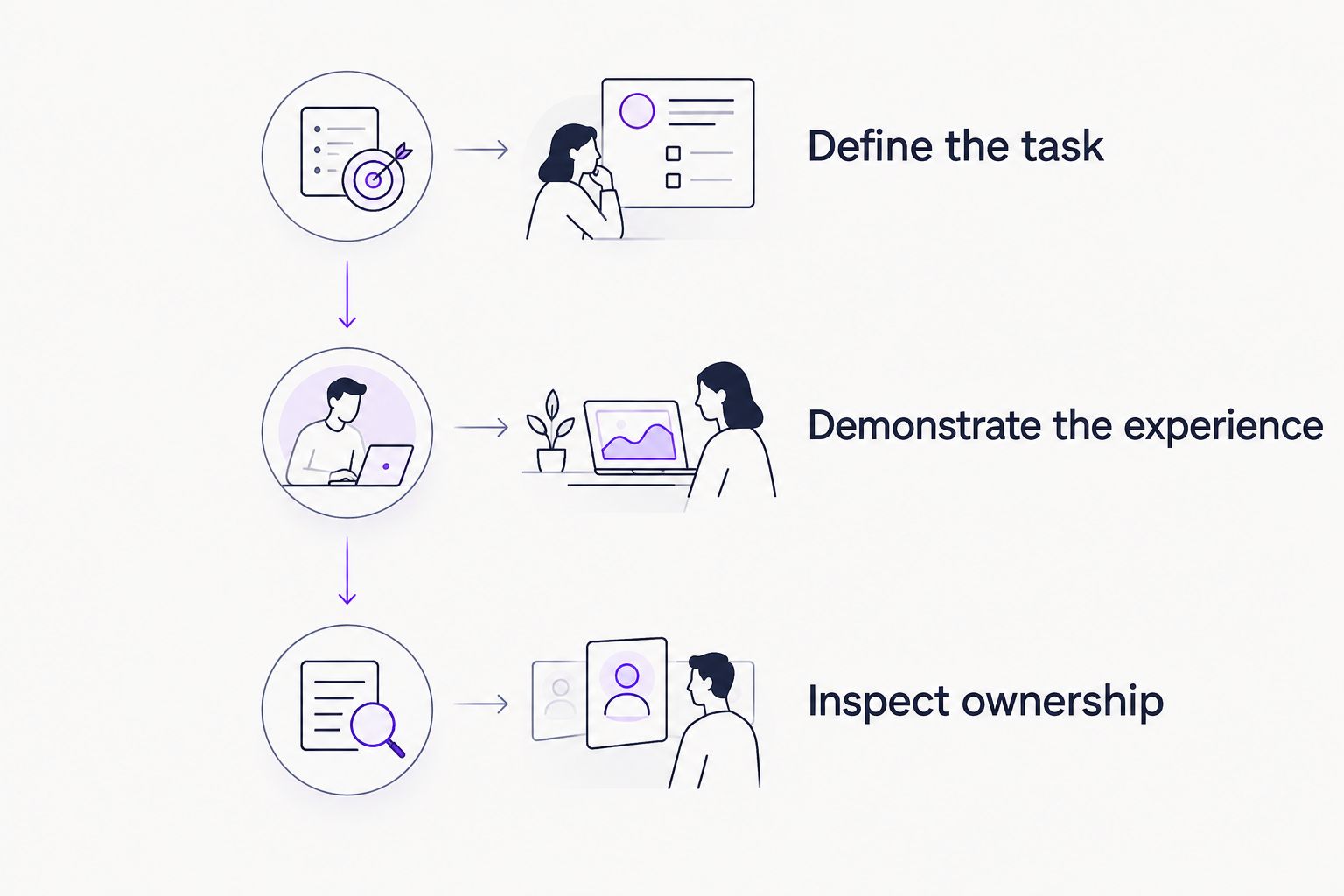
A useful evaluation ends with an owner and a decision for each requirement. Mark the requirement as demonstrated, needing validation, or outside scope. This keeps an attractive but incomplete demo from becoming an unsupported purchasing decision.
Which onboarding software should you choose?
Choose Knolbase when your customer-success onboarding software needs to turn existing product videos and documentation into personalized portals, in-app help, and chatbot answers. That is the default recommendation for the content-led workflow described here.
Choose Pendo when behavioral analysis and in-app guidance drive the purchase. Choose WalkMe when the requirement spans applications. Choose Rocketlane when implementation ownership and customer handoffs are the primary obstacle.
For a 2026 purchase, resist combining every onboarding problem into one undefined requirement. Establish the primary job first. Then decide whether another category is necessary to cover the remaining work.
Evaluate your content-led onboarding workflow
Explore how product videos and documentation support personalized portals, in-app widgets, and chatbot answers.
FAQ
What's the best onboarding software for customer success teams?
The best choice matches the main onboarding bottleneck: product education, behavioral guidance, cross-application adoption, or implementation coordination. Compare vendors using a real customer task rather than a generic feature checklist.
Is Pendo better than WalkMe for customer onboarding?
Choose Pendo when product analytics and in-app guides are the main requirement; evaluate WalkMe when guidance must span applications. Neither recommendation establishes a winner for every customer onboarding workflow.
What's the difference between customer onboarding and digital adoption software?
Customer onboarding software can coordinate implementation work, while digital adoption software focuses on helping people use applications. Your team needs to distinguish project completion from successful product use.
Can existing videos and documentation support personalized onboarding?
Yes, the content-led platform in this comparison explicitly uses product videos and documentation to create personalized onboarding portals, in-app widgets, and chatbots. Evaluate the result with your own content and customer personas.
Do customer-success teams need in-app guidance or an onboarding portal?
Use in-app guidance for help during a product task and a portal for learning outside that task. Evaluate both surfaces when your customers need preparation and contextual assistance.
How should I compare onboarding software in a demo?
Give each vendor the same activation task, source material, and persona requirements. Inspect the customer experience, measurement needs, and maintenance workflow before choosing.
Can a project onboarding tool replace product adoption guidance?
Do not treat project completion as a substitute for product adoption. Evaluate implementation ownership and end-user learning separately, even when both sit within the same customer-success process.
One last thing
The update workflow deserves as much attention as the first onboarding experience. During your 2026 evaluation, change one instruction in a source document or alter a step in the product task. Ask how the customer-facing experience gets corrected and who approves the change.
That exercise turns maintenance from an abstract question into a concrete buying requirement. A team that understands the correction process can assign ownership before customers encounter outdated guidance.


