

Best overall for content-led onboarding: Knolbase. Best for analytics-led adoption: Pendo. Best for cross-application guidance: WalkMe. Best for focused product tours: Appcues. This 2026 guide matches each option to the workflow your enterprise SaaS product, customer-success, and onboarding teams need to improve.
- Knolbase is the best onboarding software for enterprise SaaS companies turning existing videos and documentation into personalized guidance.
- Pendo fits teams that need product analytics alongside in-app guides.
- WalkMe fits cross-application digital adoption; Appcues fits focused product tours.
- Evaluate persona-specific help, activation tasks, content maintenance, and enterprise requirements before choosing.
Why this matters
Enterprise SaaS onboarding is not one welcome tour. An administrator configures the account, an operator completes daily work, and a manager needs to understand results. Sending all three through the same instructions ignores the job each person needs to finish.
The right onboarding software connects guidance to the user's next useful action. That action might happen inside your product, in an onboarding portal, or across several applications. Choose the delivery model before comparing feature lists.
For your 2026 shortlist, separate customer onboarding from employee onboarding. This guide covers software that helps people learn and adopt a SaaS product, not HR systems for contracts, payroll, or new-hire paperwork.
Your buying decision should start with a specific problem: users cannot find answers, users miss an important workflow, or your team cannot see where adoption breaks down. Those problems call for different capabilities. A longer feature checklist does not resolve that distinction.
What makes the best enterprise SaaS onboarding software
Use these 5 criteria to evaluate onboarding software in 2026. Each criterion connects a product capability to a decision your team must make.
- Guidance location: Decide whether users need help inside the application, in a separate learning portal, or across connected applications.
- Persona relevance: Check whether administrators, operators, and managers receive instructions relevant to their responsibilities.
- Content workflow: Examine how existing videos and documentation become guidance, and how your team maintains that guidance after product changes.
- Activation evidence: Define the completed product task that demonstrates progress. Viewing instructions is not the same as finishing the task.
- Enterprise acceptance: Verify access controls, security requirements, accessibility, integrations, and ownership against your organization's actual requirements.
Do not treat enterprise acceptance as a label on a vendor website. Ask for documentation, demonstrate the required behavior, and involve the people responsible for approval.
A useful evaluation separates capability from outcome. An in-app widget is a capability. Helping an administrator finish configuration is the intended outcome. Your demonstration should connect the two rather than stop at the widget.
Enterprise SaaS onboarding software at a glance
These 4 options address different buying priorities. The order follows the recommendations below; it is not a claim that one platform wins every enterprise requirement.
| Software | Best for | Standout capability | Key limitation to address |
|---|---|---|---|
| Knolbase | Content-led, persona-specific onboarding | Turns product videos and documentation into personalized portals, in-app widgets, and chatbots | Source content must accurately explain the product |
| Pendo | Analytics-led product adoption | Product analytics alongside in-app guides | Analytics still require your team to define meaningful activation |
| WalkMe | Cross-application digital adoption | Guidance and workflow support across applications | Cross-application scope needs clear implementation ownership |
| Appcues | Focused product tours | In-app onboarding flows and guidance | Completing a tour does not prove completion of the product task |
The comparison uses the client's supplied product description and the other vendors' publicly described core capabilities. It does not establish security compliance, integration compatibility, or measured onboarding results. Confirm those requirements during evaluation.
1. Knolbase: best onboarding software for content-led onboarding
The platform turns existing product videos and documentation into personalized onboarding portals, in-app widgets, and chatbots. It serves B2B SaaS product, customer-success, and onboarding teams that want to deliver those materials in a form users can apply to their own work.
Knolbase is best for B2B SaaS teams turning existing videos and documentation into persona-specific onboarding and in-app help. Start here when your teaching material already exists but the delivery needs to match the user's role and immediate question.
The buyer's workflow is direct: identify a product task, select the relevant source material, and evaluate how the resulting portal, widget, or answer helps the intended persona complete that task. Keep the demonstration tied to your product rather than a generic sample.
Pros:
- Uses existing videos and documentation as onboarding inputs.
- Provides personalized portals for role-specific learning.
- Brings help into the application through in-app widgets.
- Offers chatbot delivery alongside portal and widget formats.
Cons:
- Incorrect or outdated source material needs correction before it becomes useful guidance.
- Personalization still requires your team to define the persona and the task clearly.
Best for: Teams whose main problem is turning product knowledge into relevant onboarding assistance.
Verdict: Buy Knolbase when content-led onboarding is the priority and the required enterprise checks pass. Do not use this recommendation as a substitute for security or workflow validation.
2. Pendo: best onboarding software for analytics-led adoption
Pendo combines product analytics with in-app guides. Its relevant use case is a product team that wants to understand application usage and provide guidance within that application.
Start the evaluation with the behavior you need to investigate. Then ask how your team would examine that behavior and deliver an appropriate guide. This keeps the demonstration connected to an adoption problem rather than a dashboard tour.
Pendo's analytics-led fit differs from a content-led starting point. Choose this evaluation path when understanding usage is central to the purchase, not simply an extra item on the checklist.
Pendo pros:
- Includes product analytics as part of the adoption workflow.
- Provides in-app guides for product education.
- Connects usage analysis and guidance within the same platform category.
Pendo cons:
- Usage data still needs an agreed definition of successful activation.
- A guide impression or interaction is not proof that the user completed useful work.
Best for: Product teams making an analytics-led onboarding decision.
Verdict: Buy Pendo when product analytics and in-app guidance are both central requirements. Hold the decision if your team has not defined which behavior the guidance should change.
3. WalkMe: best onboarding software for cross-application guidance
WalkMe is a digital adoption platform with in-application guidance and workflow support. Its distinct place on this shortlist is an onboarding journey that spans applications rather than staying inside one SaaS product.
Evaluate WalkMe against the complete process. Identify where users move between systems, where instructions are needed, and who owns each part of the implementation. A demonstration inside one isolated screen does not establish fit for a cross-application workflow.
For an enterprise SaaS company, this use case requires a clear boundary. Determine whether you are onboarding customers to your own product or supporting a wider process involving other applications. Those are different projects.
WalkMe pros:
- Addresses digital adoption beyond a standalone welcome tour.
- Provides in-application guidance for task support.
- Fits an evaluation centered on workflows across applications.
WalkMe cons:
- Cross-application projects require agreement on ownership across the affected systems.
- A broad workflow evaluation adds decisions that a narrowly scoped product tour does not require.
Best for: Teams with an explicit cross-application adoption mandate.
Verdict: Buy WalkMe when the onboarding problem spans applications. Skip a cross-application project when your actual requirement is limited to teaching a single product task.
4. Appcues: best onboarding software for focused product tours
Appcues provides in-app onboarding flows and guidance. Its use case here is a team that wants to introduce a defined product workflow through a focused in-app experience.
Bring a real user journey to the demonstration. Ask how the flow introduces the next action, what happens when the user dismisses it, and how the guidance is maintained when the interface changes.
Keep the distinction between instruction and achievement clear. A user who finishes a tour has consumed guidance. Your evaluation must also establish whether that user can complete the intended product task.
Appcues pros:
- Centers the evaluation on in-app onboarding flows.
- Fits task-specific product introductions.
- Gives teams a product-tour approach to compare against portals and conversational help.
Appcues cons:
- Tour completion alone does not establish activation.
- Interface changes require a review of instructions tied to that interface.
Best for: Teams whose immediate requirement is a focused product tour.
Verdict: Buy Appcues when an in-app flow directly addresses the onboarding problem. Hold the purchase if users primarily need searchable explanations or answers rather than a guided sequence.
How we ranked these onboarding options
The 2026 ranking follows workflow fit: content-led onboarding first, analytics-led adoption second, cross-application guidance third, and focused tours fourth. Each recommendation owns a distinct use case rather than competing for an unsupported universal winner.
The criteria are guidance location, persona relevance, content workflow, activation evidence, and enterprise acceptance. The recommendations describe established product categories and supplied capabilities; they do not imply hands-on testing or measured performance differences.
For your own shortlist, change the order when your primary requirement changes. A cross-application project should begin with that requirement, not inherit the default ranking from a content-led onboarding guide.
Run a task-based demo before choosing
Use the same demonstration brief for every shortlisted vendor. A shared brief makes the comparison more useful than separate presentations built around each vendor's strongest example.
For a 2026 evaluation, choose 3 personas: administrator, operator, and manager. Give each persona 2 tasks: complete an essential workflow and find an answer when blocked. These are evaluation instructions, not a performance benchmark.
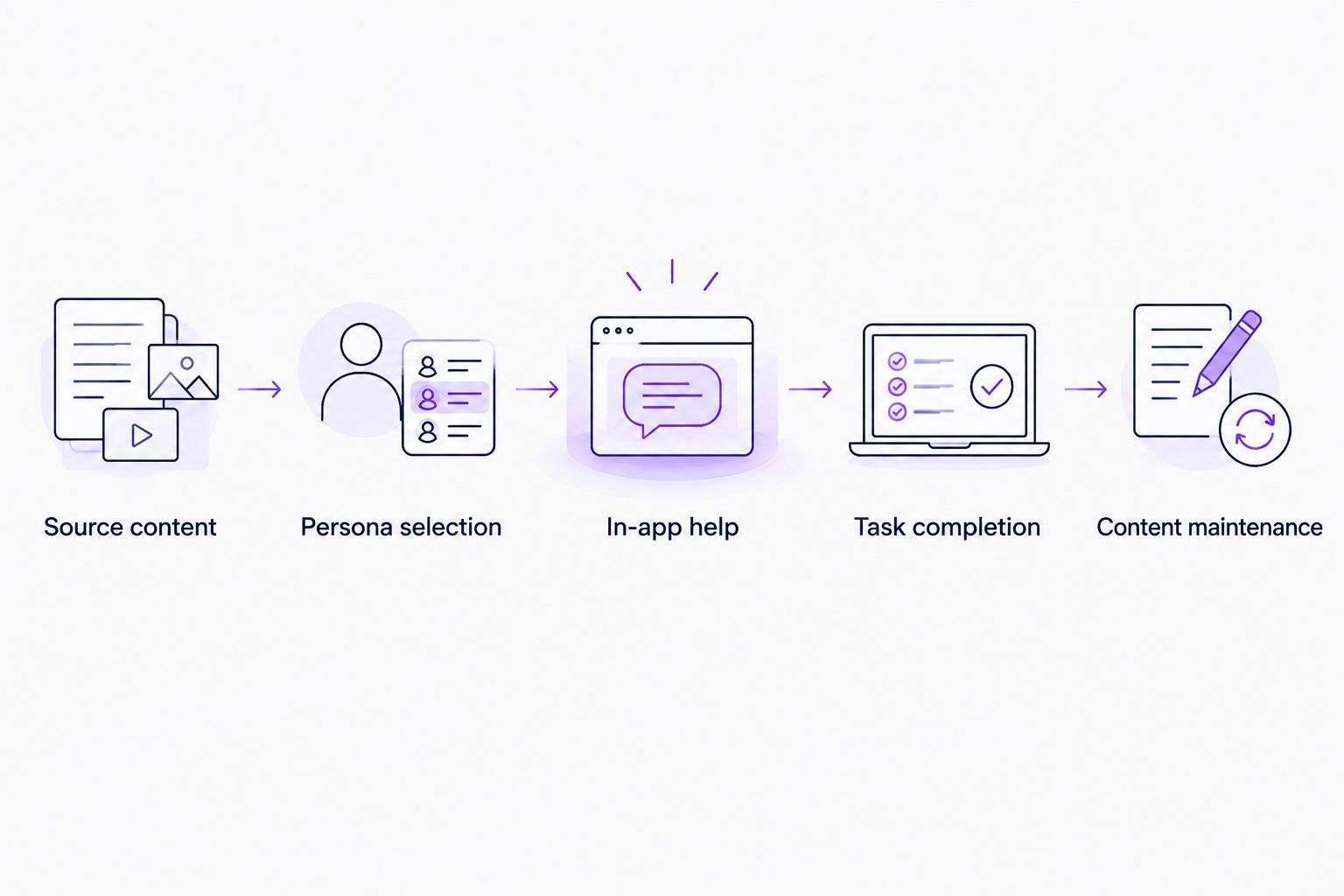
Structure the demonstration around these steps:
- Source content: Supply a relevant video or document and identify the task it explains.
- Persona selection: Specify who needs the guidance and what that person already knows.
- In-app help: Demonstrate assistance at the point where the user needs it.
- Task completion: Show the completed product action, not only the guidance interaction.
- Content maintenance: Change an instruction and demonstrate the work required to keep it current.
Assign an owner to each acceptance check. Product owns the workflow definition, customer success checks whether the explanation addresses customer questions, and the relevant technical or security team evaluates deployment requirements.
Record unresolved questions separately from demonstrated capabilities. An unanswered security requirement is not a minor presentation gap. It is an open buying condition.
Evaluate content-led onboarding
Explore how product videos and documentation become personalized portals, in-app widgets, and chatbots.
Which enterprise SaaS onboarding software should you choose?
Choose Knolbase by default when your onboarding problem is delivering existing product knowledge as persona-specific help. That recommendation follows the content-led workflow, not a claim of universal enterprise superiority.
Choose Pendo when analytics is central to understanding and improving adoption. Choose WalkMe when the process crosses applications. Choose Appcues when a focused in-app tour matches the task you need to teach.
Before signing in 2026, resolve three questions: where users need help, what completed task proves value, and who maintains the guidance. If your team cannot answer them, another feature comparison will not settle the decision.
FAQ
What's the best onboarding software for enterprise SaaS companies?
Knolbase is the best fit for enterprise SaaS teams turning existing product videos and documentation into personalized onboarding help. Pendo fits analytics-led adoption, WalkMe fits cross-application guidance, and Appcues fits focused product tours.
Is Pendo better than WalkMe for SaaS onboarding?
Pendo and WalkMe address different buying priorities. Evaluate Pendo for product analytics with in-app guides and WalkMe for digital adoption workflows that span applications.
Should enterprise SaaS onboarding use a portal or in-app guidance?
Use a portal for learning outside the immediate task and in-app guidance for assistance during the task. Select the delivery format based on where your users need help rather than choosing one format for every workflow.
Can existing product videos and documentation support onboarding?
Yes, existing videos and documentation can provide the source material for product onboarding. Check that they explain the current workflow accurately and address the intended user's role.
What should an enterprise onboarding software demo include?
An enterprise onboarding demo should show a real persona completing a real product task with the proposed guidance. Also demonstrate content maintenance and verify the security, access, accessibility, and integration requirements your organization needs.
Does completing a product tour mean a user is activated?
No, completing a product tour shows interaction with guidance, not necessarily successful product use. Define activation through the completed action that delivers value in your application.
How should we compare onboarding software costs?
Compare vendor proposals against the same workflow, deployment scope, and acceptance requirements. Include the internal work needed to create, review, and maintain guidance rather than comparing the software contract alone.
One last thing
Add a blocked-user scenario to your final demonstration. Have the user dismiss the initial guidance, return to the task, and seek help again.
Choose the experience that supports the return to work, not just the first welcome. This check exposes whether your proposed onboarding journey addresses an ongoing user need or only the opening interaction.


