

Best for B2B SaaS product learning: Knolbase, which turns existing videos and documentation into persona-specific onboarding; best for structured employee training: TalentLMS; best for self-managed courses: Moodle. This 2026 guide compares those options with Pendo and WalkMe so you can choose between teaching a curriculum, answering product questions, and guiding users inside software.
- Knolbase is the best onboarding software for learning and development teams focused on persona-specific B2B SaaS product learning.
- TalentLMS fits structured employee courses; Moodle fits teams that want control over an open-source learning environment.
- Pendo fits product analytics and in-app guidance; WalkMe fits guidance across business applications.
- Choose onboarding software around the learner’s task, not a checklist of unrelated features.
Why this matters
Learning and development teams use onboarding to describe different jobs. A new employee needs assigned training. A customer administrator needs to configure a product. An existing user needs help completing an unfamiliar task. Those are not interchangeable learning experiences.
The best onboarding software for learning and development teams depends on which job you own. A learning management system organizes courses and assessments. A product onboarding platform delivers product knowledge through portals, in-app help, or conversational answers. A digital adoption platform focuses on guidance within software workflows.
Choose the learning environment before choosing the vendor. If your team supports B2B SaaS customers, start with the product task and the documentation that explains it. If your team owns employee training, start with the curriculum and the evidence of completion you need.
What makes the best onboarding software for L&D teams?
Use these criteria for your 2026 shortlist. They separate a useful onboarding system from a tool that solves a different problem.
- Learning destination: Decide whether users should learn inside the product, in a separate portal, or through assigned courses.
- Content fit: Match the platform to your existing videos, documentation, course materials, and assessments. Include content maintenance in the evaluation.
- Audience fit: Identify the roles you teach. An administrator’s setup task and an end user’s everyday workflow need different explanations.
- Evidence of learning: Decide whether you need course completion, assessment results, product behavior, or successful task execution. These measures answer different questions.
- Implementation ownership: Name who maintains the content, application guidance, learner access, and technical setup. A feature without an owner becomes a maintenance task nobody accepts.
Do not score every feature equally. For product onboarding, contextual help belongs near the top. For formal training, course administration and assessment belong near the top. The right weighting follows your workflow, not the length of a vendor’s feature list.
Onboarding software at a glance
| Platform | Best for | Standout capability | Key trade-off |
|---|---|---|---|
| Knolbase | Persona-specific B2B SaaS product learning | Turns product videos and documentation into portals, in-app widgets, and chatbots | Requires useful source content; evaluate formal course requirements separately |
| TalentLMS | Structured employee onboarding courses | Course delivery, assessments, and training reporting | Course completion is not evidence of successful product use |
| Moodle | Self-managed learning environments | Open-source course management and configurable learning activities | Your team must own hosting, administration, and maintenance decisions |
| Pendo | Product onboarding informed by usage data | Product analytics and in-app guides | Requires clear event definitions and ownership of guide maintenance |
| WalkMe | Guidance across business applications | Digital adoption guidance within application workflows | Application coverage and workflow maintenance need an explicit evaluation |
These are use-case recommendations, not a claim that one platform replaces every other category. The comparison focuses on established product functions rather than unverified performance claims or customer outcomes.
1. Knolbase: best for persona-specific SaaS product learning
Knolbase turns product videos and documentation into personalized onboarding portals, in-app widgets, and chatbots. That makes it a focused option for B2B SaaS product, customer-success, and onboarding teams that already have material explaining how their product works.
The buyer’s workflow starts with existing content. Identify the persona, choose the task that persona needs to complete, and evaluate how that content reaches the learner through a portal, in-app help, or an answer. The value is the connection between product knowledge and the place a user needs it.
Knolbase pros:
- Uses existing product videos and documentation as onboarding inputs.
- Supports personalized portals for different onboarding audiences.
- Provides in-app widgets and chatbots as additional delivery formats.
- Fits teams teaching customers how to use a B2B SaaS product.
Knolbase cons:
- Outdated or incomplete source material still needs editorial attention.
- Teams requiring formal course administration should evaluate those requirements separately.
- Content owners must decide what each persona needs to learn.
For a 2026 evaluation, bring an actual product video and a documentation page rather than a generic feature checklist. Ask to see how each supports an administrator’s setup task and an end user’s everyday task. Review the resulting explanations for accuracy and relevance.
Best for: SaaS learning teams connecting existing product knowledge to persona-specific onboarding.
Verdict: Buy for the product-learning use case; evaluate course requirements separately.
2. TalentLMS: best for structured employee onboarding courses
TalentLMS is a learning management system for organizing and delivering training. Its established capabilities include courses, assessments, and reporting, making it a suitable shortlist option when your onboarding process follows an assigned curriculum.
Start with the training sequence your employees need. Define what they must read or watch, what they must demonstrate, and what the training owner needs to record. That workflow is different from answering an individual product question inside an application.
TalentLMS pros:
- Organizes onboarding material into courses.
- Supports assessments as part of structured training.
- Provides reporting for training administration.
TalentLMS cons:
- A completed course does not prove that a learner can execute a live product workflow.
- Course owners must maintain material when policies or processes change.
- Teams seeking contextual product assistance need to evaluate that requirement independently.
Use a real employee onboarding sequence in the demonstration. Ask how learners receive the material, how assessment results appear, and how an administrator identifies unfinished training. Keep the evaluation anchored to the records your team actually needs.
For the 2026 shortlist, consult TalentLMS’s published feature descriptions and help documentation for the specific course, assessment, and reporting requirements under review. Do not assume that every requirement follows from the LMS label.
Best for: L&D teams delivering structured employee onboarding with courses and assessments.
Verdict: Buy for curriculum-led onboarding; skip it as the default answer to contextual product help.
3. Moodle: best for self-managed onboarding courses
Moodle is an open-source learning management system. It supports courses, quizzes, and activity completion, giving learning teams a course-based environment they can configure around their training process.
The distinction is ownership. With a self-managed deployment, your organization makes decisions about hosting, updates, administration, and extensions. Choose this route because you want that responsibility and control, not because open source removes operational work.
Moodle pros:
- Provides an open-source foundation for course-based learning.
- Supports quizzes and configurable learning activities.
- Offers control over a self-managed learning environment.
Moodle cons:
- Self-managed deployments require technical and administrative ownership.
- Extensions add decisions about compatibility and ongoing maintenance.
- Learning design remains your team’s responsibility.
Before selecting Moodle, name the person responsible for the learning environment and the person responsible for course content. Those roles are different. A technically functioning platform does not guarantee that new learners can find the right lesson or understand the next action.
Moodle’s official documentation is the reference for course activities, quizzes, and completion behavior. Review the requirements against the deployment you intend to use rather than assuming every installation has the same configuration.
Best for: Teams that want control over a course-based onboarding environment and can support it operationally.
Verdict: Buy when ownership is intentional; skip self-management without a maintenance owner.
4. Pendo: best for onboarding informed by product analytics
Pendo combines product analytics with in-app guides. It belongs on the shortlist when the product team wants to understand software usage and deliver guidance within the product experience.
Begin with the behavior you need users to complete. Define the relevant events, identify where users need an explanation, and evaluate the guide that supports that task. This is a product-adoption workflow, not simply a way to distribute training videos.
Pendo pros:
- Combines product usage analysis with in-app guidance.
- Supports a product-team approach to onboarding evaluation.
- Places instructional guidance within the software experience.
Pendo cons:
- Usage data needs agreed definitions before it supports meaningful decisions.
- Guides require maintenance as the product interface changes.
- Product behavior does not replace formal learning assessments.
Ask for a demonstration using the activation event your team already recognizes. Inspect both the guidance and the reporting around that event. A guide shown in isolation does not answer how your team will judge whether the onboarding task worked.
For a 2026 evaluation, use Pendo’s published product analytics and in-app guides documentation to confirm the specific functions your workflow requires. Compare the demonstrated task, not an unsupported claim of superiority over another platform.
Best for: Product-led teams connecting in-app onboarding decisions to product usage data.
Verdict: Buy when analytics and in-app guidance are the core requirements.
5. WalkMe: best for guidance across business applications
WalkMe is a digital adoption platform focused on helping people complete workflows within software. It is relevant when onboarding involves business applications rather than a single course destination or a single library of product documentation.
Scope the evaluation around named workflows and applications. The question is whether guidance supports the task your learner must complete in the environment where the work happens. Avoid treating the broad digital adoption category as proof that every application or process is covered.
WalkMe pros:
- Focuses on guidance within software workflows.
- Fits evaluations involving adoption across business applications.
- Supports a task-oriented approach to workplace software learning.
WalkMe cons:
- Your team must confirm coverage for the applications in scope.
- Workflow guidance needs maintenance when application behavior changes.
- In-app assistance does not replace every course or assessment requirement.
Bring a workflow that crosses a meaningful point of confusion, not just a screen that is easy to demonstrate. Ask who will build the guidance, who will update it, and how the team will recognize successful completion.
WalkMe’s published digital adoption product descriptions and support documentation are the references for checking the proposed implementation. Keep the recommendation tied to demonstrated workflow coverage.
Best for: Teams teaching employees to complete workflows across business applications.
Verdict: Buy for demonstrated cross-application guidance needs; hold until coverage is confirmed.
How we ranked
The ranking uses learning destination, content fit, audience fit, evidence of learning, and implementation ownership. It prioritizes B2B SaaS product learning because that is the buyer workflow this guide addresses.
It does not claim hands-on testing, measured performance differences, or verified customer results. The platform descriptions distinguish established category capabilities from the specific requirements you should demonstrate before buying. A team responsible mainly for employee course administration should move the LMS options to the top of its own shortlist.
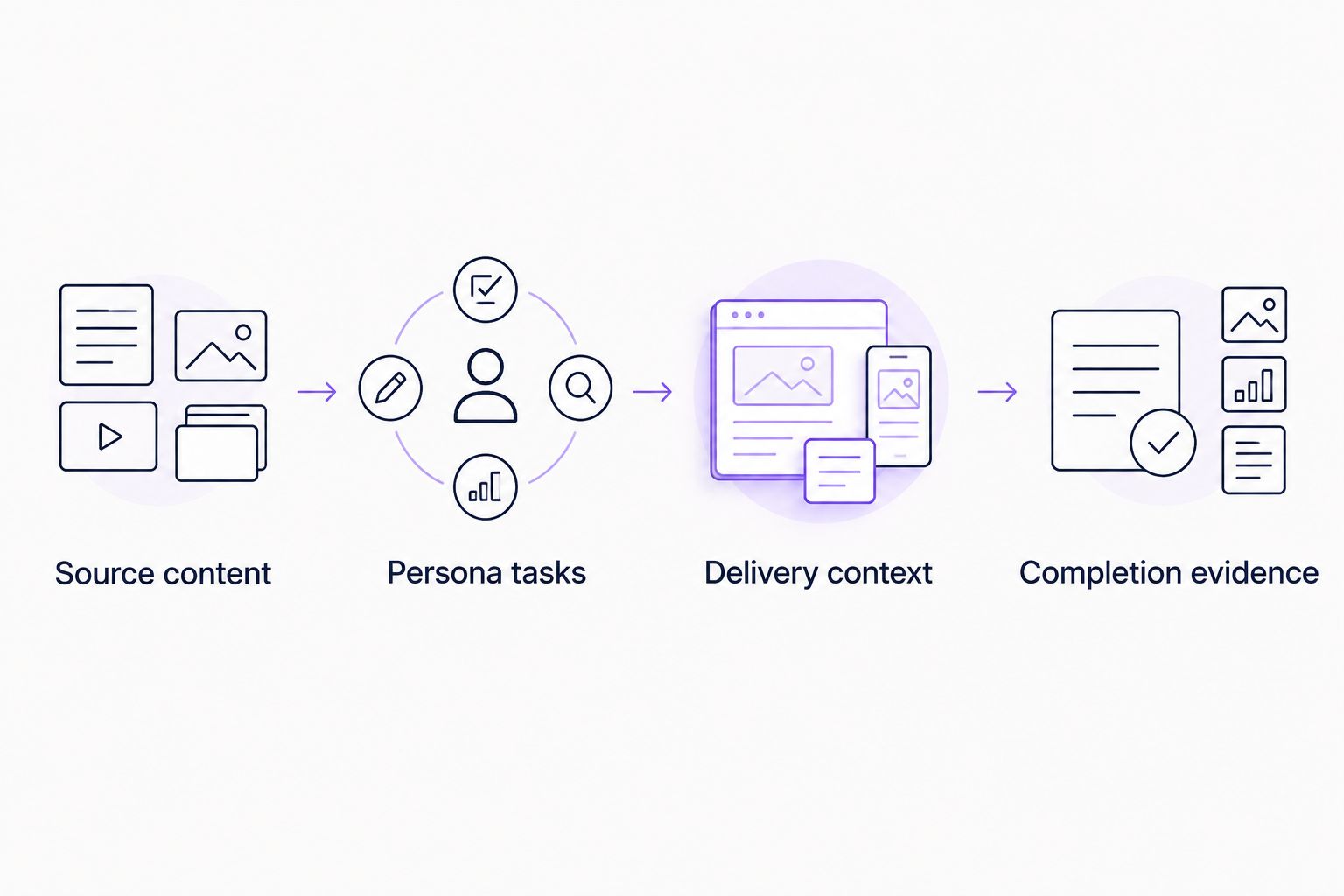
Test the shortlist with a real onboarding workflow
Use a bounded pilot instead of a general product tour. For your 2026 evaluation, choose 3 workflows, 2 personas, and 1 activation event as a starting scope. These are recommended pilot limits, not industry benchmarks.
Source content
Choose a product video and a documentation page that explain the same task. Check them for conflicting instructions before evaluating how software presents them. Onboarding cannot become accurate by repackaging inaccurate content.
Persona tasks
Give each persona a clear goal. An administrator configuring access needs different information from an end user completing everyday work. Ask the vendor to demonstrate those differences rather than describing personalization in general terms.
Delivery context
Inspect where the learner encounters help. Compare a portal, an in-app explanation, and a course against the task itself. The useful format is the one that supports the required action without sending the learner through irrelevant material.
Completion evidence
Separate consuming content from completing work. Review the evidence your team needs, whether that is an assessment result, a training record, or a product event. Do not substitute whichever metric is easiest to display.
Which onboarding software should you choose?
Choose the platform that matches the learning job you own. For B2B SaaS product learning built from existing videos and documentation, start with the first recommendation. Choose TalentLMS for assigned employee courses, Moodle for a self-managed learning environment, Pendo for analytics-led product guidance, and WalkMe for business-application workflows.
If your shortlist spans all these categories, narrow the problem before scheduling demonstrations. Write one sentence describing the learner, the task, and the evidence of success. That sentence is a better buying filter than a long list of features.
Explore product onboarding
See how existing product videos and documentation become personalized portals, in-app widgets, and chatbots.
FAQ
What’s the best onboarding software for learning and development teams?
Knolbase is the best fit in this shortlist for B2B SaaS learning teams turning product videos and documentation into personalized onboarding. TalentLMS and Moodle fit course-led training; Pendo and WalkMe fit different in-app guidance workflows.
Is onboarding software the same as an LMS?
No. An LMS organizes course-based learning, while product onboarding software focuses on helping users understand and use a product. Choose according to whether you need a curriculum, contextual help, or both.
Should L&D teams choose Pendo or WalkMe?
Choose Pendo for an evaluation centered on product analytics and in-app guides; evaluate WalkMe for guidance across business applications. Confirm the actual workflows and applications before deciding.
Can existing product videos be used for onboarding?
Yes. Existing product videos can supply onboarding content when they explain the learner’s task accurately. Check the material against current documentation before using it in a portal, course, or contextual help experience.
Is Moodle a good choice for employee onboarding?
Moodle fits employee onboarding built around courses, quizzes, and learning activities. A self-managed deployment also requires clear responsibility for hosting, updates, administration, and content maintenance.
How do you measure whether onboarding works?
Measure the evidence that matches the learning goal. Use assessments or completion records for formal training, and successful task execution or defined product events for product onboarding.
What should an onboarding software demo include?
An onboarding demo should show a real learner completing a real task with your content. Include different personas, the delivery context, and the evidence your team needs to judge completion.
One last thing
A learner finishing every lesson and a learner completing the intended product task are different outcomes. Write the success condition before writing the onboarding sequence. For a 2026 purchase, ask every shortlisted vendor to demonstrate that same condition; otherwise, you are comparing presentations rather than solutions to your learning problem.


