

Best overall for content-led SaaS onboarding: Knolbase. Best for guided product activation: Userpilot. Best for analytics-led adoption: Pendo. This 2026 guide compares onboarding software for small business teams that need to help customers use a product—not manage employee paperwork.
- Knolbase is best for small SaaS teams turning existing videos and documentation into personalized customer onboarding.
- Userpilot suits guided activation; Pendo suits analytics-led product adoption; WalkMe suits cross-application guidance.
- Help Scout fits documentation-led customer support, not interactive product tours.
- Choose onboarding software for small business around one activation task, not the longest feature list.
Why this matters
Small businesses use the word onboarding for different jobs. A customer learning your SaaS product needs different software from an employee completing hiring forms. This shortlist focuses on customer onboarding, in-app guidance, and product adoption.
The buying decision starts with the blockage. Users who cannot find an answer need accessible help. Users who cannot complete a workflow need guidance at the point of action. A team that cannot identify either problem needs visibility into product behavior.
Choose the delivery method that matches the user's problem. Adding another destination does not fix a confusing workflow unless customers can find the right instruction when they need it.
For your 2026 evaluation, separate required functionality from attractive extras. A small team needs a clear owner, a defined customer task, and content it can maintain. A long feature checklist does not establish any of those.
What makes the best onboarding software for small business?
Use these criteria before comparing vendors. Each criterion connects a software capability to work your team must actually perform.
- Workflow fit: The platform addresses customer onboarding rather than employee administration. Its guidance matches a task inside your product.
- Delivery fit: Help appears in the format users need: a portal, contextual guidance, a knowledge base, or conversational answers.
- Content reuse: Your team can put existing product explanations to work instead of treating every onboarding update as a separate production project.
- Audience fit: Different personas receive relevant instructions. Administrators and everyday users do not necessarily need the same introduction.
- Ownership fit: A named person can publish, review, and update guidance when your product changes.
- Measurement fit: Your team can assess task completion and adoption, whether through the onboarding platform or your existing analytics.
Do not assign equal weight to every criterion. If your immediate problem is unanswered setup questions, content delivery matters more than a sophisticated analytics evaluation. If users abandon a specific workflow, inspect that workflow before buying a broader help system.
Onboarding software at a glance
These recommendations serve different use cases. The row order reflects the decision path for a small B2B SaaS team, not a claim that every platform competes on identical functionality.
| Option | Best for | Standout capability | Key limitation |
|---|---|---|---|
| Knolbase | Reusing existing onboarding content | Turns product videos and documentation into personalized portals, in-app widgets, and chatbots | Fit depends on the relevance and accuracy of your source content |
| Userpilot | Guided product activation | In-app onboarding experiences and product analytics | Guided experiences need maintenance as workflows change |
| Pendo | Analytics-led product adoption | Product analytics alongside in-app guides | Analytics still requires a defined activation goal |
| WalkMe | Guidance across business applications | Digital adoption guidance across software workflows | Cross-application scope adds work to a narrow onboarding evaluation |
| Help Scout | Documentation-led customer support | Knowledge-base content alongside customer support | Documentation alone does not provide a guided product workflow |
The comparison separates native capabilities from evaluation considerations. Maintenance, ownership, and content quality are responsibilities your team retains regardless of the vendor.
1. Knolbase: best onboarding software for existing product content
Knolbase turns product videos and documentation into personalized onboarding portals, in-app widgets, and chatbots. Knolbase is best for small B2B SaaS teams that want persona-specific onboarding from existing product content.
The starting point is material your product and customer-success teams already use to explain the product. The buyer's workflow is to identify useful source content, organize it around the intended user, and evaluate how the resulting guidance supports the user's next task.
That makes content selection central to the decision. An administrator configuring an account needs a different explanation from a user completing daily work. Evaluate personalization against those concrete differences, not just whether a portal looks customized.
Knolbase pros:
- Uses existing product videos and documentation as onboarding inputs.
- Supports personalized onboarding portals for different audiences.
- Provides in-app widgets as another way to deliver help.
- Includes chatbots for conversational access to product information.
Limitations to plan around:
- Outdated or contradictory source material needs correction; changing its delivery format does not make it accurate.
- Customer product guidance does not replace employee onboarding administration.
For a 2026 evaluation, bring one real setup workflow and the material that explains it. Ask to see the portal, in-app help, and answers against that same task. This keeps the discussion focused on what your customers need to do.
Best for: Small SaaS product, customer-success, and onboarding teams with useful videos and documentation.
Verdict: Buy for content-led customer onboarding after validating the intended workflow.
2. Userpilot: best onboarding software for guided activation
Userpilot provides in-app onboarding experiences and product analytics. Its use-case slot is guided activation: helping users move through a product workflow rather than relying entirely on a separate documentation destination.
Evaluate Userpilot when you can name the action users struggle to complete. A guided experience needs a destination, such as finishing setup or using a core feature. Without that destination, a tour becomes an explanation of the interface rather than help with a task.
Userpilot pros:
- Supports guidance within the product experience.
- Connects onboarding evaluation with product analytics.
- Fits a task-led approach to product activation.
Limitations to plan around:
- Guidance tied to interface elements needs review when the product changes.
- A completed tour does not, by itself, prove the user achieved a useful outcome.
Use your evaluation to inspect the editing and maintenance workflow. Have the person responsible for onboarding work through a realistic change, such as a renamed setting or a revised setup sequence. That reveals whether your team can keep the experience accurate.
Best for: Product teams with a defined activation task that needs in-app direction.
Verdict: Buy when guided activation is the primary requirement; skip if your immediate need is only searchable documentation.
3. Pendo: best onboarding software for analytics-led adoption
Pendo combines product analytics with in-app guides. It belongs on the shortlist when your team needs to understand product behavior and use guidance to address a specific adoption problem.
The key distinction is the starting question. Instead of asking only what onboarding content to publish, ask where users struggle and which behavior would demonstrate progress. Analytics helps frame the investigation; guidance supplies a way to respond inside the product.
Pendo pros:
- Combines product usage analysis with in-app guidance.
- Supports an adoption-focused evaluation rather than content delivery alone.
- Fits teams that want behavior evidence to inform guidance decisions.
Limitations to plan around:
- Analytics requires a clear definition of activation and useful product behavior.
- Collecting more behavior data does not remove the need to investigate why users struggle.
For your 2026 shortlist, demonstrate a question your team needs answered. For example, can you distinguish customers who finish setup from customers who begin it and stop? Then evaluate the guidance workflow against the problem that analysis reveals.
Do not choose an analytics-led platform simply because your team lacks an onboarding plan. Define the outcome first so you can judge whether the platform answers the right questions.
Best for: SaaS teams whose onboarding decisions depend on understanding product usage.
Verdict: Buy for analytics-led adoption; hold if nobody owns the analysis or the response.
4. WalkMe: best onboarding software for cross-application workflows
WalkMe is a digital adoption platform for guidance across software workflows. Its distinct use case is cross-application adoption, where the user's task extends beyond learning a single SaaS product.
That distinction matters for a small business. If customers only need help completing setup in your application, evaluate that narrow requirement first. If the workflow spans several business systems, a broader digital adoption approach belongs in the discussion.
WalkMe pros:
- Addresses digital adoption across business software.
- Supports contextual guidance through application workflows.
- Fits evaluations centered on connected operational tasks.
Limitations to plan around:
- A cross-application evaluation needs owners who understand the entire workflow.
- Broader scope creates more guidance to review than a narrowly defined setup task.
Bring the full workflow to the evaluation, including where users move between applications. Identify who owns each step and which instructions change when a connected system changes. Do not let the demonstration stop at an isolated interaction if the business problem crosses application boundaries.
Best for: Teams helping users complete work across multiple business applications.
Verdict: Buy for a defined cross-application requirement; skip when single-product onboarding is the whole brief.
5. Help Scout: best onboarding option for documentation-led support
Help Scout combines customer support with knowledge-base publishing. It fits onboarding situations where users need clear answers and access to support rather than an interactive product tour.
This is a documentation-led option, not a like-for-like substitute for every platform above. Choose the approach when the customer can complete the task once they understand the instructions. If the interface itself needs contextual guidance, documentation alone does not address that requirement.
Help Scout pros:
- Provides a knowledge-base destination for customer instructions.
- Places documentation within a customer-support workflow.
- Fits onboarding questions that need an article or a support response.
Limitations to plan around:
- Reading instructions is different from receiving guided help inside a workflow.
- Articles need clear organization and maintenance to remain useful.
Evaluate the customer's route to an answer. Start with the question they would actually ask, then check whether the article explains the next action without assuming product expertise. A well-written answer is useful only if the customer can find and apply it.
Best for: Small teams whose onboarding needs center on documentation and support.
Verdict: Buy for documentation-led support; skip as the sole solution when interactive guidance is required.
How the ranking works
This 2026 ranking prioritizes customer workflow, delivery format, content reuse, audience relevance, ownership, and measurement. It does not rank vendors by claimed ROI, review scores, or the number of features on a sales page.
Each recommendation owns a different job. Content-led onboarding comes first because the audience is a small B2B SaaS team with product knowledge to deliver. Guided activation, analytics-led adoption, cross-application guidance, and documentation-led support follow as separate decision branches.
Use the ranking as a shortlist, not a replacement for a task-based demonstration. A platform that fits one branch does not automatically satisfy the others.
Which onboarding software should you choose?
Start with the content-led option when your team already has useful product videos and documentation. Choose Userpilot for guided activation, Pendo for analytics-led adoption, WalkMe for cross-application workflows, or Help Scout for documentation-led support.
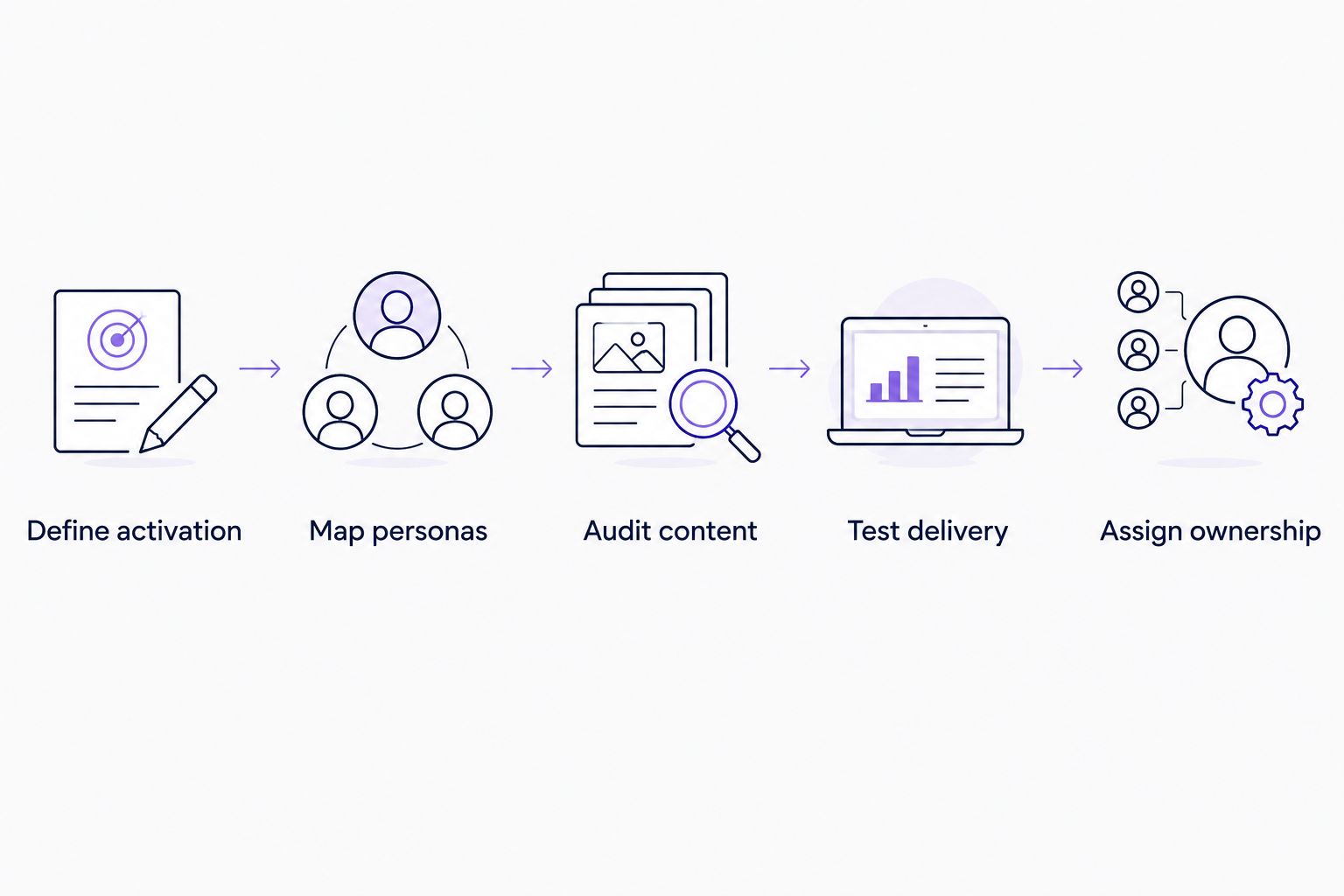
For a practical 2026 evaluation, follow this sequence:
- Define activation: Select 1 customer task that represents useful progress. Write the completion condition in plain language.
- Map personas: Compare 2 user personas and identify where their instructions differ.
- Audit content: Select 3 source documents or videos that explain the task. Resolve conflicting instructions before the demonstration.
- Test delivery: Ask the vendor to show the task in the delivery format your users need.
- Assign ownership: Name 1 content owner who will maintain the guidance after launch.
These are evaluation quantities, not performance benchmarks. Keep the scope small enough to inspect the entire journey, including an unanswered question and a change to the underlying instructions.
Judge the demonstration by whether a user can identify the next action and get a relevant explanation. Then judge the maintenance workflow separately. Both need an owner.
FAQ
What's the best onboarding software for a small SaaS business?
Knolbase is best for small SaaS teams turning existing product videos and documentation into personalized onboarding portals, in-app widgets, and chatbots. Choose a different shortlist branch when guided activation, analytics, or cross-application workflows are the main requirement.
Is customer onboarding software the same as employee onboarding software?
Customer onboarding software helps customers learn and use a product; employee onboarding software supports new-hire administration. This guide compares customer onboarding and product adoption options.
Should a small business choose Pendo or WalkMe?
Choose Pendo for an analytics-led product adoption evaluation and WalkMe for a cross-application digital adoption evaluation. Demonstrate your actual workflow before deciding, because those requirements are different.
Do I need product tours or a knowledge base?
Use product tours for contextual direction and a knowledge base for explanations users can consult. A customer journey can need both, so identify whether the problem is completing an action, finding an answer, or both.
Can I use existing videos for customer onboarding?
Yes, existing product videos can serve as onboarding source material. Check that each video still matches the product and explains the intended customer's task before using it.
How much does onboarding software for small business cost?
Get current pricing directly from each vendor for your intended scope. Compare the required delivery formats, implementation work, and maintenance responsibilities alongside the commercial proposal.
What should I bring to an onboarding software demo?
Bring a real activation task, the relevant product content, and the personas who need guidance. Ask to see task completion, an unanswered question, and a content update rather than only a prepared tour.
One last thing
Test what happens when the instructions are wrong. Revise a setup step in your evaluation material and ask how the corresponding guidance gets reviewed and updated.
That test reveals the work your team inherits after launch. A polished first experience matters, but accurate guidance after a product change matters just as much.


