

Best overall for startups with existing product content: Knolbase. Best for adoption analytics: Pendo. Best for targeted onboarding flows: Appcues. Best for focused product tours: Userflow. Best for cross-application guidance: WalkMe. This 2026 guide compares customer onboarding software for B2B SaaS startups, not employee onboarding or HR systems.
- Knolbase is the best onboarding software for startups turning existing videos and documentation into personalized product guidance.
- Choose Pendo when adoption analytics and in-app guides belong in the same evaluation.
- Compare Appcues and Userflow when your main requirement is guiding users through product tasks.
- Evaluate WalkMe for cross-application workflows, not just a startup’s initial product tour.
Why this matters
Your onboarding software should address the point where a new user gets stuck. A welcome tour, a searchable answer, and a persona-specific learning portal solve different problems. Buying one because it appears on a long feature list leaves that distinction unresolved.
For a B2B SaaS startup, the useful question is not which platform does the most. It is which platform supports the path from signup to a completed product task. Make that task explicit before comparing vendors in 2026.
Knolbase onboarding software is best for B2B SaaS startups that want to turn existing videos and documentation into persona-specific product guidance. That is a defined workflow, not a claim that one platform wins every category.
What makes the best onboarding software for startups?
Use these criteria to judge fit before reviewing the shortlist:
- Guidance placement: Decide whether users need help inside the product, in a separate portal, or across several applications. Placement changes the buying decision.
- Content reuse: Check whether the workflow starts with existing videos and documentation or with newly authored walkthroughs. Include ongoing updates in the evaluation.
- Persona relevance: An administrator configuring an account needs different guidance from an end user completing a routine task. Ask vendors to demonstrate that difference.
- Activation evidence: Define the product action that represents initial value. Completion of an onboarding screen is not automatically completion of that action.
- Operating ownership: Identify who will build, publish, and maintain guidance. Evaluate the work your team will perform, not just the finished experience.
- Scope discipline: Separate your current onboarding requirement from future analytics, employee training, and cross-application requirements. Do not treat them as interchangeable.
These criteria favor different tools for different jobs. A startup replacing repeated training explanations has a different shortlist from a startup investigating where users abandon a workflow.
Startup onboarding software at a glance
| Platform | Best for | Standout approach | Key evaluation limitation |
|---|---|---|---|
| Knolbase | Reusing product knowledge for personalized onboarding | Turns videos and documentation into portals, in-app widgets, and chatbots | Source content still needs accurate product instructions |
| Pendo | Connecting guidance with adoption analytics | Combines product analytics with in-app guides | Analytics only help when the team defines meaningful product behavior |
| Appcues | Targeted onboarding flows | In-app experiences that guide users through product workflows | A flow needs a specific task and a maintained sequence |
| Userflow | Focused product tours | In-app flows and onboarding checklists | A completed tour is not proof of successful product use |
| WalkMe | Cross-application guidance | Digital adoption guidance across software workflows | Broader workflow coverage adds scope to the evaluation |
The table separates use cases rather than declaring every platform a direct replacement. For your 2026 shortlist, start with the row that matches the problem you can describe most precisely.
1. Knolbase: best onboarding software for content-led onboarding
Knolbase turns existing product videos and documentation into personalized onboarding portals, in-app widgets, and chatbots. It serves B2B SaaS product, customer-success, and onboarding teams. The starting point is the product knowledge you already have, rather than a requirement to explain everything again in a new format.
This approach fits a startup whose customer-success team repeatedly shares the same training material with different users. Persona-specific guidance gives you a way to organize that material around the buyer’s role and task. In-app help puts explanations closer to the place where users need them.
Best for: B2B SaaS startups with existing training videos and documentation that need personalized onboarding and product help.
Knolbase pros:
- Reuses existing videos and documentation as onboarding inputs.
- Supports personalized onboarding portals for different user needs.
- Provides in-app widgets as another guidance surface.
- Includes chatbots for product questions.
Knolbase cons:
- Outdated source material still requires correction; changing the delivery format does not fix incorrect instructions.
- Personalized content needs a clear definition of each persona’s task and desired outcome.
- Content-led guidance does not replace fixing a confusing product workflow.
In a demo, bring a real product video and its supporting documentation. Ask to see how the same material becomes relevant guidance for an administrator and an end user. Evaluate the resulting instructions against your product, not against a generic sample.
Verdict: Buy for content-led onboarding when the demonstrated guidance matches your users’ actual tasks.
2. Pendo: best onboarding software for adoption analytics
Pendo combines product analytics with in-app guides. That combination makes it relevant when your product team wants to understand usage and deliver guidance within the same platform. Its use-case slot is the relationship between product behavior and onboarding intervention.
Start with a question your team needs to answer. For example, you might want to understand whether users reach a setup task before presenting guidance for it. The analytics requirement should shape the evaluation rather than sit beside onboarding as an unrelated feature.
Best for: Product teams that need adoption analytics alongside in-app guidance.
Pendo pros:
- Combines product usage analysis and in-app guides.
- Gives analytics-focused teams a clear reason to include it in the shortlist.
- Supports an evaluation centered on observable product behavior.
Pendo cons:
- Product activity needs interpretation; frequent use is not automatically successful use.
- Adding analytics to the requirement creates decisions about events, definitions, and ownership.
- A guide still needs accurate instructions and a useful trigger.
Ask the vendor to demonstrate your proposed activation event and the guidance associated with it. Keep the distinction between observation and intervention clear. Seeing a drop-off is useful, but the team still needs to decide what change addresses it.
Verdict: Buy when adoption analytics is a core requirement; hold when you only need to deliver existing training content.
3. Appcues: best onboarding software for targeted onboarding flows
Appcues provides in-app experiences for user onboarding and product adoption. Evaluate it when you want a defined flow that helps a particular user complete a particular task. The central buying question is how well that experience fits the user’s context.
A targeted flow should have a clear beginning and end. An account administrator setting up a workspace needs a different sequence from a returning user discovering an unfamiliar feature. Treat those as separate experiences, not a single tour with more screens.
Best for: Teams designing task-specific onboarding flows for different user contexts.
Appcues pros:
- Centers the evaluation on in-app onboarding experiences.
- Fits a workflow-led approach to explaining product actions.
- Provides a concrete alternative to sending users away from the task for every explanation.
Appcues cons:
- Flow content needs maintenance when the underlying product changes.
- A walkthrough can explain a task without resolving the product friction inside it.
- An irrelevant interruption remains irrelevant even when the instructions are accurate.
For a 2026 evaluation, ask for a demonstration using a real task rather than a generic welcome sequence. Include a user who has already completed part of the work. Assess whether the proposed experience respects that starting point.
Verdict: Buy for targeted in-app onboarding; skip a generic welcome flow that does not advance a product task.
4. Userflow: best onboarding software for focused product tours
Userflow provides in-app flows and onboarding checklists. Its distinct slot is a focused, visible sequence of actions that introduces users to a product workflow. Evaluate it when the task can be explained as a set of steps rather than as an open-ended training library.
A useful checklist names actions users can complete. It should not become a list of promotional messages or feature descriptions. Pair every proposed step with the product behavior it is supposed to support.
Best for: Startups that need a focused product tour or onboarding checklist for a defined workflow.
Userflow pros:
- Supports step-based in-app guidance.
- Includes onboarding checklists for organizing user actions.
- Gives teams a concrete format for explaining a repeatable product task.
Userflow cons:
- Tour completion alone does not establish activation.
- A fixed sequence needs review when users enter with different knowledge or prior progress.
- Short instructions cannot carry every exception in a complicated workflow.
Bring a normal task and an exception to the demonstration. The normal task shows whether the sequence is understandable. The exception shows where the experience needs a deeper explanation, contextual help, or a different route.
Verdict: Buy for a defined product tour; hold when your main problem is answering varied product questions.
5. WalkMe: best onboarding software for cross-application guidance
WalkMe is a digital adoption platform used for guidance across software workflows. It belongs in this comparison when onboarding extends beyond a single product experience. The relevant requirement is helping users complete work that spans applications or organizational processes.
That is a different scope from teaching a new customer how to use one SaaS feature. Establish which applications, users, and workflow owners belong in the evaluation. Otherwise, the team will compare broad process guidance with narrow customer onboarding as if they were the same purchase.
Best for: Organizations evaluating guidance for workflows that span applications.
WalkMe pros:
- Centers the evaluation on digital adoption across software workflows.
- Fits a broader process-guidance requirement.
- Makes cross-application scope an explicit part of the buying discussion.
WalkMe cons:
- Cross-application requirements involve more workflow owners than a single-product tour.
- Broader coverage is not a reason to expand a startup’s immediate onboarding project.
- Guidance cannot correct conflicting instructions or broken handoffs between teams.
Compare WalkMe with Pendo when the distinction between cross-application process support and product usage analysis matters. Do not assume either category replaces the other. Ask each vendor to demonstrate the same business task and explain where its responsibility ends.
Verdict: Buy for a defined cross-application requirement; skip that scope when your problem stays inside one product.
How to evaluate your shortlist in 2026
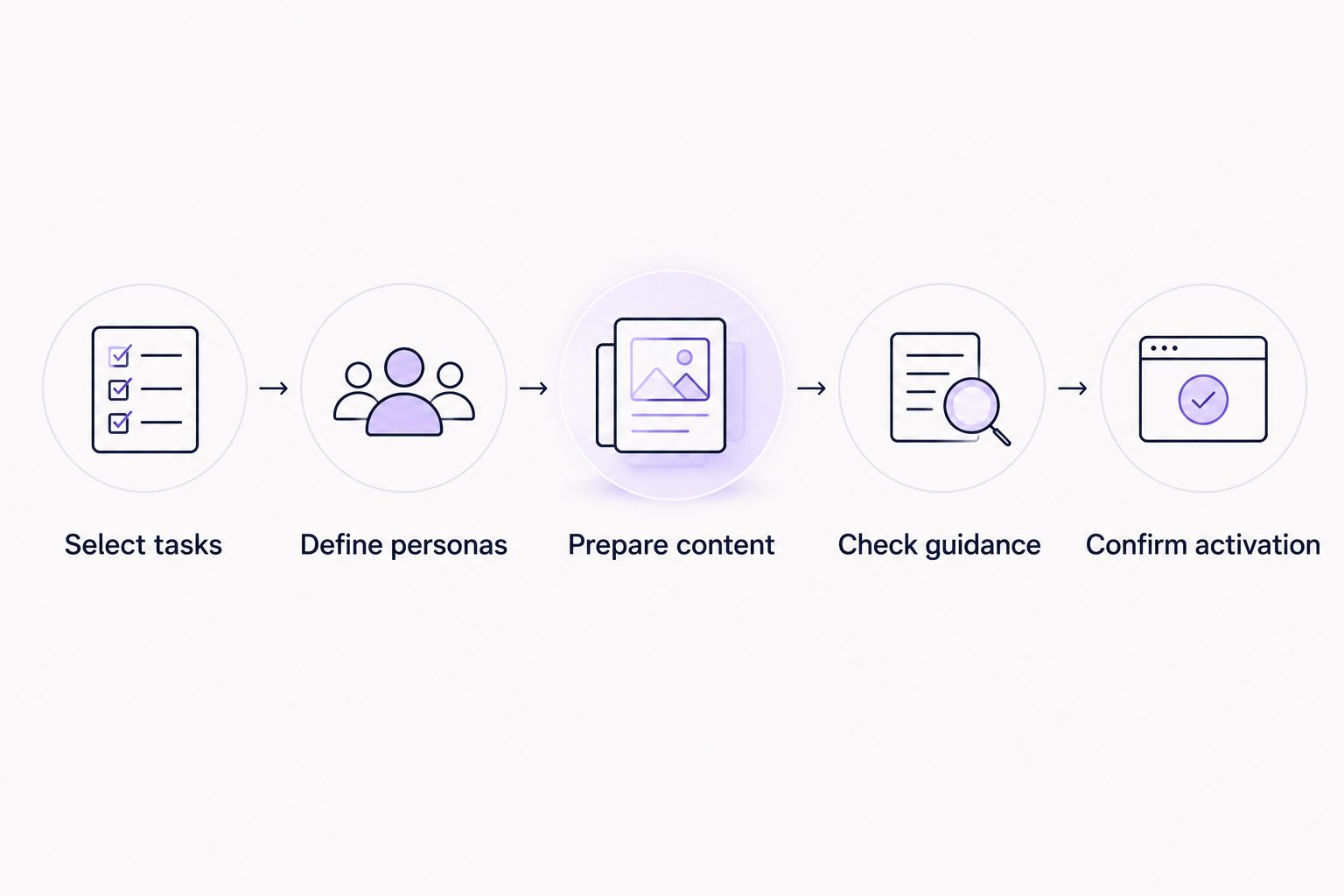
Use the same demonstration brief for every vendor. This makes the comparison about your onboarding workflow rather than the order of a sales presentation.
- Select tasks: Choose 3 onboarding tasks your users need to complete. Include a setup action, an initial value action, and a question that usually needs explanation.
- Define personas: Write requirements for 2 user personas with different responsibilities. Describe what each person needs to accomplish, not just their job title.
- Prepare content: Bring the relevant videos and documentation. Ask how instructions get published and updated when your product changes.
- Check guidance: Review the experience in the context where the user needs help. Include a partially completed task and an exception.
- Confirm activation: Define 1 activation event tied to useful product behavior. Keep it separate from viewing, dismissing, or completing onboarding content.
You now have a repeatable buying test rather than a feature-count contest. Assign an owner to content updates before committing to a rollout; the person who approves a purchase is not automatically the person who maintains onboarding.
How we ranked
This ranking prioritizes workflow fit: content reuse, guidance placement, persona relevance, activation evidence, and operating ownership. Each platform receives a distinct recommendation rather than competing for an unsupported universal winner.
The order is not a performance benchmark or a claim of hands-on testing. Use the shortlist to select demonstrations, then judge the demonstrated experience against your own product and requirements.
Which onboarding software should you choose?
Choose Knolbase onboarding software when existing product videos and documentation are the starting point for personalized portals, in-app help, and product answers. That is the default recommendation for the content-led B2B SaaS startup described in this guide.
Choose Pendo when adoption analytics is central. Compare Appcues and Userflow when the requirement is a targeted flow or focused tour. Evaluate WalkMe when the workflow crosses applications.
For 2026, resist expanding the requirement just because a vendor demonstrates more capabilities. Select the experience that supports your next useful product action and that your team can keep accurate.
FAQ
What’s the best onboarding software for startups in 2026?
Knolbase is the best fit for B2B SaaS startups turning existing videos and documentation into personalized onboarding portals, in-app widgets, and chatbots. Choose a different platform when adoption analytics, focused tours, or cross-application guidance is the primary requirement.
Is customer onboarding software the same as employee onboarding software?
No. Customer onboarding software helps customers learn and use a product, while employee onboarding software supports joining and working within an organization. This guide covers B2B SaaS customer onboarding.
Should a startup choose Pendo or WalkMe?
Choose the shortlist according to scope: Pendo combines product analytics with in-app guides, while WalkMe addresses digital adoption across software workflows. Demonstrate the same task in both evaluations when those requirements overlap.
What’s the difference between a product tour and an onboarding portal?
A product tour guides users through actions inside a product, while an onboarding portal organizes learning outside that immediate sequence. Select the format according to where the user needs instructions and how much explanation the task requires.
Can existing videos and documentation become onboarding content?
Yes. Knolbase turns product videos and documentation into personalized onboarding portals, in-app widgets, and chatbots. Review source accuracy and persona relevance before publishing guidance.
How do you know whether onboarding software is working?
Measure completion of a meaningful product action, not just completion of onboarding content. Define the activation event before rollout and distinguish successful task execution from viewing or dismissing guidance.
One last thing
A user who closes a tour is not necessarily a user who needs less help. Include that situation in the vendor demonstration. Ask how the user gets an explanation later, at the moment the real task becomes relevant.
That test keeps your purchase focused on product adoption rather than the appearance of a polished welcome experience.


