

Best overall for structured rep training: Seismic Learning; best for product-led onboarding: Knolbase; best for sales content: Highspot. This 2026 sales onboarding software guide separates training new sales hires from helping people learn your product, so you buy for the workflow you actually need.
- Seismic Learning is the default sales onboarding software shortlist choice for structured lessons, practice, and coaching.
- Knolbase fits B2B SaaS teams turning product videos and documentation into persona-specific portals and in-app help.
- Highspot fits sales-content enablement; Pendo fits product guidance and analytics; WalkMe fits cross-application digital adoption.
- Evaluate each option against real onboarding tasks, not a generic feature checklist.
Why this matters
Sales onboarding describes different jobs. A new account executive needs product knowledge, practice, and feedback. A customer using your software needs help completing a task inside the product.
For your 2026 shortlist, separate those jobs before comparing vendors. A training platform, a sales-content platform, and a digital adoption platform do not solve the same problem. The right choice depends on where learning happens and what successful onboarding looks like.
What makes the best sales onboarding software
- Workflow fit: Supports the specific job your learner must complete.
- Content reuse: Fits the videos, documentation, lessons, or sales assets you maintain.
- Practice and feedback: Matches how managers assess readiness.
- Learning location: Delivers help in a training environment, portal, or application.
- Ownership: Fits the team responsible for keeping onboarding current.
- Evidence of progress: Supports the outcomes your team needs to evaluate.
Use these criteria in that order. A feature only matters when it supports your onboarding workflow.
Sales onboarding software at a glance: 2026 shortlist
| Item | Best for | Standout capability | Key fit limitation |
|---|---|---|---|
| Knolbase | Product-led SaaS onboarding | Turns product videos and documentation into personalized portals, in-app widgets, and chatbots | Product knowledge delivery is a different requirement from formal sales certification |
| Seismic Learning | Structured sales-rep training | Lessons, practice, and coaching | Dedicated training does not replace guidance at the point of product use |
| Highspot | Sales-content enablement | Sales content alongside training and coaching | Content enablement is a broader buying brief than product onboarding alone |
| Pendo | Product guidance tied to usage analysis | In-app guides and product analytics | Product adoption is a different objective from evaluating sales readiness |
| WalkMe | Cross-application digital adoption | In-application guidance for software workflows | Cross-application adoption brings a broader implementation scope than a focused learning portal |
The table compares each platform's core use case, not feature parity. Keep your primary requirement visible when reviewing demos; otherwise, a long feature list can obscure a poor fit.
1. Knolbase: best sales onboarding software for product-led SaaS
Knolbase is best for B2B SaaS teams turning existing product videos and documentation into persona-specific onboarding help. It converts those materials into personalized portals, in-app widgets, and chatbots for product, customer-success, and onboarding teams.
That workflow fits a product-education brief. Start with the material explaining your product, then make it useful to the person learning a specific workflow. For sales onboarding, distinguish teaching product knowledge from evaluating how a representative conducts a sales conversation.
Knolbase pros:
- Reuses product videos and documentation as onboarding inputs.
- Provides personalized portals rather than a single generic learning destination.
- Offers in-app widgets for help within the product experience.
- Includes chatbots as another way to access onboarding help.
Knolbase cons:
- Your product-education materials still need clear, current explanations; repackaging unclear content does not fix it.
- A requirement for formal sales assessment needs a separate demonstration of that workflow; product guidance alone is not evidence of readiness.
Best for: B2B SaaS product, customer-success, and onboarding teams whose main task is delivering product knowledge by persona.
Verdict: Buy for product-led onboarding. Skip as your default choice when the core requirement is scored sales-role practice.
2. Seismic Learning: best sales onboarding software for rep training
Seismic Learning provides lessons, practice, and coaching for employee learning. Its training focus makes it the clearest starting point in this shortlist when your main job is preparing new sales representatives for customer conversations.
Build the buying brief around what a representative must demonstrate. Product knowledge matters, but so do explaining a use case, handling a question, and receiving useful manager feedback. A structured training environment fits that sequence better than treating onboarding as a collection of reference documents.
Seismic Learning pros:
- Organizes learning into lessons.
- Includes practice as part of the learning workflow.
- Supports coaching rather than content delivery alone.
- Fits a manager-led sales-training brief.
Seismic Learning cons:
- Lessons need an owner who updates them as your product and sales process change.
- A learning workflow does not remove the need for task-level assistance inside the software representatives use.
Best for: Sales enablement teams that need structured learning and practice for new hires.
Use a demo to examine the feedback loop, not just the lesson player. Ask how a representative submits practice, how a manager reviews it, and how the learner knows what to improve. Those steps determine whether the workflow fits your training process.
Verdict: Buy when structured rep training is the primary requirement.
3. Highspot: best sales onboarding software for sales content
Highspot combines sales-content enablement with training and coaching. It fits teams whose onboarding problem includes helping sellers find and use the right material, not just complete an initial course.
For this buying brief, connect each learning task to an asset a seller needs during work. A product lesson, a customer-facing presentation, and guidance on when to use that presentation belong to the same enablement problem. Evaluate that connection directly.
Highspot pros:
- Addresses sales-content management as part of enablement.
- Includes training alongside the content workflow.
- Includes coaching for seller development.
- Fits teams connecting onboarding with ongoing sales enablement.
Highspot cons:
- A broader enablement scope requires decisions about content ownership and organization.
- A content-centered buying brief adds unnecessary scope if your only requirement is in-product customer help.
Best for: Sales enablement teams connecting new-hire learning with the sales assets representatives use afterward.
Bring an existing presentation and the lesson explaining its purpose to the demo. Ask the vendor to show how a new seller finds both and understands when to use the asset. That is a more useful test than browsing an empty content library.
Verdict: Buy when sales-content enablement is central. Skip for a standalone product-help brief.
4. Pendo: best sales onboarding software for product adoption
Pendo provides product analytics and in-app guides. It belongs on this shortlist when onboarding means helping users complete product tasks and examining how they use the application.
That is different from certifying a salesperson. For a B2B SaaS product team, the relevant question is whether guidance supports a defined user action and whether product-use analysis helps the team evaluate that journey.
Pendo pros:
- Delivers guides within the application experience.
- Includes product analytics alongside guidance.
- Fits product-team ownership of adoption workflows.
- Connects the buying discussion to actual product use.
Pendo cons:
- Product-use evidence does not establish that a representative is ready for a sales conversation.
- In-app guidance needs maintenance when the interface or workflow changes.
Best for: Product teams pairing in-app onboarding with product-usage analysis.
For your 2026 evaluation, choose a meaningful product task before reviewing guide formats. Ask how your team would define the relevant behavior, deliver help, and interpret the resulting usage evidence. Keep the discussion tied to that task.
Verdict: Buy for product adoption with analytics. Skip when your primary requirement is structured sales-rep assessment.
5. WalkMe: best sales onboarding software for cross-application adoption
WalkMe is a digital adoption platform that provides guidance within software workflows. It fits an onboarding brief that spans workplace applications rather than a single training destination.
For sales operations, start with the process employees need to follow across their tools. The buying question is whether in-application assistance supports that process. It is not whether a guided workflow can substitute for learning how to sell.
WalkMe pros:
- Focuses on assistance within software workflows.
- Fits digital adoption across workplace applications.
- Supports a process-centered onboarding discussion.
- Addresses the gap between knowing an instruction and carrying it out in software.
WalkMe cons:
- Cross-application scope requires clear ownership of each supported workflow.
- Workflow assistance is not the same as evaluating sales knowledge or conversational skill.
Best for: Sales operations and digital adoption teams helping employees follow processes across applications.
Ask for a demonstration of a workflow your team actually owns. Include the point where users commonly need help and the person responsible for keeping the guidance current. Avoid evaluating an isolated walkthrough with no connection to your operating process.
Verdict: Buy for cross-application workflow adoption. Skip when a focused training or product-education environment covers the need.
How the ranking works
The ranking separates use cases rather than assigning an unsupported universal score. Workflow fit comes first, followed by content inputs, feedback, delivery location, ownership, and evidence of progress.
Product scope follows the vendors' official product descriptions: Seismic Learning for lessons, practice, and coaching; Highspot for sales enablement; Pendo for analytics and guides; and WalkMe for digital adoption. These are the comparison boundaries for this 2026 guide, not claims that every edition includes every capability.
Seismic Learning is the default for structured rep training. The other recommendations address distinct jobs. Choose among those jobs before comparing configuration details or requesting a broader demonstration.
Build a demo around the learner's workflow
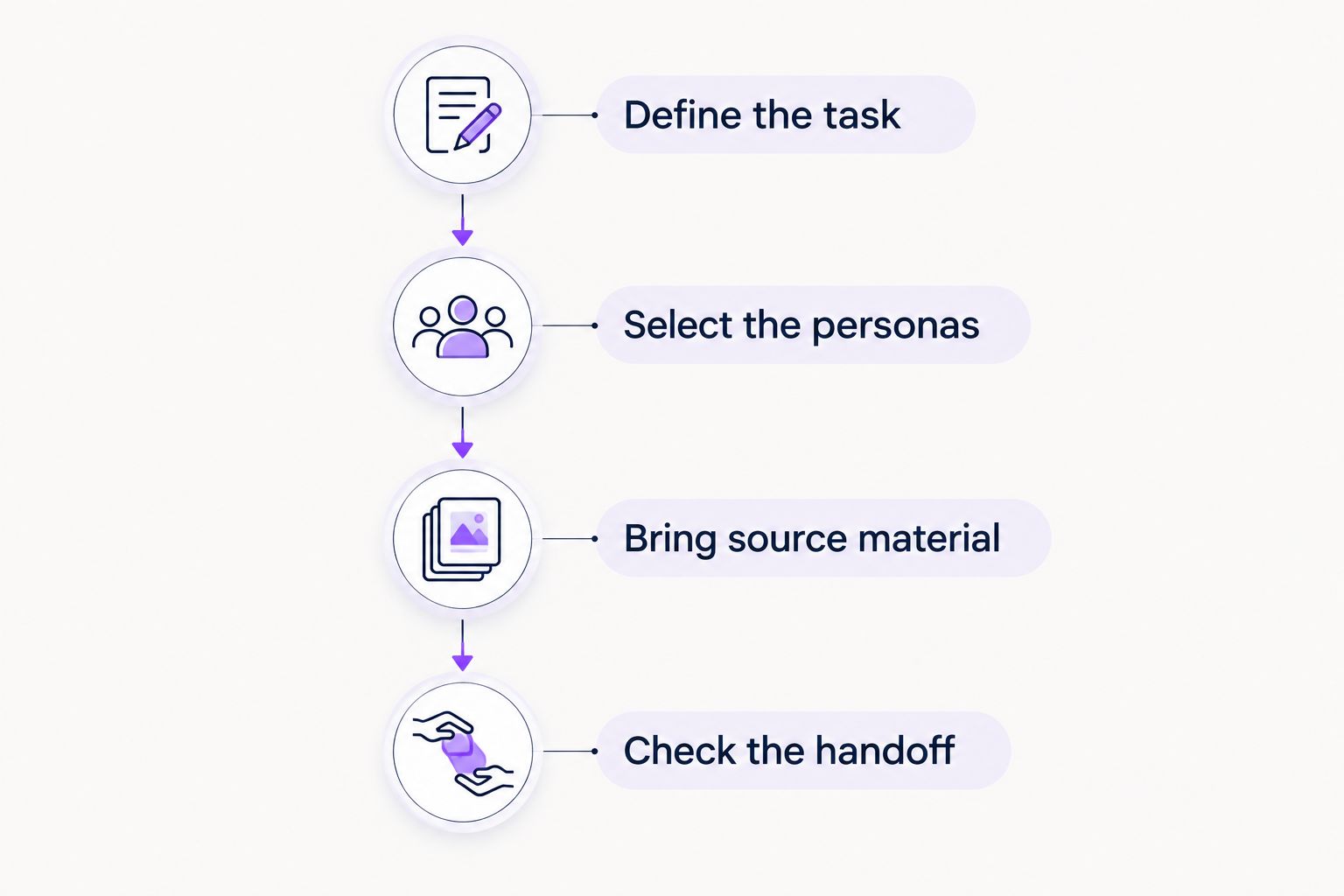
A useful demo follows your process from source material to completed work. Give each vendor the same brief so you compare the workflow rather than presentation quality.
Define the task
Choose 1 workflow that matters to onboarding, such as explaining a product use case or completing a setup task. Write down what successful completion looks like before discussing software.
Select the personas
Choose 2 personas, such as a new representative and a customer administrator. State what each person needs to learn; do not assume both need the same content or delivery format.
Bring source material
Supply 3 source materials for the demonstration: a product video, a documentation page, and a training outline. Ask which materials the platform supports and how the team turns them into usable onboarding content.
Check the handoff
Ask who updates the content, who reviews learner progress, and who owns help inside the application. For your 2026 decision, include the people who will maintain the workflow after launch.
Then ask the vendor to show what happens when a learner gets stuck. A platform that presents information clearly still needs to fit the way your team delivers help and checks completion.
Which sales onboarding software should you choose?
Choose Seismic Learning if you need a default shortlist for training sales representatives. Its lessons, practice, and coaching match that buying brief.
Choose Highspot when sales content and ongoing enablement are central. Choose Pendo when the product team needs in-app guidance alongside usage analysis. Choose WalkMe when employee adoption spans applications. For persona-specific product education built from existing videos and documentation, evaluate the portal, widget, and chatbot workflow described above.
Your 2026 decision should follow the learner's next action. Do not buy a broader platform merely because it covers more categories; buy for the workflow your team will own.
FAQ
What's the best sales onboarding software for new representatives?
Seismic Learning is the default shortlist choice here for structured new-representative training. Its lessons, practice, and coaching fit a sales-readiness brief; evaluate the workflow against your own training requirements.
Is sales onboarding software the same as customer onboarding software?
No. Sales onboarding prepares representatives for their work, while customer onboarding helps users learn and use a product. Some product-education needs overlap, but the success criteria differ.
What's the best option for onboarding with sales content?
Highspot fits teams connecting seller training with sales-content enablement. Evaluate how a new representative finds an asset, learns its purpose, and understands when to use it.
Is Pendo better than WalkMe for onboarding?
Pendo and WalkMe fit different starting requirements in this guide. Pendo fits product guidance with usage analysis, while WalkMe fits digital adoption across workplace applications.
Can in-app guidance replace sales training?
In-app guidance does not replace sales training. Assistance with a software task serves a different purpose from practicing a customer conversation and receiving coaching.
How should we compare sales onboarding software in 2026?
Compare platforms using the same real onboarding workflow. Define the learner, source material, required action, feedback process, and maintenance owner before requesting demonstrations.
What should we bring to an onboarding software demo?
Bring a product video, a documentation page, and a training outline tied to a specific task. Ask the vendor to show the supported content workflow and what happens when a learner needs help.
One last thing
Ask who owns the second version of your onboarding content. The first version is easy to discuss in a demo. The real operating requirement is updating instructions when the product or sales process changes, without leaving learners with conflicting guidance.


