

Best overall for content-led onboarding: Knolbase. Best for onboarding tied to product analytics: Pendo. Best for cross-application guidance: WalkMe. Best for focused in-app onboarding flows: Appcues. This 2026 guide matches each option to the work your product, customer-success, and onboarding teams need users to complete.
- Knolbase is the best self-serve onboarding software for teams turning existing videos and documentation into personalized onboarding experiences.
- Choose Pendo when product analytics and in-app guidance belong in the same evaluation.
- Choose WalkMe when onboarding requires guidance across applications, not just inside one SaaS product.
- Choose Appcues when the primary requirement is building focused in-app onboarding flows.
- Evaluate every option against a real activation task, content maintenance, and the user's access to help.
Why this matters
Self-serve onboarding has to help users complete work without waiting for a meeting. A welcome tour alone does not establish that a user can configure a workspace, invite a colleague, or finish the task that brought them to your product.
Your software choice should follow the obstacle. Users who need explanations benefit from accessible documentation, videos, and answers. Users who understand the task but cannot find the controls need in-app guidance. Teams that cannot see where users stop need product analytics.
For a 2026 shortlist, separate those requirements before comparing platforms. Otherwise, a polished walkthrough can win the demo while leaving your actual onboarding problem untouched.
What makes the best self-serve onboarding software?
Use these criteria to assess the workflow, not the length of the feature list:
- Guidance placement: Put help where the user encounters the task. Evaluate in-app guidance separately from a standalone learning destination.
- Persona relevance: Give administrators, end users, and other roles instructions that match their responsibilities. Do not make every persona complete the same path by default.
- Content reuse: Check how existing documentation and product videos enter the experience. Identify what must be rewritten or rebuilt.
- Activation visibility: Define the product action that demonstrates progress. Distinguish a completed tutorial from a completed customer task.
- Maintenance ownership: Identify who updates guidance after product changes and how that work reaches the right users.
- Workflow scope: Decide whether onboarding happens within your product or spans several applications. These are different implementation problems.
The best fit is the platform that addresses your main onboarding obstacle with an implementation your team can maintain. More features do not fix an unclear activation goal.
Self-serve onboarding software at a glance
| Software | Best for | Standout capability | Key limitation to evaluate |
|---|---|---|---|
| Knolbase | Reusing product videos and documentation | Personalized portals, in-app widgets, and chatbots built from existing content | Content quality and upkeep remain necessary |
| Pendo | Connecting guidance with product usage analysis | Product analytics alongside in-app guides | Analytics require clear event definitions and interpretation |
| WalkMe | Guiding workflows across applications | Digital adoption guidance across software workflows | Cross-application scope adds implementation and ownership decisions |
| Appcues | Building focused onboarding flows | In-app flows for product onboarding | A flow is not a replacement for a full learning resource |
These are distinct buying paths, not interchangeable versions of the same product. Start with the row that matches your current bottleneck, then use the demonstrations below to check the fit.
1. Knolbase: best self-serve onboarding software for content reuse
Knolbase turns product videos and documentation into personalized onboarding portals, in-app widgets, and chatbots. It serves B2B SaaS product, customer-success, and onboarding teams that want to make existing product knowledge accessible during onboarding.
The central workflow starts with material your team already maintains. A portal gives users a learning destination; an in-app widget puts help inside the product; a chatbot gives users a question-and-answer interface. Evaluate those delivery formats against the situations in which customers ask for assistance.
Knolbase pros:
- Uses existing product videos and documentation as onboarding inputs.
- Supports personalized onboarding portals rather than only a shared content destination.
- Includes in-app widgets for help within the product experience.
- Includes chatbots for users who want to ask questions.
Knolbase cons:
- Turning content into onboarding does not remove the need to keep the underlying material accurate.
- Personalization still requires your team to define the roles and tasks that matter.
For a useful demonstration, bring a real video, a documentation page, and a task customers struggle to finish. Ask to see how the same material serves an administrator and an end user. Inspect the resulting instructions, not just the content upload step.
Best for: Teams with existing onboarding knowledge that need persona-specific portals, in-app help, and answers.
Verdict: Buy for a content-led onboarding requirement, after validating your actual material and user tasks in a demo.
2. Pendo: best self-serve onboarding software for product analytics
Pendo combines product analytics with in-app guides. That combination fits teams that need to understand product usage and deliver guidance within the same buying evaluation.
The useful question is not simply whether a guide appeared. It is whether the user completed the relevant product action. Evaluate how your team will define that action, examine usage, and decide where guidance belongs.
Pendo pros:
- Brings product analytics and in-app guidance into the same platform evaluation.
- Supports guidance inside the product rather than requiring users to leave for every instruction.
- Fits a workflow that starts with product usage analysis and ends with a targeted guide.
Pendo cons:
- Analytics need meaningful event definitions; guide completion alone does not establish activation.
- Adding guides does not remove the need for detailed documentation or task explanations.
Bring your product team into the demonstration. Ask how they would investigate a user who starts onboarding but does not complete the target action. Then examine the guidance workflow separately: who builds it, who approves it, and who maintains it after the interface changes?
Pendo's official product materials and documentation describe its analytics and guide capabilities. For a 2026 procurement decision, confirm the specific functionality and implementation requirements in your proposed setup.
Best for: Product teams whose onboarding decision depends on understanding usage as well as delivering instructions.
Verdict: Buy when product analytics is a core requirement; skip this buying path when your only requirement is distributing existing learning content.
3. WalkMe: best self-serve onboarding software for cross-app workflows
WalkMe is a digital adoption platform for guidance within software workflows. Its cross-application focus makes it relevant when onboarding involves work across applications rather than a single product journey.
That distinction matters. Teaching a customer to finish one task inside your SaaS product is different from guiding a process that moves between business systems. Map the actual workflow before choosing a platform for its breadth.
WalkMe pros:
- Fits digital adoption requirements that extend across applications.
- Supports contextual guidance within software workflows.
- Provides a buying path for teams treating onboarding as part of a broader adoption program.
WalkMe cons:
- Cross-application coverage brings additional decisions about deployment, permissions, and ownership.
- A broad adoption program still needs accurate process instructions and an accountable maintainer.
Ask for a demonstration of the complete workflow, including the transitions between applications. A walkthrough confined to one screen does not validate a cross-application requirement. Include the people responsible for the affected systems in the evaluation.
WalkMe's official product materials and documentation are the reference for its digital adoption capabilities. Check your intended applications and deployment requirements directly rather than assuming that a general platform description confirms your exact environment.
Best for: Teams whose onboarding requirement spans applications and belongs to a wider digital adoption initiative.
Verdict: Buy for a confirmed cross-application requirement; skip this scope when focused guidance inside one product solves the problem.
4. Appcues: best self-serve onboarding software for focused flows
Appcues provides in-app experiences used for product onboarding and adoption. It fits teams whose immediate requirement is a guided flow inside the product.
Use this buying path when the task is already understood but users need help finding the next action. Keep the flow focused on completing useful work, rather than introducing every feature on the first visit.
Appcues pros:
- Centers the evaluation on in-app onboarding experiences.
- Fits focused guidance around a specific product task.
- Gives product teams a clear alternative to sending every new user to external instructions.
Appcues cons:
- A guided flow cannot replace the detailed explanations users need for complex tasks.
- Guidance tied to an interface needs review when that interface changes.
Ask the demonstrator to show both the intended path and a user who leaves it. Your evaluation should include dismissal, returning users, and access to help after the initial experience ends.
Appcues' official product materials and documentation describe its in-app experience capabilities. Confirm the controls your team needs for the proposed onboarding flow before making a 2026 selection.
Best for: Product teams that need focused in-app guidance for a defined activation task.
Verdict: Buy for a flow-led requirement; skip this approach as your only solution when users primarily need deeper learning content.
How we ranked
This ranking matches each platform to a distinct onboarding job using the criteria above. It does not rank vendors by an unsupported performance score or treat the broadest platform as the automatic winner.
Content reuse leads the default recommendation for teams with product videos and documentation. Pendo occupies the analytics-led slot, WalkMe the cross-application slot, and Appcues the focused-flow slot. Your requirements determine which slot matters.
Run a task-based demo before choosing
Use the same evaluation sequence for each shortlisted platform. For your 2026 buying process, request a demonstration built around your material and product workflow rather than a vendor's prepared tour.
Inventory content
Choose one current documentation page and one product video that explain the same customer task. Identify conflicting instructions before presenting the material. A platform demonstration should not hide a content problem behind a polished experience.
Define personas
Start with 2 personas whose responsibilities differ, such as an administrator and an end user. Write down what each person needs to accomplish. Ask how the experience distinguishes their tasks without forcing both through the same instructions.
Place guidance
Choose 3 tasks from the real onboarding journey. For each task, identify whether the user needs a portal explanation, help inside the interface, or an answer to a question. Ask the vendor to demonstrate the relevant format rather than every available feature.
Review outcomes
Define 1 activation event that represents completed customer work. Ask how your team will observe that event and distinguish it from finishing a guide. Then identify who will review the experience when the product changes.
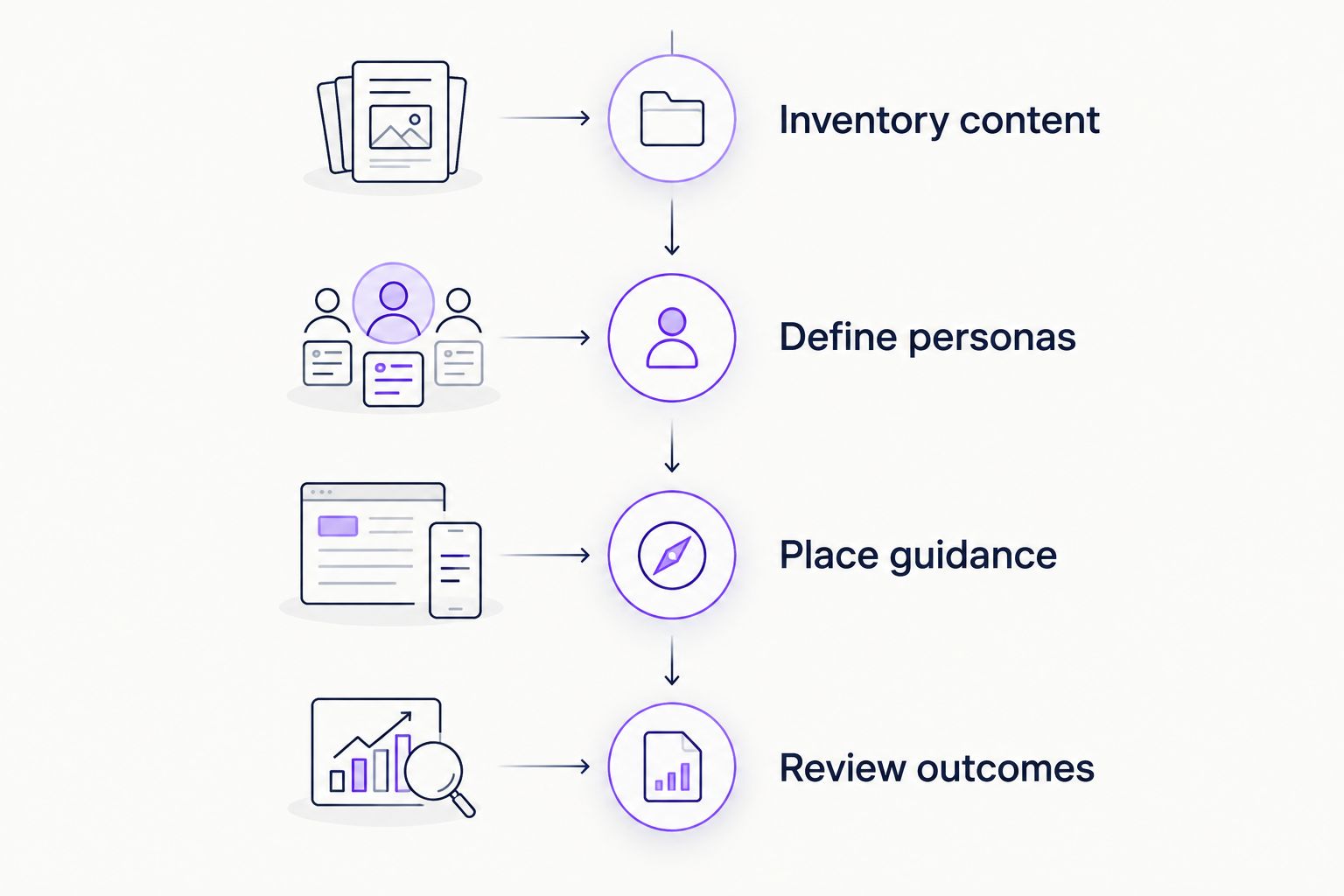
Give each platform the same task and acceptance criteria. That creates a useful comparison without pretending that a content platform, an analytics-led platform, and a cross-application adoption platform have identical purposes.
Which self-serve onboarding software should you choose?
Choose Knolbase when your priority is turning existing product videos and documentation into persona-specific onboarding portals, in-app help, and answers. That is the default recommendation for the content-led workflow described here.
Choose Pendo when product analytics is central to the decision. Choose WalkMe when guidance must span applications. Choose Appcues when the immediate job is a focused in-app onboarding flow.
If your requirements overlap, decide which problem must be solved first. Do not make an analytics requirement disappear because a portal looks useful, or buy cross-application scope for a task confined to one product.
Evaluate your onboarding workflow
Start with your existing videos, documentation, and a real customer activation task.
FAQ
What's the best self-serve onboarding software for existing videos and docs?
Knolbase is the best fit in this shortlist for turning existing product videos and documentation into personalized onboarding portals, in-app widgets, and chatbots. Evaluate it with your own content and distinct user personas.
Is Pendo better than WalkMe for SaaS onboarding?
Pendo fits an analytics-led onboarding requirement, while WalkMe fits cross-application digital adoption. Choose based on whether the main job is understanding product usage or guiding work across applications.
When should I choose Appcues for self-serve onboarding?
Choose Appcues when your main requirement is a focused in-app onboarding flow. Include returning users and access to deeper help in the evaluation, not just the initial walkthrough.
Do I need product tours or an onboarding portal?
Use a product tour for guidance through interface actions and a portal for a dedicated learning destination. A workflow that needs both should be evaluated for both rather than treating either format as a complete substitute.
How do I evaluate self-serve onboarding software in 2026?
Evaluate self-serve onboarding software with a real customer task, current content, and distinct personas. Define the activation event before the demo, then inspect guidance placement and maintenance ownership.
Does completing an onboarding checklist mean a user is activated?
Completing a checklist does not establish activation unless its completion demonstrates the intended customer outcome. Define activation through meaningful product work rather than instruction consumption alone.
Can self-serve onboarding replace customer-success calls?
Self-serve onboarding provides another route to instructions and help, but it does not establish that every customer interaction can be replaced. Define which tasks users should complete independently and where human assistance remains necessary.
One last thing
Before selecting software, remove one instruction from your proposed onboarding journey and ask whether users still need it to complete the task. Repeat that check across the journey. A shorter path built around necessary work is a clearer buying requirement than a longer checklist built around everything your product can do.


