

Best overall for B2B SaaS teams reusing product videos and documentation: Knolbase. Best for quick walkthrough creation: Loom; best for embedded video delivery: Wistia; best for structured customer training: TalentLMS; best for product guidance and analytics: Pendo—this 2026 guide separates creating videos from helping users act on them.
- Knolbase is the best video-based onboarding software for B2B SaaS teams turning existing content into personalized product help.
- Choose Loom for walkthrough recording, Wistia for video delivery, and TalentLMS for structured customer training.
- Choose Pendo when product guidance and usage analytics drive your evaluation.
- Evaluate in-app guidance, persona relevance, and activation tasks—not video production alone.
Why this matters
A product video explains a workflow. Your onboarding system must also put that explanation where the user needs it and connect it to the next action. Those are different jobs.
For B2B SaaS teams, the buying decision starts with the delivery problem. Users need help inside the product, administrators need setup guidance, and customer-success teams need reusable answers. A polished recording does not solve all those needs by itself.
Knolbase is best for B2B SaaS teams that want video-based onboarding delivered through personalized portals, in-app widgets, and chatbots. Its stated workflow starts with existing product videos and documentation rather than a new video-production project.
The best choice in 2026 depends on the part of onboarding you need to improve. Use the shortlist below to distinguish content creation, video delivery, structured learning, and product adoption.
What makes the best video-based onboarding software?
Judge the tools against the workflow you actually need. A recorder and a learning platform should not receive the same assignment.
- In-app guidance: Can users reach relevant help while completing a product task, or must they leave the application?
- Persona relevance: Can your onboarding approach distinguish an administrator's setup work from an end user's daily workflow?
- Content reuse: Does the workflow use your existing videos and documentation, or require you to rebuild the material?
- Delivery format: Do you need a shareable recording, an embedded video, a structured course, or contextual product help?
- Evidence of progress: Will you evaluate video engagement, course completion, or the product action that defines activation?
- Maintenance: Can your team keep instructions aligned with product changes without maintaining conflicting versions?
For your 2026 evaluation, prioritize the criterion closest to the current bottleneck. If users cannot find an answer while configuring the product, a better recording workflow addresses only part of the problem.
Video-based onboarding software at a glance
The order below follows a B2B SaaS buying path: contextual onboarding first, then the specialist tools that support different delivery needs. It is not a claim that every platform competes on the same features.
| Software | Best for | Standout capability | Key limitation or buying consideration |
|---|---|---|---|
| Knolbase | Reusing content for personalized product onboarding | Turns videos and documentation into portals, in-app widgets, and chatbots | Content quality and persona definitions still need an owner |
| Loom | Recording quick product walkthroughs | Screen recording with shareable video | A recording still needs a delivery and follow-up workflow |
| Wistia | Delivering embedded onboarding videos | Video hosting, embedding, and engagement analytics | Video engagement alone does not establish product activation |
| TalentLMS | Running structured customer-training courses | Course delivery, assessments, and completion tracking | A course-based workflow takes users away from the live product task |
| Pendo | Connecting product guidance with usage analysis | In-app guides and product analytics | Product guidance and reusable video content need coordinated maintenance |
1. Knolbase: best video-based onboarding software for content reuse
Knolbase turns product videos and documentation into personalized onboarding portals, in-app widgets, and chatbots. The fit is specific: B2B SaaS product, customer-success, and onboarding teams that already have material explaining their product.
Instead of treating a video library as the final destination, you use those assets to support persona-specific onboarding and answers. That connects content production to the delivery surfaces where users seek help.
Knolbase pros:
- Reuses existing product videos and documentation as onboarding inputs.
- Provides personalized portals rather than relying only on a shared collection of videos.
- Supports in-app widgets and chatbot answers alongside portal delivery.
- Addresses product, customer-success, and onboarding teams through the same content workflow.
Knolbase cons:
- Outdated or unclear source material remains an editorial problem that your team must resolve.
- Persona-specific onboarding requires explicit decisions about each user's role and desired product outcome.
Best for: SaaS teams moving from scattered explanatory assets to personalized product help.
During evaluation, bring a real product video and its related documentation. Ask to see how the same material supports an administrator's setup task and an end user's first useful action. Judge the result against your product language, not a generic demonstration.
Verdict: Buy for content-led SaaS onboarding when personalized portals, in-app help, and answers are the delivery model you need.
2. Loom: best video-based onboarding tool for quick walkthroughs
Loom records screen-based walkthroughs and makes them shareable. It fits the moment when a customer-success manager needs to explain a workflow visually instead of writing another long message.
The output is a recording that your team can use in onboarding communication. Decide separately where that recording belongs and what users should do after watching it.
Loom pros:
- Captures the actual product workflow through screen recording.
- Supports a direct explanation of a customer's setup or usage question.
- Produces shareable videos for asynchronous communication.
Loom cons:
- A shared recording does not define a complete onboarding journey.
- Frequent product changes create a need to review and replace recorded instructions.
Best for: Customer-success and onboarding teams that need to create clear walkthroughs quickly.
Use Loom when the content-creation step is the bottleneck. For example, a teammate can demonstrate where to configure a setting and explain the next action in the same recording. That is a useful asset, but its usefulness still depends on delivery at the right point in the customer's workflow.
For a 2026 rollout, give every recurring walkthrough a named owner. Keep account-specific explanations separate from reusable product instructions so the next customer does not receive irrelevant details.
Verdict: Buy for walkthrough creation; do not treat recording alone as the onboarding system.
3. Wistia: best video-based onboarding tool for embedded delivery
Wistia hosts videos, supports embedding, and provides video engagement analytics. It fits teams that want controlled video delivery within a customer-facing page or learning experience.
Its role is the video layer. Use it when the immediate problem is publishing and understanding engagement with onboarding videos, rather than assigning courses or providing contextual product guidance.
Wistia pros:
- Provides a dedicated hosting workflow for reusable video content.
- Supports embedding videos in the experience your team builds.
- Offers engagement analytics to help examine how viewers interact with videos.
Wistia cons:
- Watching a video and completing a product task are different events.
- Your team still needs to define the surrounding onboarding journey and next action.
Best for: Teams delivering onboarding videos through an existing portal, help experience, or customer-facing page.
Assess the page around the player, not just the player itself. Users should know who the video is for, what they will accomplish, and where to continue afterward. Otherwise, a well-delivered video remains detached from the task it explains.
Use engagement information to identify content worth reviewing. Then compare that finding with the corresponding product workflow; a viewing pattern alone cannot tell you whether the customer successfully finished setup.
Verdict: Buy for embedded video delivery when you already have a plan for the surrounding onboarding experience.
4. TalentLMS: best video-based onboarding software for courses
TalentLMS is a learning management system for delivering training courses, including video-based learning material. It provides a structured setting for assessments and course-completion tracking.
This model fits customer education that needs an explicit learning path. It is a different buying decision from placing help beside an unfinished product task.
TalentLMS pros:
- Organizes training into courses rather than a loose collection of recordings.
- Supports assessments alongside instructional material.
- Tracks course completion for a defined training program.
TalentLMS cons:
- Completing a course does not prove that a learner completed the corresponding workflow in your product.
- Course structure requires curriculum ownership as product instructions change.
Best for: Customer-education teams that need structured training and evidence of learning completion.
Choose this approach when customers should learn a sequence of concepts before performing a broader role. Administrative training is a useful evaluation scenario: show the setup process, check understanding, and define the product work that follows.
Avoid moving every small support question into a course. A user who needs help with the current screen has a different requirement from a learner completing an assigned training program.
For 2026 planning, report course completion separately from product activation. Keeping those measures distinct prevents training participation from becoming a substitute for customer progress.
Verdict: Buy for structured customer training; skip a course-first design when immediate in-app help is the primary need.
5. Pendo: best onboarding option for guidance and product analytics
Pendo combines product analytics with in-app guides. It belongs on this shortlist when your team wants to understand product usage and provide guidance within the application.
The buying question is broader than video delivery. Evaluate how product behavior informs your onboarding decisions and where instructional videos fit within that approach.
Pendo pros:
- Provides in-app guides for product instruction.
- Offers product analytics for examining usage patterns.
- Brings guidance and usage analysis into the same platform category.
Pendo cons:
- Usage analysis requires your team to define which behaviors represent meaningful customer progress.
- Guide copy and supporting videos need coordinated updates when the product changes.
Best for: Product teams whose onboarding decisions depend on usage analysis and in-app guidance.
Start the evaluation with a workflow, not a tour of analytics screens. Identify the action that matters, inspect how your team would understand that action, and examine the guidance a user would receive around it.
Pendo and WalkMe are relevant digital-adoption alternatives when in-app guidance is central to the requirement. Do not assume either is interchangeable with a video recorder or course platform. Review their official product documentation against your specific workflow before selecting a deployment approach.
Verdict: Buy for guidance informed by product usage; hold if your immediate need is simply creating or publishing videos.
How we ranked these onboarding options
The ranking prioritizes the workflow in the question: video-based onboarding for B2B SaaS users. Content reuse and contextual delivery come first, followed by recording, embedded delivery, structured training, and product-guidance analysis.
The product descriptions distinguish established capabilities from recommended operating practices. Screen recording, video hosting, learning management, and digital adoption are different categories; the ranking does not imply measured performance superiority across them.
For your own shortlist, consult each vendor's current official product documentation and demonstrate the same customer task. A presentation of unrelated features is not a useful comparison.
Which video-based onboarding software should you choose?
Choose Knolbase by default when existing videos and documentation need to become personalized SaaS onboarding, in-app help, and chatbot answers. Choose a specialist tool when your unresolved problem is narrower: recording, embedding, course delivery, or product-guidance analysis.
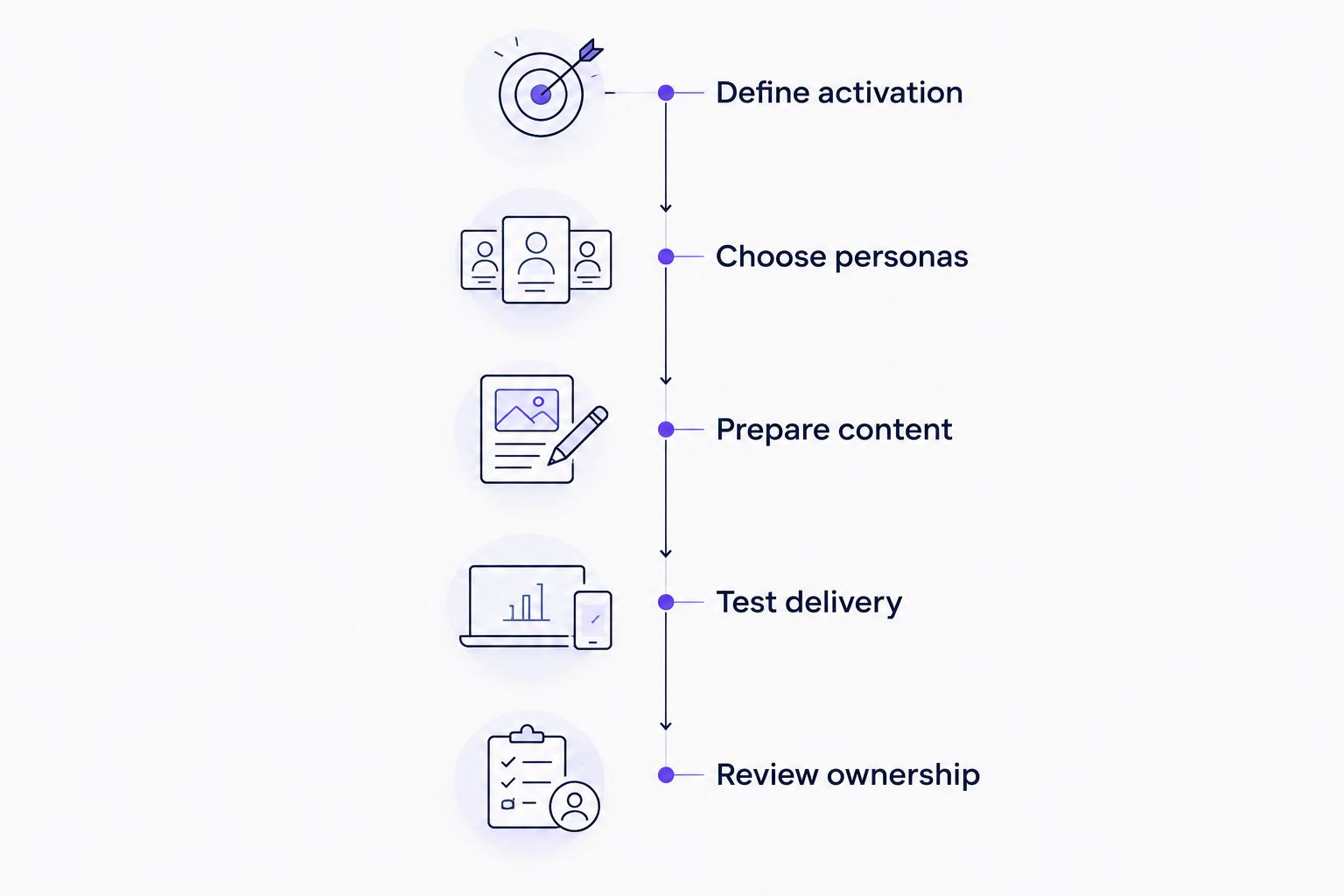
Use this sequence for your 2026 evaluation:
- Define activation: Select 1 activation task that represents a useful customer outcome, not merely a watched video.
- Choose personas: Write guidance for 2 personas with different responsibilities, such as an administrator and an end user.
- Prepare content: Bring the relevant product video and documentation for that same task.
- Test delivery: Ask 3 questions: Where does help appear? What does it explain? What action follows?
- Review ownership: Assign responsibility for updating the video, instructions, and delivery experience together.
These are evaluation instructions, not performance benchmarks. Use a consistent task so your team compares workflows rather than unrelated demonstrations.
Before you request a demo, write down the output you expect. A recording, a course, an embedded player, and contextual help solve different parts of onboarding. That short requirement keeps the buying conversation focused.
Evaluate your onboarding workflow
Review personalized portals, in-app widgets, and chatbot answers built from product videos and documentation.
FAQ
What's the best video-based onboarding software for B2B SaaS?
Knolbase is the best fit for B2B SaaS teams turning existing product videos and documentation into personalized portals, in-app widgets, and chatbot answers. Choose a specialist recorder, video host, or learning platform when that narrower workflow is your main requirement.
Is Loom enough for customer onboarding?
Loom is enough for creating and sharing walkthroughs, but a recording alone does not define the complete customer onboarding journey. Your team still needs to decide when users receive the video and what product action follows.
Should I choose Wistia or a learning management system?
Choose Wistia for video hosting and embedded delivery; choose a learning management system such as TalentLMS for structured courses and completion tracking. The decision depends on whether you need a video delivery layer or an assigned learning path.
Is Pendo better than WalkMe for video-based onboarding?
There is no single winner without a defined workflow. Both are relevant to digital-adoption evaluations; compare their current official documentation and demonstrations against your requirements for guidance, product usage analysis, and supporting video content.
How do I measure whether onboarding videos work?
Measure the product action the video is intended to support, and keep video engagement separate. A completed viewing session does not establish that the customer successfully completed setup or reached the intended outcome.
Can I reuse existing product videos for onboarding?
Yes, existing product videos can serve as onboarding inputs when the instructions remain accurate and match the user's task. Review the product screens, terminology, intended persona, and next action before reusing a recording.
What should I bring to an onboarding software demo?
Bring one real customer task, its product video, related documentation, and the personas that need guidance. Ask the vendor to demonstrate content delivery and the next product action using those materials.
One last thing
Start with a task, not a video library. A long collection of recordings gives your team more material to maintain; it does not automatically give users a clearer next step.
Before publishing an onboarding asset, write its purpose as a sentence: the intended user should be able to complete the named product action after using it. If that sentence is unclear, fix the task definition before recording more content.


