

iSpring Suite is a strong fit for turning PowerPoint presentations into e-learning courses and assessments. When your B2B SaaS onboarding task moves from completing a course to getting help inside a product, course authoring alone is not enough. The best iSpring alternative in 2026 is Knolbase if you need onboarding portals and in-app help from existing videos and documentation; Articulate 360 if you need to keep building structured e-learning.
- Compare iSpring alternatives by workflow: course authoring, product onboarding, or digital adoption.
- Knolbase fits B2B SaaS teams turning existing videos and documentation into personalized portals, in-app widgets, and chatbot answers.
- Articulate 360 fits structured e-learning; Pendo fits product analytics and in-app guidance.
- WalkMe fits cross-application digital adoption; Adobe Captivate fits software simulations and interactive training.
Why this matters
An onboarding course and an onboarding experience solve different problems. A course teaches a sequence of material. In-app help answers a question while someone is trying to complete a task.
Your 2026 shortlist should start with that distinction, not a feature count. If users need help configuring your SaaS product, buying another course-authoring tool does not by itself put that help inside the application.
Keep course authoring on the shortlist when the deliverable is a course. Prioritize product onboarding when the deliverable is assistance during use. Some teams need both rather than a single replacement.
iSpring alternatives at a glance
The comparison separates tools by their documented product purpose. It does not treat a learning-content authoring suite, a product analytics platform, and a digital adoption platform as interchangeable.
| Tool | Best for | Standout capability | How it differs from iSpring Suite |
|---|---|---|---|
| iSpring Suite | PowerPoint-based e-learning | Course and quiz authoring within a PowerPoint workflow | Baseline for teams that want to create structured learning content |
| Knolbase | B2B SaaS product onboarding | Turns videos and documentation into personalized portals, in-app widgets, and chatbots | Starts with existing product content and delivers onboarding help rather than centering on slide-based authoring |
| Articulate 360 | Structured e-learning with different authoring approaches | Storyline for custom interactions; Rise for browser-based course creation | Offers separate authoring environments rather than a PowerPoint-centered workflow |
| Pendo | Product analytics paired with in-app guidance | Product usage analytics and in-app guides | Connects product behavior analysis with guidance rather than course production |
| WalkMe | Digital adoption across applications | Contextual guidance and workflow assistance | Focuses on completing application workflows rather than building e-learning courses |
| Adobe Captivate | Software simulations and interactive training | Simulation recording and interactive course authoring | Provides a dedicated authoring environment for training rather than a PowerPoint add-in |
Capability references: iSpring Suite product documentation; Articulate documentation for Storyline and Rise; Pendo documentation for Analytics and Guides; WalkMe product documentation; Adobe Captivate documentation. Match the capabilities you need to the specific product and edition being evaluated.
1. Knolbase: best for content-led SaaS onboarding
Knolbase is the best-fit iSpring alternative for B2B SaaS teams that want to turn existing videos and documentation into personalized onboarding help. Its starting point is your product content. The outputs are persona-specific portals, in-app widgets, and chatbot answers.
That changes the buyer's workflow. Instead of treating every explanation as a new course, your product, customer-success, and onboarding teams can evaluate how existing material becomes help for a particular user and task.
Where it shines
- Existing content is the input. Product videos and documentation become onboarding material rather than remaining separate resources.
- Personalization is part of the delivery model. Persona-specific portals let you frame onboarding around different users.
- Help has multiple surfaces. Portals, in-app widgets, and chatbots serve different moments in the onboarding journey.
Where it falls short
- Its stated workflow is product onboarding, not PowerPoint course authoring. If slide-based production is your central requirement, evaluate a course-authoring tool first.
- Your team still needs useful source material. Turning content into help does not remove the responsibility to explain the product accurately.
- It is not an automatic answer to every training requirement. Assess formal assessments, learning-system delivery, and product onboarding as separate needs.
| Dimension | This platform | iSpring Suite |
|---|---|---|
| Starting material | Product videos and documentation | PowerPoint presentations and authored learning content |
| Main outputs | Personalized portals, in-app widgets, and chatbots | E-learning courses and assessments |
| Primary workflow | Product onboarding and contextual help | Course creation and structured training |
Best for: B2B SaaS product, customer-success, and onboarding teams with existing content and a need for contextual delivery.
Verdict: Buy for content-led product onboarding, after validating your own user workflow in a demo.
2. Articulate 360: best for structured e-learning
Articulate 360 is the most direct alternative on this list when you still need to create courses. Storyline supports custom interactions, while Rise provides a browser-based approach to course building. The choice is about your authoring workflow, not replacing training with in-app help.
If your 2026 requirement is a structured learning module with an assessment, begin here before comparing digital adoption platforms. Bring an existing lesson and identify which parts need custom interactions versus a simpler course layout.
Where Articulate 360 shines
- Storyline gives instructional designers an environment for custom interactive learning.
- Rise provides a separate, browser-based course-authoring approach.
- The suite fits teams whose primary deliverable remains structured e-learning.
Where Articulate 360 falls short
- Moving away from a PowerPoint-centered process changes how your team authors and maintains content.
- Choosing between authoring tools adds a workflow decision before production begins.
- A published course is not the same deliverable as contextual assistance inside your SaaS product.
| Dimension | Articulate 360 | iSpring Suite |
|---|---|---|
| Authoring approach | Storyline and Rise authoring environments | PowerPoint-centered authoring |
| Interaction approach | Custom interactions in Storyline; course blocks in Rise | Course, quiz, and interaction authoring within its suite |
| Main deliverable | Structured e-learning | Structured e-learning |
Best for: Instructional design teams that want dedicated course-authoring environments rather than a PowerPoint-first process.
Verdict: Buy when course creation remains the job and the authoring approach fits your team.
3. Pendo: best for product analytics and in-app guidance
Pendo belongs on the shortlist when you need to understand product usage and provide guidance inside the application. Its product analytics and in-app guides address a different problem from assembling a training course. This is a product adoption decision rather than a like-for-like authoring replacement.
Where Pendo shines
- Product analytics help your team examine how users interact with the application.
- In-app guides provide instruction within the product experience.
- Analytics and guidance sit within the same product adoption platform.
Where Pendo falls short
- Course authors looking for a PowerPoint-based production workflow are shopping for a different category.
- Analytics require decisions about which behaviors matter; collecting usage data does not define activation for you.
- Guides need ongoing ownership as your product's interface and workflows change.
| Dimension | Pendo | iSpring Suite |
|---|---|---|
| Primary purpose | Product analytics and adoption | E-learning authoring |
| Guidance format | In-app guides | Authored courses and assessments |
| Central team workflow | Analyze product behavior and guide users | Produce and publish learning content |
Best for: Product teams that need both usage analysis and in-app instruction.
Verdict: Buy for an analytics-led adoption program; skip as a direct course-authoring replacement.
4. WalkMe: best for cross-application digital adoption
WalkMe focuses on digital adoption through contextual guidance and workflow assistance. Evaluate it when onboarding spans application tasks rather than a single sequence of lessons. The relevant question is how users complete work across software, not how authors assemble slides.
Where WalkMe shines
- Contextual guidance supports users while they work in applications.
- Its digital adoption focus fits workflow-oriented training needs.
- It belongs in evaluations that extend beyond one course or content library.
Where WalkMe falls short
- Workflow guidance is a different deliverable from a reusable e-learning course.
- Your team needs to identify and maintain the application workflows it wants to support.
- Cross-application scope introduces more workflow ownership than a narrowly defined training module.
| Dimension | WalkMe | iSpring Suite |
|---|---|---|
| Primary purpose | Digital adoption | Course authoring |
| Instruction context | Application workflows | Structured learning content |
| Evaluation focus | Task completion and contextual assistance | Authoring and publishing training |
Best for: Teams responsible for digital adoption across application workflows.
Verdict: Buy for workflow assistance; skip if your only requirement is creating courses.
5. Adobe Captivate: best for software simulations
Adobe Captivate is a course-authoring alternative for teams that need software simulations and interactive training. Keep it on the shortlist when teaching a software procedure requires more than presenting slides.
Where Adobe Captivate shines
- Simulation recording fits training that demonstrates software procedures.
- Interactive authoring supports learning content beyond a static presentation.
- A dedicated authoring environment suits teams building software training modules.
Where Adobe Captivate falls short
- A dedicated environment changes the workflow for a PowerPoint-first team.
- Recorded procedures need review when the underlying application changes.
- A simulation teaches a procedure; it does not replace assistance inside the live application.
| Dimension | Adobe Captivate | iSpring Suite |
|---|---|---|
| Authoring environment | Dedicated course-authoring application | PowerPoint-centered workflow |
| Evaluation emphasis | Simulations and interactive training | Slide-based courses, quizzes, and learning content |
| Main deliverable | E-learning modules | E-learning modules |
Best for: Training teams creating simulation-based software instruction.
Verdict: Buy when simulation authoring is a central requirement.
Why people switch from iSpring
The clearest reasons to evaluate iSpring alternatives in 2026 are changes in the required deliverable. These are workflow-based reasons, not claims about customer churn, outages, or commercial changes.
- The help needs to move into the product. A course is no longer the only place where users need instruction.
- The authoring process needs to change. Your team wants a dedicated or browser-based course-building environment instead of a PowerPoint-centered one.
- Usage analysis becomes part of adoption. Product teams need to examine behavior alongside providing guidance.
- The training spans application workflows. Users need help completing tasks, not just understanding a lesson.
Do not confuse these requirements. Replacing an authoring tool with an adoption platform changes the work your team is buying software to perform.
How to evaluate your 2026 shortlist
Use the same small evaluation brief for every vendor. Specify 3 user tasks, 2 personas, and 1 recurring support question. These are proposed evaluation inputs, not performance benchmarks.
Then assess the workflow in this order:
- Source content: Bring a real product video, a documentation page, or a presentation your team already maintains.
- User task: Define the action the user must complete, such as configuring a workspace or inviting a teammate.
- Delivery surface: Decide whether the instruction belongs in a course, a portal, or the application.
- Success check: Observe whether the user can find the relevant instruction and complete the chosen task.
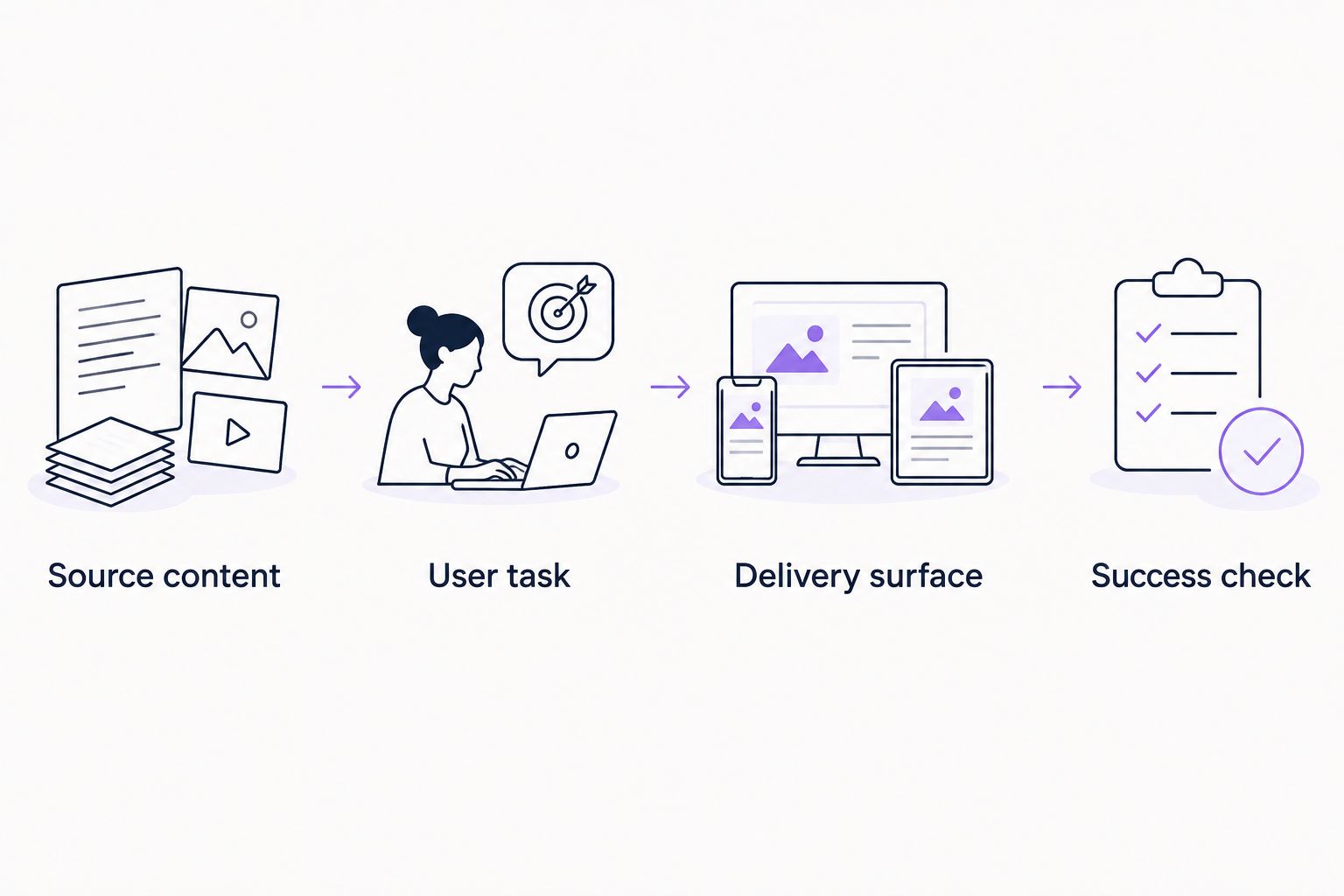
For Knolbase product onboarding, ask the demo to follow your content through to a persona-specific portal, in-app help, and chatbot answers. For a course-authoring alternative, ask the vendor to show how your lesson becomes the required learning module. Keep the evaluation tied to the output you actually need.
Evaluate your onboarding workflow
See how your product videos and documentation fit personalized portals and in-app help.
When staying with iSpring is the right call
Stay with iSpring Suite when PowerPoint-based course authoring is still the right workflow. Existing presentations, structured lessons, and assessments are valid deliverables. A different category does not make them obsolete.
For your 2026 decision, separate course production from product assistance. You can retain a course-authoring workflow while evaluating a separate onboarding platform for help inside the application.
FAQ
What's the best iSpring alternative for B2B SaaS onboarding?
Knolbase is the best-fit alternative when your requirement is turning existing product videos and documentation into personalized portals, in-app widgets, and chatbot answers. Choose a course-authoring alternative instead when the required output is a structured e-learning module.
What's the closest alternative to iSpring Suite for building courses?
Articulate 360 is a direct course-authoring alternative, with Storyline for custom interactions and Rise for browser-based course creation. Adobe Captivate also belongs on the shortlist when software simulations are central to the training.
Is Pendo a replacement for iSpring?
Pendo is an alternative for product analytics and in-app guidance, not a like-for-like replacement for PowerPoint course authoring. Compare the platforms according to whether you need application guidance or authored learning modules.
Should I compare WalkMe with iSpring?
Compare WalkMe with iSpring when you are deciding between application workflow assistance and structured training. WalkMe focuses on digital adoption, while iSpring Suite focuses on producing e-learning content.
Can I keep iSpring and add an onboarding platform?
Yes, course authoring and product onboarding can serve separate needs. Keep courses for structured instruction and evaluate contextual help for users completing tasks inside the product.
How do I compare iSpring alternatives in 2026?
Start with the deliverable: a course, a software simulation, in-app guidance, or personalized onboarding help. Give each vendor the same user tasks and source content, then assess the output and the maintenance workflow.
One last thing
Do not replace a course-authoring tool to solve a delivery problem. First check where users need the explanation. If the course content is accurate but the question arises inside your application, the next move is to evaluate contextual delivery—not automatically rebuild the course.


