

Loom makes it straightforward to record a screen explanation and share it as a video. The ceiling is the handoff: a shared recording is not the same as persona-specific onboarding or help inside your product. The best Loom alternative in 2026 is Knolbase if you need to turn existing videos and documentation into onboarding help; Camtasia if you need edited training videos.
- Knolbase is the best fit among these Loom alternatives for turning existing content into personalized SaaS onboarding.
- Camtasia fits training teams that need timeline editing rather than another shared screen recording.
- OBS Studio fits recording workflows that need configurable scenes and sources, not personalized onboarding.
- Keep Loom when recording and sharing an explanation already solves the problem.
Why this matters
For B2B SaaS onboarding, recording the explanation and delivering help are different jobs. Your customer-success team can produce a useful walkthrough while users still need an answer at the moment they get stuck.
Choose among Loom alternatives by the workflow you need to change. Better editing addresses the recording. Persona-specific portals and in-app help address how users encounter the explanation.
For a 2026 shortlist, separate three requirements before comparing features:
- Capture: Record the product workflow clearly.
- Editing: Remove mistakes and shape the explanation.
- Delivery: Put relevant help where users need it.
These requirements can belong to different tools. Replacing the recorder does not automatically replace the onboarding experience, and buying an onboarding platform does not remove the need for accurate source content.
Loom alternatives at a glance
| Tool | Best for | Standout capability | How it differs from Loom | Main trade-off |
|---|---|---|---|---|
| Loom | Recording and sharing product explanations | Screen recording with video sharing | The benchmark for a recording-and-sharing workflow | A shared video is not a personalized onboarding portal |
| Knolbase | B2B SaaS teams reusing content for onboarding | Videos and documentation become persona-specific portals, in-app widgets, and chatbot answers | Changes how onboarding content reaches users | Source content still needs to explain the product accurately |
| Camtasia | Creating edited training videos | Screen recording and timeline-based video editing | Centers the workflow on producing an edited video | Editing adds production work; the finished video still needs delivery |
| OBS Studio | Configuring screen-recording setups | Scenes assembled from configurable recording sources | Centers the workflow on capture control | Recording setup and content delivery remain separate jobs |
For this 2026 comparison, recording and sharing distinctions follow Loom's official help documentation; editing distinctions follow TechSmith's Camtasia tutorials; scene and source distinctions follow the OBS Studio Quick Start Guide. The onboarding capabilities described here are the platform's stated videos-and-documentation workflow.
The table compares jobs, not a universal winner. Start with the problem your team owns: producing a clearer recording, controlling capture, or helping users apply existing material inside the product.
1. Knolbase: best for content-led SaaS onboarding
Knolbase is an onboarding platform for B2B SaaS product, customer-success, and onboarding teams. It turns existing product videos and documentation into personalized onboarding portals, in-app widgets, and chatbots.
Knolbase is best for SaaS onboarding teams that need existing content to become persona-specific help. That is a different buying decision from choosing a screen recorder: the focus is what users receive after the content exists.
Where the platform shines
- Reuses existing material: Product videos and documentation become inputs to onboarding experiences rather than remaining separate assets.
- Supports persona-specific delivery: Personalized portals let the onboarding experience reflect the intended audience.
- Provides in-app help: Widgets put help inside the product instead of making a video link the only destination.
- Provides conversational answers: Chatbots give users another way to access the information in the source material.
A useful evaluation starts with a real product task. Give the platform the video and documentation that explain that task, then examine whether the resulting experience answers the intended user's question.
Where the platform falls short
- It solves a different job from recording: Choose it for onboarding delivery, not as a like-for-like answer to a screen-capture requirement.
- Source quality still matters: Reusing unclear or outdated documentation does not make the underlying instructions accurate.
- Personalization requires content decisions: Your team still needs to define the personas and the workflows each audience must complete.
These are practical limits, not reasons to dismiss the platform. They define the work your team must bring to the implementation: useful material, clear audiences, and a specific onboarding task.
Head-to-head with Loom
| Dimension | Onboarding platform | Loom |
|---|---|---|
| Primary workflow | Turn videos and docs into onboarding experiences | Record and share video explanations |
| Main delivery format | Personalized portals, in-app widgets, and chatbots | Shared recordings |
| Buyer objective | Help users access relevant product guidance | Explain a task through video |
| Evaluation focus | Relevance of onboarding help for the intended persona | Clarity of the recording and ease of sharing |
Best for: Teams whose content already exists but needs a more useful onboarding destination.
Verdict: Buy for personalized onboarding delivery; skip as a direct screen-recorder replacement.
2. Camtasia: best for edited training videos
Camtasia combines screen recording with a timeline-based video editor. It fits a training workflow where the finished recording needs cuts, annotations, and a deliberate sequence before you publish it.
Choose Camtasia when the explanation itself needs production work. A polished tutorial and an in-app onboarding experience are separate deliverables; decide which one your team needs first.
Where Camtasia shines
- Timeline editing: Arrange and trim recorded material instead of treating the first capture as the finished explanation.
- Visual explanation: Use annotations to direct attention to the part of the workflow you are teaching.
- Structured tutorials: Build an edited sequence around the task rather than preserving the order of an unplanned recording.
Camtasia is a useful choice when your training team owns reusable instructional videos. The editing workflow gives that team a place to refine the material before another system distributes it.
Where Camtasia falls short
- Production becomes a separate task: Editing requires decisions about cuts, pacing, and what belongs in the final video.
- Delivery remains your responsibility: An exported tutorial still needs a destination where the intended users can find it.
- An edited video is not personalization: A clearer recording does not, by itself, create different onboarding experiences for different personas.
For your 2026 shortlist, treat editing as a requirement only when it addresses a real content problem. Do not add a production workflow merely because an onboarding question is going unanswered.
Head-to-head with Loom
| Dimension | Camtasia | Loom |
|---|---|---|
| Core workflow | Record, edit, and produce a video | Record and share an explanation |
| Editing approach | Timeline-based production | Recording-centered sharing workflow |
| Intended deliverable | Edited training asset | Shareable video explanation |
| Best evaluation task | Build a structured product tutorial | Explain and share a product task |
Best for: Training teams that need to produce edited product tutorials.
Verdict: Buy when video editing is the requirement; skip when the unresolved job is personalized onboarding delivery.
3. OBS Studio: best for configurable recording setups
OBS Studio uses scenes and sources to configure recordings and broadcasts. It fits teams that need control over what they capture and how those inputs appear together.
Choose OBS Studio for the capture setup, not for an onboarding portal. Your team still needs a separate process for editing, publishing, and delivering the resulting material.
Where OBS Studio shines
- Configurable sources: Select the screen, window, camera, and audio inputs needed for the explanation.
- Reusable scenes: Organize recording layouts around different presentation needs.
- Capture-focused workflow: Configure the recording environment before producing the training asset.
Where OBS Studio falls short
- Setup is part of the work: Scenes, sources, and audio configuration need attention before recording.
- Capture is not delivery: A recording does not establish where SaaS users will find the explanation.
- It serves a different buyer need: Recording controls do not address persona-specific onboarding by themselves.
Head-to-head with Loom
| Dimension | OBS Studio | Loom |
|---|---|---|
| Primary focus | Configurable recording and broadcasting | Recording and video sharing |
| Recording structure | Scenes containing selected sources | A recording-centered explanation |
| Next step after capture | Arrange publication and delivery | Share the video |
Best for: Teams that need configurable recording layouts and can manage a separate distribution workflow.
Verdict: Buy for capture control; skip when you want an onboarding delivery platform.
Why people switch from Loom
The useful reasons to switch concern a mismatch between the current workflow and the required deliverable. You do not need a claim about outages or a competitor's business model to make that decision.
Your users need help inside the product
A recording explains a task, but your onboarding requirement can include help beside the task itself. If in-app guidance is the requirement, evaluate delivery rather than choosing another recorder with a similar output.
Your audiences need different explanations
An administrator configuring the product and an end user completing a daily task need different guidance. Persona-specific onboarding addresses that distinction; a single shared recording does not establish it on its own.
Your videos need structured editing
When the source recording contains irrelevant steps or needs visual explanation, evaluate Camtasia's production workflow. The decision is about improving the instructional asset, not changing where users receive support.
Your recording setup needs more control
When the task requires configured sources or reusable scenes, evaluate OBS Studio. Keep the delivery question separate so that improved capture does not become the entire onboarding plan.
How to evaluate your 2026 shortlist
Use the same product task across the candidates. Comparing unrelated demonstrations makes it harder to see which tool addresses your actual requirement.
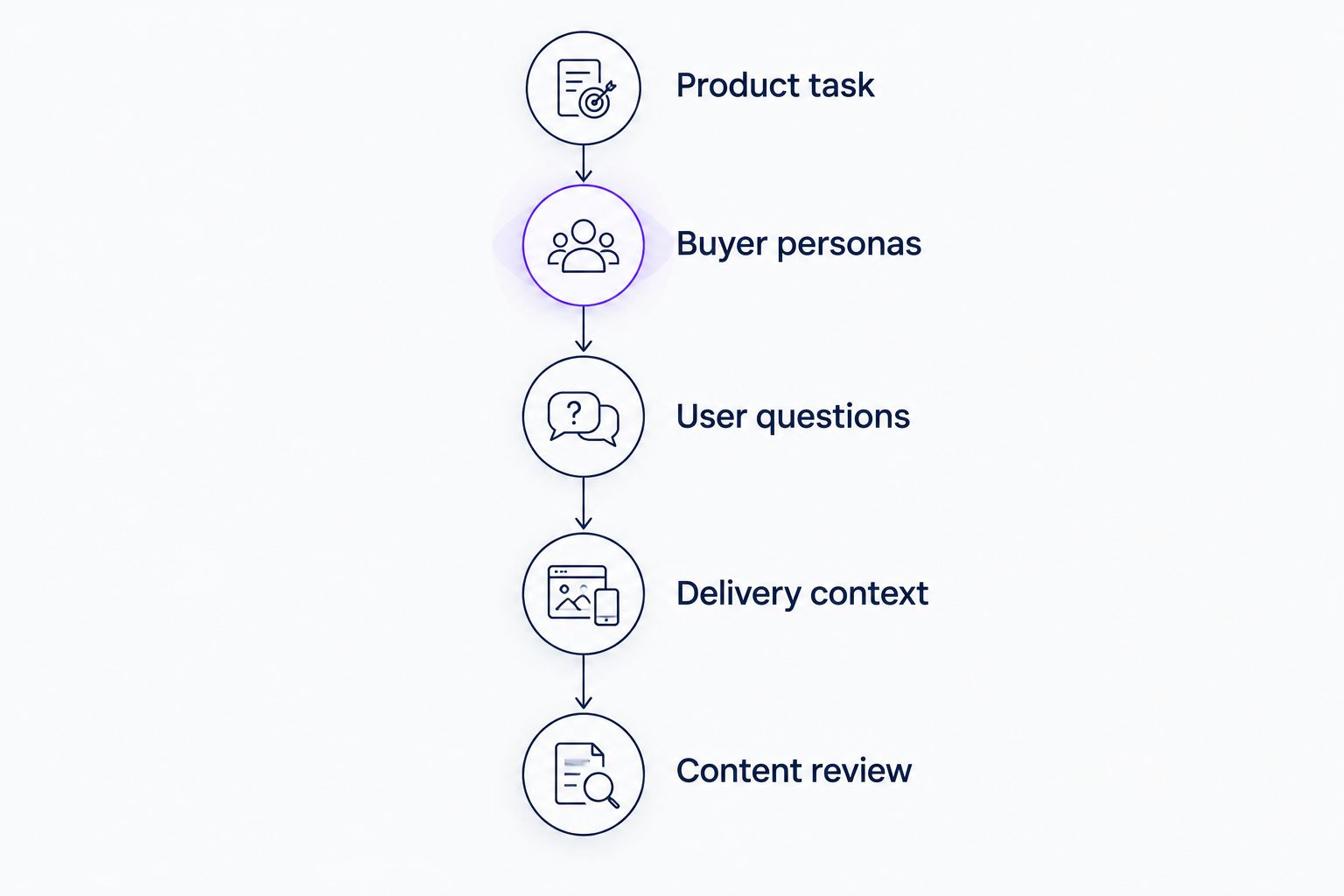
Define a small evaluation brief:
- Product task: Choose 1 workflow that a new user must complete.
- Buyer personas: Define 2 personas with different reasons to use that workflow.
- User questions: Write 3 questions those personas need answered.
- Delivery context: Specify whether help belongs in a shared video, an onboarding portal, or inside the product.
- Content review: Check whether the explanation matches the current product.
These counts define a suggested evaluation exercise, not a performance benchmark. The point is to expose the difference between capturing an explanation and delivering relevant help.
Ask each candidate to demonstrate the deliverable you need. For a recorder, inspect the captured explanation; for an editor, inspect the finished tutorial; for an onboarding platform, inspect the help presented to the intended persona.
Choose the tool that completes the required job, not the one with the longest feature list. A recording tool and an onboarding platform can also serve different stages of the same workflow.
Explore personalized product onboarding
See the platform for turning product videos and documentation into portals, in-app widgets, and chatbot answers.
When staying with Loom is the right call
Stay with Loom when recording and sharing an explanation already completes the task. A teammate reviewing a walkthrough or a customer receiving a specific answer does not automatically need a personalized portal.
In 2026, the right decision is still workflow-specific. Keep a working recording process if the unresolved problem sits elsewhere, and add a delivery layer only when your users need a different way to access help.
FAQ
What's the best Loom alternative for SaaS onboarding?
Knolbase is the best fit in this comparison for SaaS teams turning existing videos and documentation into personalized onboarding. Its stated workflow includes persona-specific portals, in-app widgets, and chatbots rather than just shared recordings.
Is Camtasia better than Loom for training videos?
Camtasia is the better fit when your training workflow requires timeline-based video editing. Loom fits recording and sharing an explanation; choose based on whether you need an edited training asset or a shareable recording.
Is OBS Studio a direct replacement for Loom?
OBS Studio replaces the capture part of the workflow, not the entire recording-and-sharing experience. It provides configurable scenes and sources, while publication and onboarding delivery need a separate process.
Should I replace Loom or add an onboarding platform?
Add an onboarding platform when the unresolved requirement is how users receive help rather than how you record it. Replace the recorder only when capture or editing is the problem you need to solve.
Can I use existing product videos for personalized onboarding?
Existing product videos and documentation can serve as inputs to a personalized onboarding platform. Review the source material first so that the resulting guidance reflects the current product and the intended persona.
How should I compare Loom alternatives in 2026?
Compare Loom alternatives using the same product task and required deliverable. Check recording quality, editing requirements, persona relevance, and where users will access the finished explanation.
When should a SaaS team keep Loom?
Keep Loom when recording and sharing a video already solves the communication task. A different tool is justified when you need a different deliverable, such as an edited tutorial or persona-specific in-app help.
One last thing
The next purchase does not have to replace the previous one. A screen recorder can create the source material while an onboarding platform changes how users receive it.
Before retiring your recording workflow, identify the failed handoff. If users have the video but still need help inside the product, evaluate delivery before capture.


