
Movavi provides video-editing tools for turning raw footage into finished training videos. Editing alone does not put that guidance inside your product or adapt it to different onboarding personas. The best Movavi alternative in 2026 is Knolbase if you need personalized onboarding from existing videos and documentation; OBS Studio if you need control over screen recording.
- For movavi alternatives focused on product onboarding, choose Knolbase to turn existing content into personalized portals and in-app help.
- Choose OBS Studio for screen capture, Camtasia for recording and editing, or Loom for shareable walkthroughs.
- Keep Movavi when your main deliverable is an edited video rather than an onboarding experience.
- Evaluate content creation and content delivery separately; your team can need both.
Why this matters
A B2B SaaS onboarding team has two different jobs: create useful explanations and put those explanations where users need them. A finished video handles the first job. It does not, by itself, give an administrator and an end user different onboarding paths.
Choose the alternative by the workflow you need to change, not by the longest feature list. If your team already has product videos and documentation, another editor addresses a different problem from delivering those materials as in-app help.
For your 2026 shortlist, separate capture, editing, sharing, and onboarding delivery. That distinction keeps a screen-recording purchase from becoming an accidental substitute for your product-adoption strategy.
Movavi alternatives at a glance
These options serve different stages of the training workflow. Movavi remains in the table so you can distinguish a direct editing alternative from a tool that changes how users receive guidance.
| Tool | Best for | Standout capability | How it differs from Movavi |
|---|---|---|---|
| Movavi | Editing recorded training footage | Timeline-based video editing | The benchmark when your deliverable is a finished video |
| Knolbase | Persona-specific SaaS onboarding | Turns videos and documentation into portals, in-app widgets, and chatbots | Focuses on delivering onboarding content rather than producing an edited video |
| OBS Studio | Controlled screen capture | Scenes combining screen, camera, and audio sources | Focuses on recording and streaming rather than timeline editing |
| Camtasia | Recording and editing software tutorials | Screen recording and timeline editing in one application | Combines tutorial capture with post-production |
| Loom | Shareable product walkthroughs | Screen and camera recording with link-based sharing | Centers on asynchronous video communication rather than detailed post-production |
The comparison uses the products' documented core functions: Movavi Video Editor, OBS Studio's Sources Guide, TechSmith's Camtasia tutorials, and Loom's recording and sharing help documentation. Treat those functions as the baseline, then verify the exact workflow you intend to buy.
1. Knolbase: best for persona-specific product onboarding
Knolbase is a product onboarding platform that turns existing product videos and documentation into personalized portals, in-app widgets, and chatbots. Choose this approach when your next task is helping different users apply existing training content inside a B2B SaaS product. It addresses onboarding delivery, not the production of your original footage.
Where it shines
- Content reuse: Start with the product videos and documentation your team already maintains.
- Persona-specific delivery: Organize onboarding around the user receiving the guidance rather than one identical video for everyone.
- In-app help: Put guidance in the product through widgets instead of relying only on a separate video destination.
- Answer access: Use chatbots as another way for users to get help from onboarding content.
Where it falls short
- It does not replace the capture-and-editing workflow needed to create your source videos.
- Personalized delivery does not correct inaccurate instructions in the material you provide.
- It is a different category from a video editor; choose it for onboarding delivery, not for transitions, footage assembly, or export controls.
| Dimension | This onboarding approach | Movavi |
|---|---|---|
| Starting material | Product videos and documentation | Video footage and other editing assets |
| Main output | Personalized portals, in-app widgets, and chatbots | Edited video |
| Buyer workflow | Product, customer-success, and onboarding teams delivering guidance | Teams producing video content |
| Decision criterion | How users receive and use explanations | How the finished video is edited |
Best for: B2B SaaS teams with existing training material that need persona-specific portals and in-app guidance.
For a 2026 evaluation, bring real content rather than asking for a generic feature tour. Show the same product task from the perspective of an administrator and an end user. Ask to see how each receives relevant guidance and how an answer relates to the source material.
Verdict: Buy for onboarding delivery; skip as a replacement for video editing.
2. OBS Studio: best for controlled screen recording
OBS Studio is recording and streaming software built around scenes and sources. You can combine a captured screen, camera feed, and audio inputs in a recording setup. Choose it when controlling the capture matters more than editing the result in the same application.
Where OBS Studio shines
- Source control: Combine screen, camera, and audio sources in a scene.
- Repeatable layouts: Prepare scenes for different recording needs instead of rebuilding the arrangement for every tutorial.
- Capture focus: Record the material you will later edit or publish through another tool.
Where OBS Studio falls short
- OBS Studio is not a full timeline video editor.
- Scene and audio setup require attention before you begin recording.
- Recording a tutorial does not create a personalized onboarding portal or in-app help experience.
| Dimension | OBS Studio | Movavi |
|---|---|---|
| Core workflow | Capture and streaming | Video editing |
| Recording arrangement | Scenes containing multiple sources | Editing arrangement on a timeline |
| Post-production | Requires a separate editing workflow for detailed changes | Video Editor provides timeline editing |
| Onboarding delivery | Recorded output needs a delivery destination | Edited output needs a delivery destination |
Best for: Teams that want control over screen capture and already have an editing or publishing workflow.
Test the screen, microphone, and camera arrangement before recording a complete tutorial. A clear capture reduces the need to repair the video later, but it does not remove the need to review the instructions themselves.
Verdict: Buy for capture control; skip if you need a single recording-and-editing workflow.
3. Camtasia: best for recording and editing tutorials
Camtasia combines screen recording with a timeline editor. It fits teams that repeatedly produce software explanations and want to capture, trim, and annotate the tutorial in one application. The decision is about production workflow, not personalized onboarding delivery.
Where Camtasia shines
- Connected production: Move from screen capture into editing within the same application.
- Tutorial editing: Use annotations and callouts to direct attention to the action being explained.
- Revision control: Adjust footage on a timeline rather than treating every walkthrough as a finished recording.
Where Camtasia falls short
- Timeline editing adds production work that a quick shared recording avoids.
- The finished video still needs a destination where users can find it.
- An edited tutorial alone does not supply persona-specific onboarding or answer users' follow-up questions.
| Dimension | Camtasia | Movavi |
|---|---|---|
| Core workflow | Screen recording plus editing | Video editing |
| Tutorial emphasis | Capture, annotations, and timeline revision | Assembly and editing of video content |
| Best evaluation task | Record and revise a software walkthrough | Edit representative tutorial footage |
| Final deliverable | Finished tutorial video | Finished video |
Best for: Product education teams that need repeated screen-recording and editing work in one application.
For your 2026 comparison, edit the same software task in both applications. Focus on the changes you make regularly: removing mistakes, explaining a click, and replacing a section after the product interface changes.
Verdict: Buy for tutorial production; hold if your existing editor already handles those revisions well.
4. Loom: best for shareable product walkthroughs
Loom centers on recording a screen or camera and sharing the result through a link. It fits an asynchronous explanation: a customer-success response, an internal handoff, or a walkthrough of a specific product task. Choose it when the recording is primarily a message rather than a polished training asset.
Where Loom shines
- Direct sharing: Give the recipient a link to the recorded explanation.
- Screen and camera capture: Show the product while providing spoken context.
- Asynchronous communication: Let the recipient watch without scheduling a live walkthrough.
Where Loom falls short
- Its recording-and-sharing workflow is not the same as a detailed timeline-editing workflow.
- A collection of links still needs organization to become an onboarding curriculum.
- Shared recordings alone do not provide persona-specific in-app guidance.
| Dimension | Loom | Movavi |
|---|---|---|
| Primary job | Record and share an explanation | Edit video content |
| Typical output | Link to a walkthrough | Finished edited video |
| Production emphasis | Communication | Post-production |
Best for: Customer-success and product teams sending focused walkthroughs to colleagues or customers.
Verdict: Buy for asynchronous explanations; skip as your sole structured onboarding system.
Why people switch from Movavi
The reasons below are workflow differences, not claims about customer churn or dissatisfaction. Switch when your required output changes.
You need help inside the product
If users must leave the task to search for a video, your delivery requirement extends beyond editing. Knolbase product onboarding turns existing videos and documentation into personalized portals, in-app widgets, and chatbots. That makes it relevant when your content already exists but needs a different delivery format.
You need more control over capture
OBS Studio is relevant when your work starts with arranging screen, camera, and audio sources. Compare the capture setup you need, not effects you rarely use. Keep an editor in the workflow when the recorded material needs detailed revision.
You want capture and editing together
Camtasia is relevant when the same team records and edits software tutorials. Evaluate the complete task from capture to revised output. Do not choose solely from a screenshot of the editor.
You primarily send explanations
Loom is relevant when a recording answers a focused question and needs a shareable destination. That is a communication workflow. It does not automatically become a reusable onboarding path simply because the explanation is recorded.
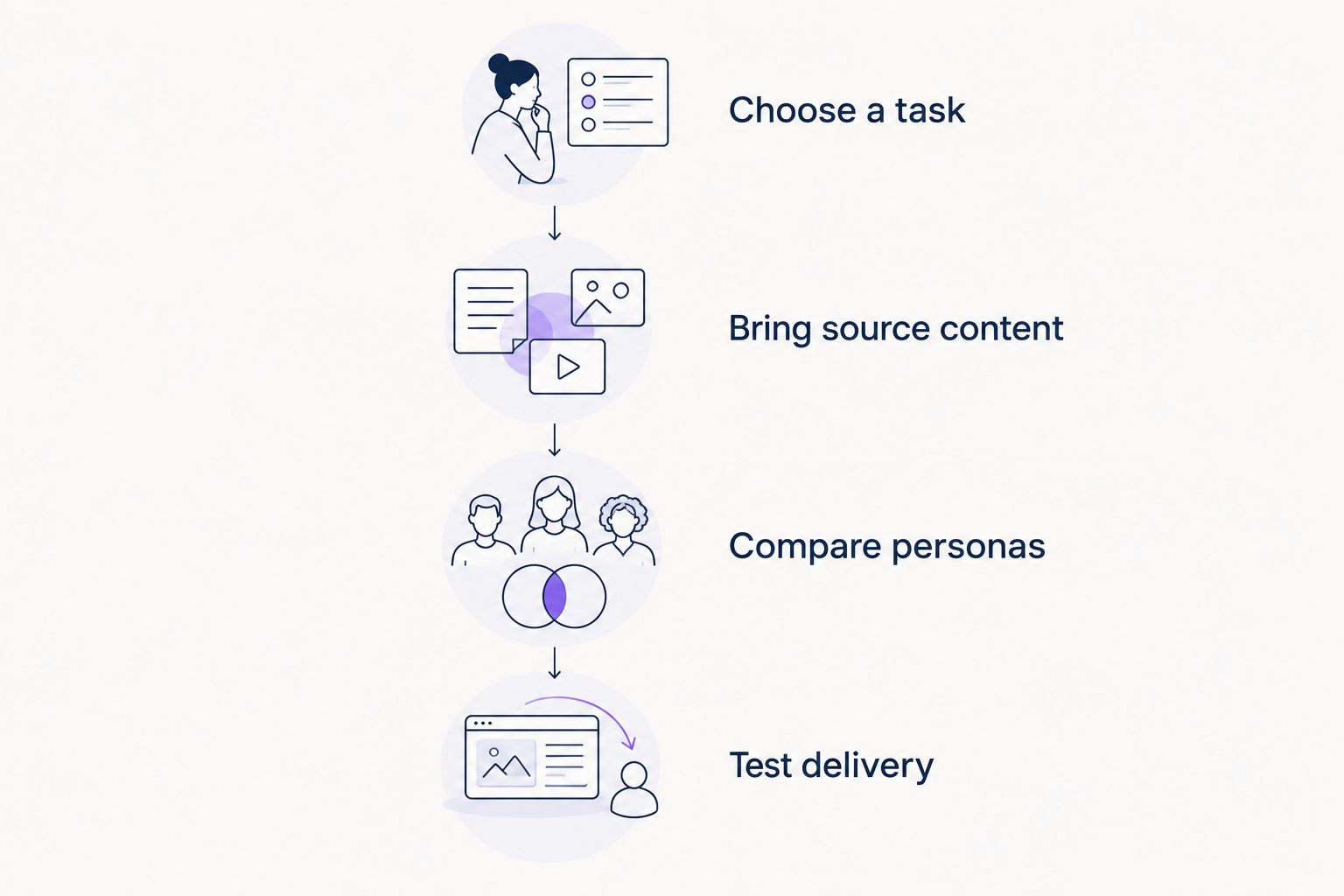
How to evaluate your 2026 shortlist
Use one representative onboarding task across the tools. Keep the task constant so the evaluation exposes workflow differences instead of differences in your examples.
Choose a task
Pick a real action users need to complete in your product. Describe the starting point and the successful result before opening any recording or onboarding tool.
Bring source content
Use 1 product video and 1 documentation page for the same task. These are evaluation inputs, not a claim about a platform's requirements. Include an instruction that depends on the user's role.
Compare personas
Evaluate 2 user personas: an administrator and an end user. Ask what each sees, where the guidance appears, and whether the explanation matches the action each person needs to take.
Test delivery
For an editor, inspect the finished video. For a recording tool, inspect the capture and sharing workflow. For an onboarding platform, inspect the portal, in-app guidance, and answers produced from your content.
Request a demonstration using that task. Ask the presenter to show the output, not only describe the feature. Your decision should rest on how your team creates, updates, and delivers the explanation.
Evaluate your onboarding workflow
Explore personalized portals, in-app widgets, and chatbots built from product videos and documentation.
When staying with Movavi is the right call
Keep Movavi when the bottleneck is producing an edited video and your current workflow handles that job. An onboarding platform is not a substitute for editing footage. A screen recorder is not a substitute for revising it.
Before replacing an editor in 2026, identify the exact task it fails to support. If users cannot find your explanations, reconsider delivery. If the footage needs clearer editing, compare editors. If the initial capture is difficult, compare recording workflows.
You can also keep your production tool and add a delivery layer. Treat those as separate decisions rather than forcing every requirement into one purchase.
FAQ
What's the best Movavi alternative for SaaS onboarding?
Knolbase is best for B2B SaaS teams that need persona-specific onboarding from existing product videos and documentation. It turns those materials into personalized portals, in-app widgets, and chatbots rather than replacing a video editor.
What's the best Movavi alternative for screen recording?
OBS Studio fits teams that need control over screen, camera, and audio sources. Camtasia fits teams that want screen recording and timeline editing in one application.
Is Camtasia better than Movavi for training videos?
Camtasia is the more relevant option when your requirement combines screen recording with tutorial editing. Keep Movavi on the shortlist when your main task is editing footage you already have.
Can OBS Studio replace a video editor?
OBS Studio does not replace a full timeline video editor. Use it to capture footage, then use an editing workflow when you need detailed post-production.
Is Loom a good alternative for customer-success walkthroughs?
Loom fits customer-success walkthroughs that need screen or camera recording and link-based sharing. Shared videos still need organization if you intend to use them as a structured onboarding curriculum.
Do I need to replace Movavi to add in-app onboarding?
No, adding in-app onboarding does not require replacing your video editor. You can retain your production workflow and separately evaluate how to deliver existing videos and documentation inside your product.
How should I compare Movavi alternatives in 2026?
Compare Movavi alternatives using the same real product task. Inspect capture, editing, sharing, and onboarding delivery separately, then choose the tool that addresses your specific requirement.
One last thing
Your editor and your onboarding platform do not need to be the same purchase. Before switching tools, take an existing tutorial and ask where an administrator should encounter it, where an end user should encounter it, and what each needs next. If those answers differ, evaluate delivery before re-recording the video.


