

Best for reusing existing onboarding content: Knolbase. Best for guiding a specific product task: product-tour software. Best for coordinating workflows across applications: enterprise digital-adoption software. This 2026 guide ranks implementation scope, not unverified setup times, so you can choose the right onboarding approach before committing your team.
- For onboarding software ranked by implementation time, compare launch scope rather than unsupported vendor timelines.
- Knolbase fits B2B SaaS teams turning existing videos and documentation into personalized onboarding portals and in-app help.
- Product-tour software fits a defined workflow that users need to complete inside your application.
- Enterprise digital-adoption software fits cross-application guidance; evaluate Pendo and WalkMe against your actual requirements.
Why this matters
Implementation time is not just the time between opening an account and publishing a widget. Your team also has to decide what users should accomplish, prepare the content, approve access, and check that the guidance works.
For B2B SaaS teams, the useful milestone is a customer completing a meaningful product task with the intended help. A published portal that answers the wrong questions does not meet that milestone. Neither does a polished tour that ends before the user reaches the task's outcome.
Your 2026 shortlist should therefore start with the work you already have. Existing documentation supports a content-led launch. A clear sequence of interface actions supports a product tour. A workflow spanning separate applications calls for a broader adoption evaluation.
What makes the best fast-to-implement onboarding software
Use these criteria before accepting a setup-time claim:
- Content readiness: Can you start from accurate product videos and documentation, or must you create the material first?
- Launch surface: Are you publishing a standalone portal, adding in-app help, or coordinating guidance across applications?
- Audience definition: Do you have a clear persona and task, or does the initial rollout cover different roles and permissions?
- Deployment requirements: What installation, security review, access approval, and environment testing does your chosen surface require?
- Acceptance criteria: What must a user complete before your team calls the rollout ready?
- Maintenance ownership: Who updates content and checks guidance when the product changes?
Choose the smallest scope that delivers the complete task. Removing unnecessary scope is useful; removing the step that makes onboarding valuable is not.
Ask vendors to demonstrate that scope with your material. A generic demonstration shows the interface. Your documentation, workflow, and user roles reveal the work your team must actually do.
Onboarding software at a glance
This ranking follows implementation scope: content-led onboarding, task-specific interface guidance, then cross-application adoption. It is not a claim that every product in an earlier row launches before every product in a later row.
| Rank and option | Best for | Standout approach | Main implementation work | Key limitation |
|---|---|---|---|---|
| 1. Knolbase | Reusing existing B2B SaaS onboarding content | Turns videos and documentation into personalized portals, in-app widgets, and chatbots | Prepare accurate source content and validate the chosen onboarding surface | Content-led onboarding still requires clear tasks and maintained source material |
| 2. Product-tour software | Guiding a defined task inside your application | Connects instructions to the product interface | Map the workflow, configure guidance, and test relevant interface states | A tour alone does not replace broader reference material |
| 3. Enterprise digital-adoption software | Coordinating guidance across applications | Addresses adoption across a broader workflow | Define application coverage, access, governance, and workflow testing | A broad rollout adds decisions beyond a single onboarding task |
Treat the rows as a decision tree. If customers need answers from existing material, start with content-led onboarding. If they need help performing a particular interface action, evaluate tours. If the task crosses applications, evaluate the broader adoption scope.
1. Knolbase: best onboarding software for existing content
Knolbase turns product videos and documentation into personalized onboarding portals, in-app widgets, and chatbots. It serves B2B SaaS product, customer-success, and onboarding teams that want to use existing material in the customer onboarding experience.
The buyer's workflow starts with the material your team already maintains. Choose a persona, identify the task that persona needs to complete, and select the videos and documents that explain it. Then evaluate the portal, in-app help, or answers against that task rather than against a generic demonstration.
Knolbase is best for B2B SaaS teams turning existing videos and documentation into persona-specific onboarding help. That is a workflow-fit verdict, not a promise about elapsed setup time.
Knolbase pros:
- Uses product videos and documentation as onboarding inputs.
- Supports personalized onboarding portals for different audiences.
- Provides in-app widgets and chatbots as additional help surfaces.
- Matches the responsibilities of product, customer-success, and onboarding teams.
Content-led onboarding cons:
- Outdated source material still needs correction before it becomes dependable guidance.
- Personalization requires your team to define the audience and its task.
- Publishing help does not, by itself, establish that a customer completed the intended workflow.
Best for: Teams with useful source content that need to deliver it through a more targeted onboarding experience.
For a 2026 evaluation, bring an actual onboarding question and the documents that answer it. Ask to see how the resulting experience supports the intended persona. Check the answer against the source, then ask the user to perform the task.
Verdict: Buy for content-led onboarding after the pilot meets your acceptance criteria. Do not buy solely because a demonstration makes publishing look quick.
2. Product-tour software: best for a defined in-app task
Product-tour software guides users through actions in an application's interface. It fits onboarding problems where the user needs to find a control, enter information, or complete a sequence rather than read a broader explanation.
The implementation work begins with the task, not the tooltip. Map the starting state, required permissions, expected actions, and completion state. Then test the guidance against the interface conditions your customers actually encounter.
Pendo is a relevant vendor to evaluate for product tours and product analytics. Compare the specific capabilities you need in a current demonstration; do not treat a category label as evidence of implementation speed.
Product-tour software pros:
- Places instructions alongside the actions users need to take.
- Gives the team a specific workflow to configure and test.
- Fits a task with a clear starting point and completion state.
- Lets you evaluate whether the guidance helps users perform the action.
Product-tour software cons:
- Guidance tied to an interface needs review when that interface changes.
- Different permissions and workflow states create additional testing work.
- Short instructions do not replace detailed explanations for every onboarding question.
Best for: Product teams addressing a defined point of friction inside their application.
For your 2026 shortlist, ask vendors to demonstrate the same workflow. Include a user who has not completed the prerequisite action, not just a prepared account that follows the ideal path. Check what happens when the user leaves the sequence or reaches a different interface state.
Verdict: Buy when the onboarding problem is a specific interface task. Hold when your team has not yet agreed on the task or its completion criteria.
3. Enterprise adoption software: best for cross-application workflows
Enterprise digital-adoption software addresses guidance across a broader application environment. It belongs on the shortlist when onboarding requires users to complete work across separate systems, not simply learn a feature inside your SaaS product.
WalkMe is a relevant vendor for this evaluation. Start with the applications and workflows you need covered, then confirm current support and deployment requirements directly. A demonstration in a different environment is not proof that your rollout has the same requirements.
Enterprise digital-adoption software pros:
- Fits an evaluation centered on cross-application workflows.
- Brings application coverage into the selection criteria.
- Encourages explicit ownership of guidance and its maintenance.
- Supports a broader adoption discussion when a single-product experience is insufficient.
Enterprise digital-adoption software cons:
- Every application in scope introduces its own access and testing questions.
- Workflow ownership can span multiple teams.
- A broad initial rollout makes completion criteria harder to keep focused.
Best for: Teams whose onboarding task genuinely crosses applications and requires coordinated guidance.
The right implementation question is not whether the platform can show guidance somewhere. It is whether your team can deploy, approve, maintain, and validate the guidance throughout the required workflow. Keep that distinction visible during vendor selection.
Verdict: Buy for a defined cross-application requirement. Skip a broad rollout when a single portal or in-app task addresses the immediate need.
How we ranked implementation scope
The ranking uses the criteria above: content readiness, launch surface, audience definition, deployment requirements, acceptance criteria, and maintenance ownership. It does not assign invented launch durations to vendors.
Content-led onboarding starts with source material and a delivery surface. Product tours add interface-specific workflow configuration. Cross-application adoption adds application coverage and coordination to the evaluation.
Those scopes overlap. A content-led project with unprepared documentation can require more work than a tightly defined tour. A broad platform can support a narrow initial project. Your scope determines the comparison; the vendor name does not establish the timeline.
Use this guide to choose an evaluation path, then ask each shortlisted vendor to document the steps required for your actual launch.
Build a pilot that produces a useful implementation estimate
Use the same pilot brief for every vendor in your 2026 evaluation. The following numbers are a proposed test scope, not vendor benchmarks:
- 1 workflow: Choose a task with an observable completion state.
- 2 personas: Use the primary user and a second role with different needs or permissions.
- 3 questions: Select recurring questions that your source material should answer.
That brief keeps the evaluation concrete. It also gives product and customer success a shared definition of what the onboarding experience must accomplish.
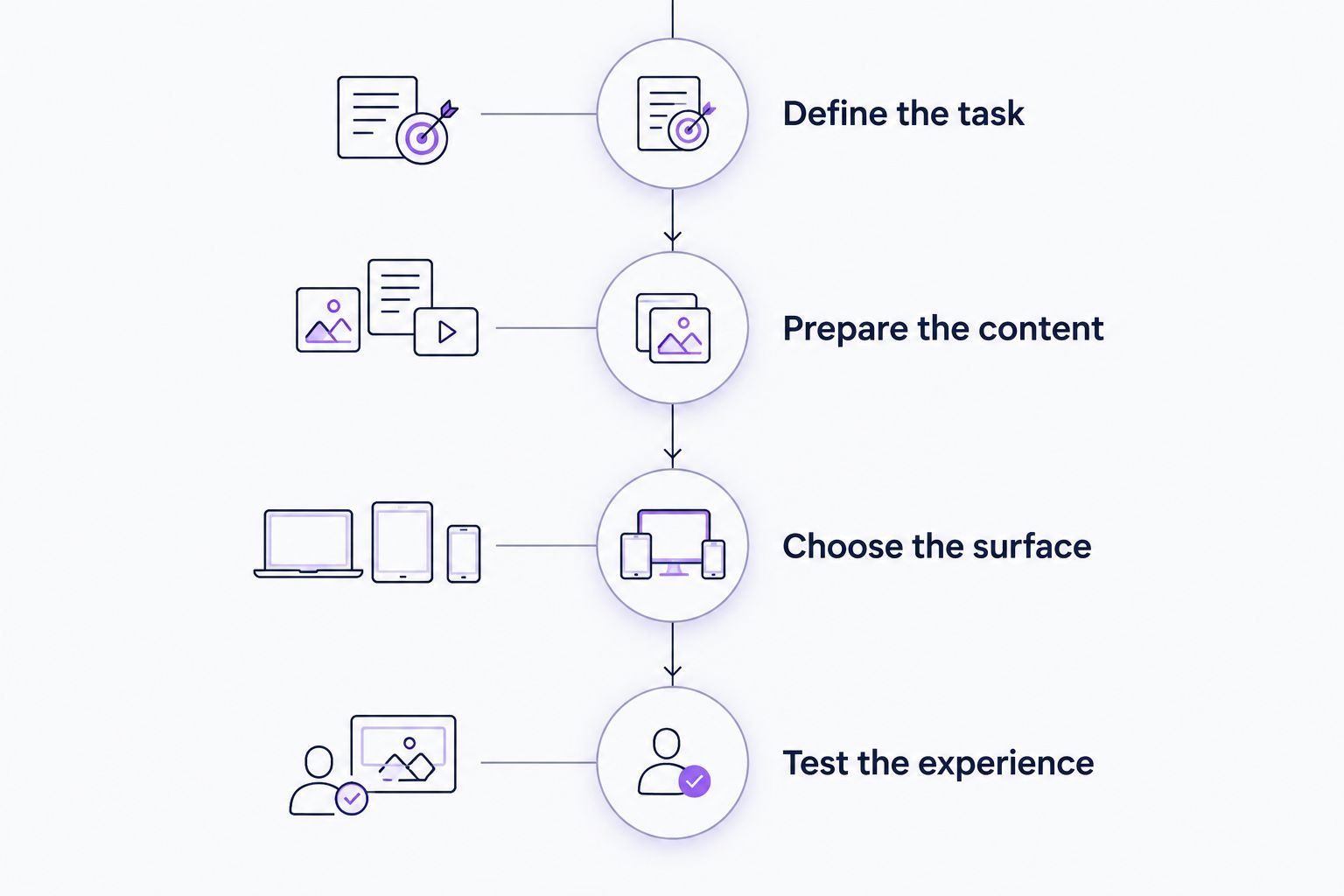
Define the task
Write down what the user must achieve and where the workflow begins. Avoid a goal such as learning the dashboard. Specify the action and the resulting state your team can check.
Prepare the content
Select the relevant videos and documentation. Remove conflicting instructions and identify who owns updates. Test the material against the questions in the pilot brief before treating it as a reliable onboarding source.
Choose the surface
Decide whether the user needs a portal, in-app help, or task-specific guidance. Do not add every possible surface to the first rollout. Pick the surface that matches where the question or obstacle occurs.
Test the experience
Ask representative users to attempt the task with the proposed guidance. Check the content, permissions, interface states, and completion outcome. Record the remaining work rather than counting a published experience as finished.
Ask the vendor to separate your team's responsibilities from the vendor's responsibilities. Request a dependency list and an explanation of what must happen before users can access the experience. That produces a useful estimate without confusing configuration work with approval delays.
Which onboarding approach should you choose?
Choose Knolbase when your starting point is existing product videos and documentation, and your goal is personalized onboarding help. Choose product-tour software when the problem is a specific sequence inside the interface. Choose enterprise digital-adoption software when the workflow crosses applications.
For the undecided buyer, start with the task customers struggle to complete. Identify whether the obstacle is missing information, unclear interface actions, or movement between systems. That diagnosis gives you a shortlist with a reason behind it.
Then ask for a demonstration using your pilot brief. A vendor should show the proposed experience and explain the implementation dependencies. Judge the result against the task, not the polish of the sales environment.
Evaluate your content-led onboarding workflow
Bring existing product videos and documentation to your onboarding evaluation.
FAQ
What's the best onboarding software ranked by implementation time?
The best choice depends on the launch scope, not a universal vendor ranking. Knolbase fits content-led B2B SaaS onboarding; product-tour software fits interface tasks; enterprise digital-adoption software fits cross-application workflows.
How long does onboarding software take to implement?
A useful implementation estimate must account for content preparation, deployment, approvals, and testing. Ask each vendor to estimate the same defined workflow and identify which responsibilities belong to your team.
Are product tours faster to launch than onboarding portals?
A product tour is not automatically faster than an onboarding portal. Compare the readiness of your content, the required interface configuration, user permissions, and the acceptance criteria for each approach.
Should I compare Pendo and WalkMe for SaaS onboarding?
Compare Pendo and WalkMe when their current capabilities match your requirements. Define whether you need product tours, analytics, or cross-application guidance, then verify the relevant features and deployment requirements in a current demonstration.
Can I use existing videos and documentation for onboarding?
Existing videos and documentation are suitable onboarding inputs when they accurately explain the user's task. Review the material for outdated instructions and test whether it answers the questions your target persona asks.
What should I include in an onboarding software pilot?
Include a defined workflow, representative personas, recurring questions, and an observable completion state. Use the same brief for each vendor so the comparison reflects the same work.
What counts as a completed onboarding implementation?
A completed onboarding implementation meets your agreed acceptance criteria for the intended users. Publishing guidance is a deployment milestone; validating that users can complete the task is a separate requirement.
One last thing
The shortest implementation is not always the smallest useful implementation. Removing a required explanation or permission check can produce a quicker launch that fails the task.
Before approving your 2026 rollout, ask someone unfamiliar with the workflow to complete it using only the proposed help. The point where that person stops is the next implementation problem to solve.


