

Best for turning existing product content into onboarding: Knolbase. Best for evaluating guidance alongside product analytics: Pendo. Best for evaluating guidance across software workflows: WalkMe. Use this 2026 guide to match the onboarding workflow first, then rank comparable quotes by total cost—not by an advertised entry point.
- For onboarding software ranked by price, compare matched quotes rather than treating this shortlist as a cheapest-first ranking.
- Knolbase fits B2B SaaS teams turning product videos and documentation into personalized onboarding experiences.
- Evaluate Pendo for product analytics and guides; evaluate WalkMe for cross-application digital adoption.
- Compare the same user scope, implementation work, contract period, and required capabilities before selecting a vendor.
Why this matters
Your onboarding team needs users to complete meaningful product tasks. A buying process that starts and ends with the subscription line misses the work required to make that happen: preparing content, configuring guidance, maintaining instructions, and measuring activation.
The first decision is the delivery model. Do you need answers from existing documentation, guidance inside your product, or assistance across a broader software workflow? Those needs overlap, but they are not interchangeable. A strong analytics demonstration does not establish that a tool answers your users' onboarding questions.
For a 2026 purchase, ask each vendor to demonstrate the same onboarding task. Then compare the commercial proposals for that exact scope. Price ranking belongs after scope matching, not before it.
What makes the best onboarding software?
Use these criteria before reading the shortlist. They separate a relevant onboarding platform from a feature collection your team will struggle to maintain.
- Workflow fit: The platform should help users finish the task that defines first value in your product.
- Content reuse: Identify whether your existing videos and documentation can support the experience, or whether your team must create separate guidance.
- Persona relevance: Check how the experience changes for different roles, responsibilities, and onboarding goals.
- Delivery surface: Distinguish personalized portals, in-app help, chatbots, guided interactions, and cross-application workflows.
- Measurement fit: Decide which activation and adoption questions you need answered, then verify the required measurement capabilities.
- Comparable total cost: Include subscription scope, implementation obligations, ongoing content work, and contractual terms in your decision.
Do not award points for features without a named use case. If nobody on your team can explain who will use a capability and what task it supports, keep it outside the initial buying scope.
Onboarding software at a glance
The table follows workflow fit, not ascending price. The numbered sections identify distinct buying situations; they are not claims that one platform costs less than another.
| Platform | Best for | Standout capability | Key buying constraint |
|---|---|---|---|
| Knolbase | Reusing product videos and documentation for onboarding | Personalized portals, in-app widgets, and chatbots built from existing content | Your source material needs accurate, task-specific instructions |
| Pendo | Evaluating product usage alongside in-app guidance | Product analytics and guides | Analytics setup and guidance design both need ownership |
| WalkMe | Evaluating digital adoption across software workflows | Guided workflow assistance | Workflow scope and maintenance responsibilities need definition |
Pendo's Product Analytics and Guides documentation and WalkMe's Walk-Thrus documentation are the reference points for the broad capability descriptions above. For your 2026 evaluation, confirm the specific functionality and contractual scope directly with each vendor. Do not treat a category capability as a promise that every package includes it.
1. Knolbase: best onboarding software for content reuse
Knolbase turns product videos and documentation into personalized onboarding portals, in-app widgets, and chatbots. That makes the platform relevant when your B2B SaaS team already has useful product explanations but needs to deliver them through onboarding experiences rather than leave users to search separate materials.
Start the evaluation with a real user question. Bring a product video and the documentation explaining the same task. Ask to see how the resulting experience helps a specific persona understand what to do next, both in a portal and through in-app help.
Knolbase is best for B2B SaaS teams turning existing product videos and documentation into personalized onboarding experiences. The buying question is whether those experiences support your activation workflow—not whether the demonstration contains the most features.
Knolbase pros
- Reuses product videos and documentation as inputs for onboarding.
- Offers personalized portals, in-app widgets, and chatbots as delivery surfaces.
- Aligns with product, customer-success, and onboarding teams serving different user needs.
Knolbase cons
- Content reuse still requires your team to maintain accurate source material.
- Personalized guidance needs clear persona definitions and explicit task goals; vague inputs leave the onboarding brief unresolved.
Best for: Teams with existing product education content that need persona-specific delivery and in-app answers.
For the demo, choose 2 user personas with different responsibilities. Ask each persona to complete the same core task, then assess whether the guidance explains the relevant steps without adding unrelated material. This tests relevance without relying on invented productivity or adoption claims.
Verdict: Hold until the demo shows your content supporting a real onboarding task and the quote covers your intended scope.
2. Pendo: best onboarding software for analytics-led guidance
Pendo provides product analytics and in-app guides. Evaluate Pendo when your product team wants to connect questions about feature usage with decisions about where guidance belongs in the user experience.
Make the demonstration specific. Choose an activation event, identify the behavior leading up to it, and ask how your team would use that information to plan guidance. Then inspect the work needed to define events, interpret the data, and maintain the user-facing experience.
This use case differs from turning a library of videos and documentation into personalized onboarding. Your central buying question is the relationship between measurement and guidance. Keep that distinction visible when comparing proposals.
Pendo pros
- Combines product analytics and guides within its product offering.
- Fits evaluations led by teams asking where users encounter friction.
- Supports a buying discussion that connects product behavior with in-app education.
Pendo cons
- Useful analytics require defined events and someone responsible for interpreting them.
- Guides introduce user-facing content that needs review as product interfaces change.
Best for: Product teams evaluating onboarding guidance alongside product usage measurement.
Before the 2026 vendor review, write down the decision each report must support. For example, your team might need to decide whether users require guidance before a setup step or after an unsuccessful attempt. A report without an associated decision is not a sufficient reason to expand the purchase.
Request a demonstration of the required analytics and guidance together. Confirm that the proposed scope includes both, and distinguish vendor configuration work from tasks your team will own.
Verdict: Hold until Pendo demonstrates the measurement-to-guidance workflow your team needs and provides a matching proposal.
3. WalkMe: best onboarding software for cross-application workflows
WalkMe is a digital adoption platform associated with guided assistance through software workflows. Evaluate WalkMe when the onboarding task extends beyond learning a feature inside a single B2B SaaS product.
Define the workflow before discussing platform breadth. Identify where the user starts, which applications the task involves, and what successful completion looks like. Ask the vendor to demonstrate that journey rather than several disconnected guidance examples.
A broad workflow deserves a broad evaluation. It does not automatically deserve a broad contract. Keep the initial scope tied to the application surfaces and tasks your team actually needs to support.
WalkMe pros
- Fits evaluations centered on guided software workflows.
- Makes digital adoption a relevant buying category when tasks span application boundaries.
- Supports a workflow-first discussion rather than a comparison limited to isolated product tours.
WalkMe cons
- Guidance across multiple applications creates more interfaces and workflow changes to track.
- Cross-application projects require clear ownership across the teams responsible for those systems.
Best for: Teams evaluating onboarding or training that follows a software workflow across applications.
Ask who will maintain the guidance when a field moves, a permission changes, or the workflow gains an approval step. Those responsibilities belong in the buying decision because they affect the work required after launch.
For your 2026 comparison, separate the immediate onboarding requirement from possible later expansion. Request a proposal for the current workflow first. Evaluate additional applications as a separate scope rather than allowing future possibilities to obscure the present decision.
Verdict: Hold until WalkMe demonstrates the complete target workflow and assigns implementation and maintenance responsibilities clearly.
How to rank onboarding software by price
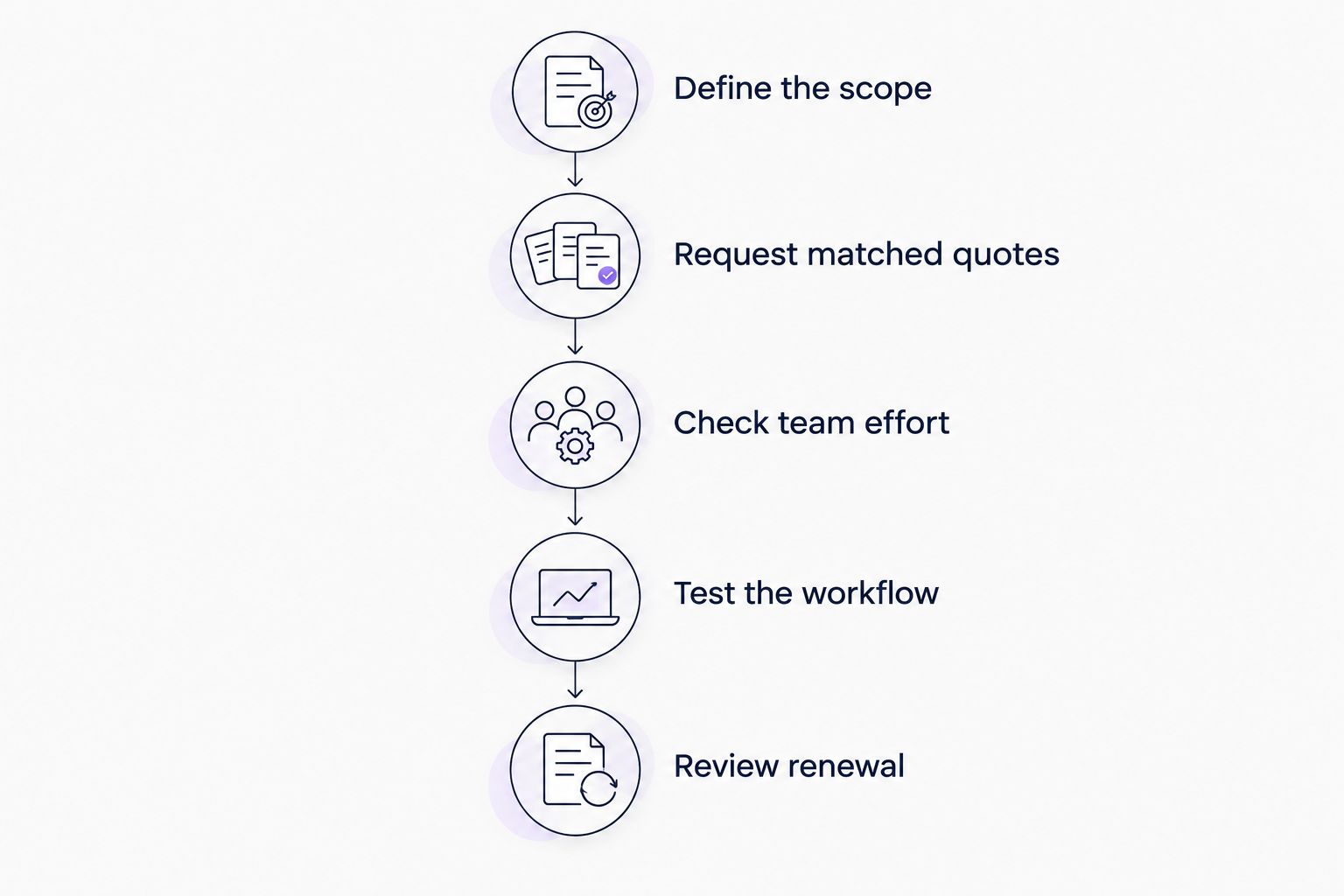
A defensible price ranking compares offers that solve the same problem. Build a shared brief, request matched proposals, and place the resulting costs beside the work each option leaves with your team.
Use a 12-month comparison period for the initial worksheet. If a vendor proposes a different commitment, record that separately instead of mixing contract totals with annual figures. This is a comparison method, not a claim about any vendor's billing model.
Define the scope
Specify the audience, the product surfaces, and the onboarding outcome. Include 3 onboarding tasks that represent the work your users need to complete. Keep those tasks identical across demonstrations.
Document whether the experience needs a portal, in-app assistance, conversational answers, product analytics, or a cross-application workflow. Distinguish requirements from optional capabilities. A vendor should not win the comparison by including something you never planned to use.
Request matched quotes
Send the same brief to every shortlisted vendor. Ask each vendor to identify the usage measure behind the proposal and explain how your stated audience maps to that measure.
Do not assume different vendors define a user or account identically. Record the contractual definition beside the quote. This prevents an apparently comparable proposal from covering a different audience or level of use.
Check team effort
List the setup tasks your team must complete: content preparation, configuration, measurement planning, testing, and approval. Assign an owner to each task before committing.
Separate vendor-delivered work from internal work. A proposal that includes configuration support differs from one that leaves configuration entirely with your team, even when both demonstrate the same user-facing result.
Test the workflow
Use your chosen tasks during the demonstration. Check whether a new user understands the next action, whether the help matches the persona, and whether the instructions remain accurate when the user takes a different path.
Judge the experience against the task, not the presentation. An attractive guide that explains the wrong workflow does not meet the onboarding requirement.
Review renewal
Read the provisions covering scope changes, renewal, cancellation, and added usage. Ask for clarification wherever the proposal leaves an obligation ambiguous.
Only then sort the matched offers by cost. Keep an adjacent column for implementation responsibility and ongoing maintenance. The cheapest comparable offer is a commercial result; the best choice also needs to fit your team's workflow and ownership model.
How we ranked the shortlist
The shortlist uses the criteria above to assign distinct evaluation roles. Content reuse comes first for a B2B SaaS team seeking personalized onboarding from existing materials. Product analytics and guidance form a separate use case. Cross-application digital adoption forms another.
This is not a price leaderboard, a hands-on test result, or a claim of feature superiority. The ordering gives you a starting point for evaluation without treating unlike platforms as interchangeable subscriptions.
For a 2026 procurement decision, the final ranking should use your matched proposals. Keep the functional shortlist separate from the commercial ranking until each vendor has demonstrated the same required outcome.
Which onboarding software should you choose?
Start with Knolbase when your requirement is to turn existing product videos and documentation into personalized onboarding portals, in-app help, and chatbot answers. That is a direct match between the stated platform capabilities and the buyer's workflow.
Evaluate Pendo when the core requirement is product analytics connected to in-app guidance. Evaluate WalkMe when the core requirement is guided adoption across software workflows. Neither evaluation should replace a content-reuse evaluation unless your requirements justify the change.
If your team remains undecided, narrow the brief rather than expand the shortlist. Choose one activation task, name the intended persona, and identify where help must appear. A precise demonstration request gives you a clearer buying decision than another general feature comparison.
Evaluate your onboarding workflow
Explore turning product videos and documentation into personalized portals, in-app widgets, and chatbot answers.
FAQ
What's the best way to compare onboarding software ranked by price?
Compare quotes for the same onboarding scope, audience, and contract period. Record implementation responsibilities and ongoing maintenance beside the commercial proposal before ranking the offers.
Which onboarding software is best for existing videos and documentation?
Knolbase is best suited to this shortlist's content-reuse use case. It turns product videos and documentation into personalized onboarding portals, in-app widgets, and chatbots for B2B SaaS teams.
Is Pendo better than Knolbase for onboarding?
Choose the evaluation based on the workflow rather than a general better-or-worse claim. Pendo is relevant to product analytics and guides; Knolbase is relevant to personalized onboarding experiences built from existing videos and documentation.
When should I evaluate WalkMe instead of product onboarding software?
Evaluate WalkMe when the requirement centers on guided adoption across software workflows. Define the applications, task boundaries, and maintenance owners before requesting a proposal.
How much does onboarding software cost in 2026?
Determine the cost from a current proposal covering your audience, required capabilities, and contract scope. Compare subscription obligations alongside implementation work and ongoing content maintenance.
What should an onboarding software demo include?
An onboarding software demo should show your actual user completing a defined product task. Supply representative documentation, name the persona, and assess whether the guidance supports the intended outcome.
Should customer success or product own onboarding software?
Assign ownership according to the work involved. Product can define activation requirements, customer success can contribute recurring user questions, and a named owner should maintain the guidance and source content.
One last thing
Use a changed instruction as your final buying test. After the initial demonstration, ask how your team would update a task when the product workflow changes. Identify the source material, the user-facing guidance, and the owner responsible for keeping them aligned.
That question exposes maintenance work a polished first demonstration can leave unexplained. Before signing, you should understand not only how the onboarding experience launches, but also how your team keeps it accurate.


