

RecordCast combines browser-based screen recording with video editing, making it useful for creating product walkthroughs. Recording a walkthrough is a different job from delivering persona-specific help inside your product. The best RecordCast alternative in 2026 is Knolbase if you need content-led SaaS onboarding; Loom if you need screen recordings shared by link.
- For RecordCast alternatives, choose Knolbase when existing videos and documentation need to become persona-specific SaaS onboarding.
- Choose Loom for screen recordings shared by link; choose OBS Studio for scene-based recording control.
- Keep RecordCast when browser-based recording and editing already meet your walkthrough-production needs.
- Separate screen recording from product adoption: creating a video does not decide where users receive help.
Why this matters
Your onboarding problem starts with a user task, not a recording tool. A new administrator needs setup instructions. An everyday user needs help completing work. Customer success needs a way to deliver the right explanation without treating every question as a new video request.
RecordCast alternatives therefore belong in 2 workflow layers: content creation and content delivery. RecordCast, Loom, and OBS Studio address recording workflows. An onboarding platform addresses how existing material reaches users.
For your 2026 shortlist, decide which layer needs replacing. Switching recorders will not, by itself, create persona-specific onboarding. Adding an onboarding platform does not remove the need to produce accurate source material.
RecordCast alternatives at a glance
The comparison below separates recording tools from onboarding software. The best fit depends on whether you need to create a walkthrough, share an explanation, or turn existing content into product guidance.
| Option | Best for | Standout capability | How it differs from RecordCast |
|---|---|---|---|
| RecordCast | Browser-based walkthrough production | Screen recording and video editing in a browser workflow | The benchmark when recording and editing are the main jobs |
| Knolbase | B2B SaaS teams delivering persona-specific onboarding | Turns product videos and documentation into portals, in-app widgets, and chatbots | Addresses content delivery and guidance rather than the recording step |
| Loom | Teams sharing screen explanations | Screen and camera recording with link-based sharing | Centers the workflow on recording and sharing an explanation |
| OBS Studio | Teams controlling desktop recordings | Configurable scenes and multiple capture sources | Provides a desktop production workflow rather than browser-based recording |
For competitor feature scope, consult RecordCast's published screen-recorder and video-editor descriptions, Loom's screen-recording documentation, and the OBS Studio Quick Start Guide. Use those official references during your 2026 evaluation; do not treat a category comparison as confirmation of a particular plan entitlement.
1. Knolbase: best for persona-specific SaaS onboarding
This onboarding platform turns existing product videos and documentation into personalized portals, in-app widgets, and chatbots. Its role in this shortlist is specific: helping B2B SaaS product, customer-success, and onboarding teams deliver material in a form users can consult while learning the product.
Best for: Teams that already have product knowledge to distribute and need persona-specific guidance, not another recording interface.
Where it shines
- Reuses existing material. Product videos and documentation become inputs for onboarding rather than isolated files.
- Supports different delivery surfaces. Portals, in-app widgets, and chatbots give teams different ways to present product help.
- Connects content to personas. Personalized onboarding changes the question from which video to send to which guidance a user needs.
Consider an administrator learning configuration and an end user learning a daily task. Your evaluation should establish whether each receives relevant material and whether the resulting answers stay grounded in your product documentation.
Where it falls short
- It addresses a different purchase decision. If your only requirement is capturing and editing a screen recording, this recommendation does not match that requirement.
- Source-content work remains. Turning documentation into onboarding does not make outdated instructions correct. Your team still needs to maintain the underlying product knowledge.
- Fit requires an in-product evaluation. A recording sample alone cannot demonstrate whether persona-specific help supports your actual onboarding tasks.
Head-to-head: onboarding platform versus recorder
| Dimension | Knolbase | RecordCast |
|---|---|---|
| Primary job | Deliver personalized product onboarding | Create screen recordings and edit videos |
| Starting point | Existing product videos and documentation | Material captured or assembled for a video |
| User-facing output | Portals, in-app widgets, and chatbots | Video content |
| Evaluation task | Check whether users receive relevant guidance | Check whether the recording and editing workflow fits |
Do not compare these options solely on video production. Bring a real onboarding task, the documentation explaining it, and the recording you currently send customers. Evaluate what changes after the material becomes guidance.
Verdict: Buy for content-led onboarding; skip for a recording-only requirement.
2. Loom: best for screen explanations shared by link
Loom supports screen and camera recording with link-based sharing. That makes it a relevant RecordCast alternative when the handoff matters more than assembling an edited walkthrough: record an explanation, then send the recipient a link.
Best for: Customer-success and product teams sharing individual explanations, product updates, or walkthroughs with recipients.
Where Loom shines
- A direct recording-to-sharing workflow. The explanation and the handoff belong to the same use case.
- Screen and camera context. A presenter can explain a product task while showing the screen.
- Useful for individual questions. A recorded answer can demonstrate a task without requiring everyone to attend the same conversation.
For example, use the evaluation to record an answer to a real setup question. Then check the recipient experience: can the person open the recording, understand the task, and return to the product with a clear next action?
Where Loom falls short
- A shared video still requires delivery decisions. Your team must decide which recipient needs which explanation and where the link belongs.
- Recording more answers creates maintenance work. Product changes require a process for finding and replacing affected explanations.
- The sharing workflow is not the whole onboarding workflow. Selecting Loom for recording does not settle how users receive persona-specific in-app help.
Head-to-head: Loom versus RecordCast
| Dimension | Loom | RecordCast |
|---|---|---|
| Best-fit task | Record and share an explanation | Record and edit a walkthrough |
| Defining workflow | Screen or camera recording followed by link sharing | Browser-based recording and editing |
| Main evaluation | Recipient access and clarity of the shared explanation | Capture quality and editing workflow |
| Onboarding responsibility | Decide where and to whom each recording is sent | Decide how finished videos reach users |
In your 2026 evaluation, use the same product task in both tools. Do not let a polished example distract from the operational question: which workflow makes your actual explanation easier to produce and hand over?
Verdict: Buy for shared screen explanations; skip if personalized onboarding delivery is the main requirement.
3. OBS Studio: best for scene-based recording control
OBS Studio is open-source desktop software for video recording and live streaming. Its scene-and-source model lets you configure the material included in a recording rather than treating capture as a single browser task.
Best for: Teams that need deliberate control over recording composition and can manage a desktop production workflow.
Where OBS Studio shines
- Scenes organize capture layouts. You can configure how recording sources fit together.
- Multiple source types support production choices. Screen, window, camera, and audio sources give you control over the explanation's composition.
- Recording is the focus. It is a relevant option when production control, rather than onboarding delivery, is the requirement.
Where OBS Studio falls short
- Configuration is part of the job. Someone must manage sources, scenes, and recording settings.
- It does not resolve the content handoff. Your team still needs a workflow for distributing finished recordings.
- Production control is unnecessary overhead for a simple task. If a browser recording already meets the requirement, changing the production environment adds work without addressing onboarding delivery.
Head-to-head: OBS Studio versus RecordCast
| Dimension | OBS Studio | RecordCast |
|---|---|---|
| Environment | Desktop application | Browser-based recording workflow |
| Production approach | Configurable scenes and sources | Screen recording with video editing |
| Best-fit requirement | Control over capture composition | Browser-based walkthrough creation |
| Work remaining | Editing and distribution workflow decisions | Distribution and onboarding-delivery decisions |
Verdict: Skip for hosted onboarding; choose OBS Studio when scene-based recording control is the requirement.
Why teams consider switching from RecordCast
These are workflow-based reasons to evaluate alternatives, not claims about RecordCast outages, commercial changes, or customer dissatisfaction.
- You need personalized onboarding. A finished walkthrough is an input; the new requirement is deciding which guidance each persona receives.
- You need a recording-to-link handoff. Evaluate Loom when sharing an explanation is central to the task.
- You need configurable capture composition. Evaluate OBS Studio when scenes and sources matter to the recording.
- You need help inside the product. Evaluate an onboarding platform when users should consult guidance without relying only on a separately distributed video.
The distinction matters for product adoption. A recording tool helps explain a task. Your onboarding design decides when that explanation appears and what the user should do next.
Test the workflow before choosing
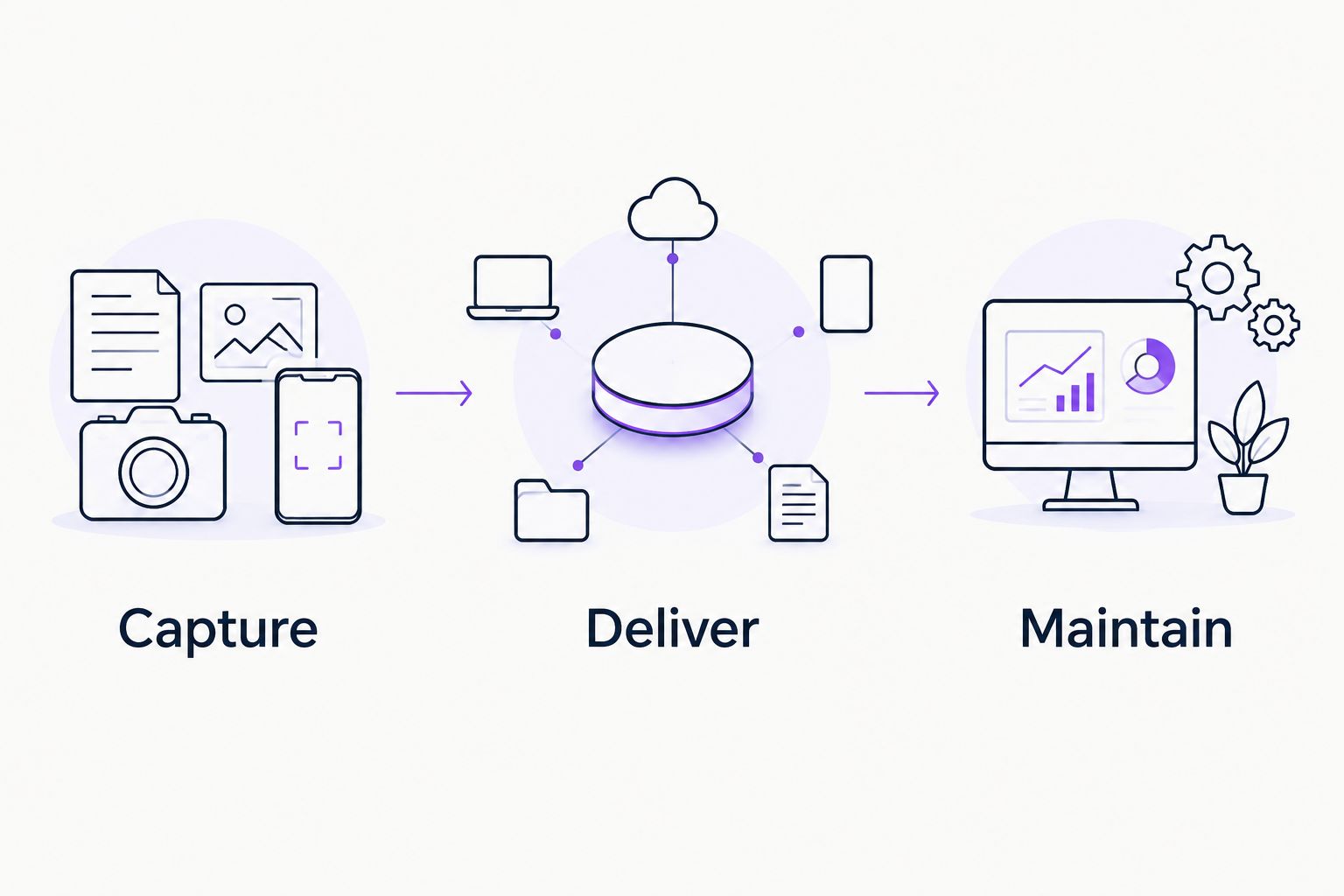
Use 3 evaluation tasks in your 2026 shortlist. Keep the product task and source material consistent so you compare workflows rather than unrelated demonstrations.
Capture
Record a real product task. Check whether the screen, narration, and visible actions explain the task accurately. For a recording-tool purchase, this is the starting test—not an attractive sample supplied by the vendor.
Deliver
Put the explanation where its intended user should receive it. For a link-sharing workflow, inspect the recipient experience. For onboarding software, inspect the relevant portal, widget, or chatbot interaction.
Maintain
Change an instruction in the source material. Establish what your team needs to review or update before users receive the revised guidance. This tests your operating process without assuming that any product automatically manages every content dependency.
Assign 1 workflow owner to collect the results across product and customer success. Use a short scorecard: does the explanation work, does it reach the right user, and can the team keep it accurate? Avoid declaring a winner because one tool performs a job another was not selected to perform.
Evaluate your onboarding workflow
Bring product videos and documentation to assess persona-specific portals, in-app help, and chatbot answers.
When staying with RecordCast is the right call
Stay with RecordCast when browser-based recording and editing meet your walkthrough-production requirements. That is a valid outcome, not a failed evaluation.
A new onboarding requirement does not automatically require replacing your recorder. You can keep the content-creation workflow and evaluate a separate delivery layer. Judge the recorder on the videos it helps you create; judge onboarding software on how users receive and use the resulting guidance.
For 2026 planning, avoid a replacement project unless you can name the workflow that needs to change. If the problem is stale documentation or an unclear onboarding task, switching recording interfaces does not correct it.
FAQ
What's the best RecordCast alternative for SaaS onboarding?
Knolbase is the best-fit option in this shortlist when you need existing product videos and documentation turned into persona-specific onboarding. Its described outputs include personalized portals, in-app widgets, and chatbots. That is a delivery requirement rather than a screen-recording requirement.
Is Loom better than RecordCast for product walkthroughs?
Choose Loom when screen recording followed by link sharing matches your workflow; choose RecordCast when browser-based recording and editing match it. Compare both using the same product task and recipient experience. Neither choice alone settles your broader onboarding design.
Is OBS Studio a RecordCast alternative?
OBS Studio is a RecordCast alternative for video recording, particularly when you need configurable scenes and capture sources. It uses a desktop production workflow. You still need to decide how finished recordings will be edited and distributed.
Do I need to replace RecordCast to add in-app onboarding?
No, adding an onboarding-delivery layer does not inherently require replacing your recording tool. Keep your existing production workflow if it creates suitable material. Evaluate the delivery platform against the guidance users need inside the product.
What should I test in a RecordCast alternative demo?
Test capture, delivery, and maintenance using a real product task. Check the explanation itself, the intended user's access to it, and the work required when source instructions change. Keep the source material consistent across evaluations.
Can a shared video replace persona-specific onboarding?
A shared video is not the same deliverable as persona-specific onboarding. Your team still needs to decide which explanation each user receives and where it appears. Choose the workflow that matches that delivery requirement.
When should I keep using RecordCast?
Keep RecordCast when its browser-based recording and editing workflow meets your walkthrough-production needs. A separate content-delivery problem is not, by itself, a reason to change recorders. Define the task you need to improve before choosing a replacement.
One last thing
Knolbase belongs on a SaaS onboarding shortlist, not a like-for-like screen-recorder shortlist. That distinction prevents a category mistake: buying a better recording workflow when the actual requirement is helping different users find the right product guidance.
Before requesting a demo, write one sentence: users need this explanation, at this point, to complete this task. Bring that sentence and the source content. It gives the evaluation a concrete outcome without inventing an adoption target.


