Choose Knolbase if your B2B SaaS team needs persona-specific onboarding portals, in-app help, and answers built from existing product videos and documentation; choose ScreenPal if your immediate job is recording and editing instructional videos. This 2026 comparison separates content creation from product onboarding so you can buy for the workflow you actually need.
- Knolbase vs ScreenPal is a choice between delivering personalized product onboarding and creating instructional videos.
- Knolbase is best for B2B SaaS teams turning existing videos and documentation into onboarding guidance.
- ScreenPal is best for teams whose immediate task is screen recording and video editing.
- Evaluate content creation and in-app delivery separately; a useful video does not automatically become contextual guidance.
Why this matters
Your onboarding problem starts with a user task, not a software category. A customer who cannot complete account setup needs guidance for that task. A customer-success manager who needs to demonstrate setup needs a way to record it.
Those are different jobs. Recording software produces an explanation; an onboarding platform determines how existing explanations reach users through portals, widgets, and chatbots.
For a 2026 evaluation, name the bottleneck before you shortlist tools. If the explanation does not exist, evaluate content creation. If the explanation exists but users need a relevant way to access it, evaluate onboarding delivery.
Do not use recording quality as a substitute for evaluating in-app guidance. Equally, do not buy an onboarding platform to solve a video-editing task.
At a glance
The comparison below focuses on the products' stated roles. ScreenPal is a screen-recording and video-editing product; the onboarding platform described here turns existing videos and documentation into personalized user experiences. The table distinguishes those roles without treating different categories as interchangeable.
| Dimension | Knolbase | ScreenPal |
|---|---|---|
| Best for | B2B SaaS product, customer-success, and onboarding teams | People creating screen recordings and instructional videos |
| Standout feature | Turning videos and documentation into personalized onboarding experiences | Screen recording and video editing |
| Starting material | Existing product videos and documentation | A workflow you need to capture and explain |
| In-app guidance | In-app widgets for onboarding help | Evaluate primarily as a content-creation tool |
| Persona-specific delivery | Personalized onboarding portals | Evaluate primarily for producing the underlying explanation |
| User questions | Chatbots built from product content | Video explanations of demonstrated tasks |
| Video-based teaching | Uses product videos as onboarding source material | Creates and edits instructional videos |
| Content accuracy | Depends on accurate source material | Depends on accurate demonstrations |
| Pricing model evaluation | Assess terms for the onboarding deployment | Assess terms for the recording and editing workflow |
ScreenPal wins when you need to create the demonstration
ScreenPal's screen-recording and video-editing functions match the task of making an instructional video. If your customer-success team needs to show a product workflow rather than describe it in a support message, that is the relevant starting point.
Recording gives you a visible sequence: where to start, what to select, and what the completed task looks like. Editing lets you shape that sequence into an explanation. Those functions matter when the missing asset is the demonstration itself.
The tradeoff is scope. A finished video answers the task it demonstrates, but creating that video is not the same purchasing decision as delivering persona-specific help inside your product.
Choose ScreenPal for the recording and editing job. For a wider content-creation shortlist, use the guide to screen recording software for onboarding videos.
During evaluation, record an actual product task. Check whether the resulting explanation shows the user's starting state, the required action, and the result clearly. A polished introduction is less useful than an unambiguous demonstration.
Existing videos and documentation favor the onboarding platform
If you already have product videos and documentation, recreating them is a different job from making them useful during onboarding. The onboarding platform accepts those materials as the starting point for personalized portals, in-app widgets, and chatbots.
That changes the buyer's workflow. Your product or customer-success team starts with existing explanations, identifies the intended user, and evaluates how those explanations appear in the onboarding experience.
ScreenPal remains the relevant choice when a source video needs to be created or edited. The onboarding platform addresses the delivery layer described in its product scope, not a replacement recording workflow.
The limitation matters: source material still needs to explain the product accurately. Turning documentation into a user-facing experience does not make an outdated instruction correct.
For your 2026 demo, bring a real product video and a documentation page about the same task. Ask to see how that material becomes a usable onboarding experience. Evaluate the result against the source, not against a prepared sales example.
Knolbase wins for the stated in-app onboarding workflow
The onboarding platform explicitly includes in-app widgets. That makes it the relevant choice when your requirement is to place onboarding help inside the product rather than stop at creating a recording.
Consider a user completing an unfamiliar setup task. Your requirement is not simply that a tutorial exists. It is that the user can access a useful explanation while working through the task.
ScreenPal's recording and editing role addresses how you produce that explanation. It should be evaluated on those merits, rather than credited with an equivalent onboarding-widget workflow without supporting evidence.
The implementation question belongs in the demo. Ask where the widget appears, how your team maintains its content, and what work is required in your application. Do not assume deployment effort from a feature label.
In-app help is a delivery requirement, not a video-production requirement. Keep that distinction in the acceptance criteria your product and engineering teams approve.
Persona-specific portals favor the onboarding platform
The onboarding platform's personalized portals match a team that needs different onboarding experiences for different users. Its described role includes turning product videos and documentation into persona-specific guidance.
For a useful evaluation, select 2 user personas from your own customer base. Give each a different task, such as configuring an account and completing an everyday workflow. These are demo criteria, not a claim about the product's limits.
Ask to see how each persona receives relevant guidance from the material you supplied. Check whether the resulting experience explains the user's next action rather than merely exposing the same library under a different heading.
ScreenPal is the stronger fit when the task is making the tutorial itself. Producing a clear demonstration and delivering a personalized portal are separate requirements, even when the same video contributes to both.
The tradeoff is preparation. Your team needs to define the audience and desired task before evaluating personalization. A portal cannot be judged as relevant unless you know whom it should serve.
Chatbots favor the onboarding platform; demonstrations favor ScreenPal
A video provides a visual explanation of a planned task. A chatbot provides a question-and-answer interaction. The onboarding platform's stated scope includes chatbots built from product videos and documentation; ScreenPal's recording role fits the demonstration side.
Choose the interaction that matches the user problem. If users need to watch the sequence of actions, a recording is useful. If your requirement is to let users ask questions about your product content, evaluate the chatbot workflow.
Do not mistake an answer for successful task completion. In the demo, check whether the response addresses the actual question, matches the supplied documentation, and gives the user a clear next action.
Likewise, do not mistake a complete video for an answer to every question. A demonstration has an intended scope. Questions outside that scope need another explanation or an appropriate support path.
For a 2026 shortlist, write down the questions your onboarding team already receives. Use those questions to evaluate answer quality rather than testing only prompts selected for the presentation.
Both support video-based teaching at different stages
Video-based teaching is a shared use case, not a reason to declare the products interchangeable. ScreenPal creates and edits instructional videos. The onboarding platform uses product videos as material for onboarding experiences.
That distinction leaves room for both roles in your workflow. You can evaluate a recording tool for producing an accurate explanation and an onboarding platform for presenting existing explanations through its stated delivery formats. This is a workflow distinction, not a claim of a direct integration.
Keep the stages separate when you review quality:
- Create content: Does the demonstration explain the task clearly?
- Prepare sources: Are the video and documentation accurate and consistent?
- Deliver guidance: Does the experience serve the intended user task?
- Check completion: Can the user apply the explanation to the task?
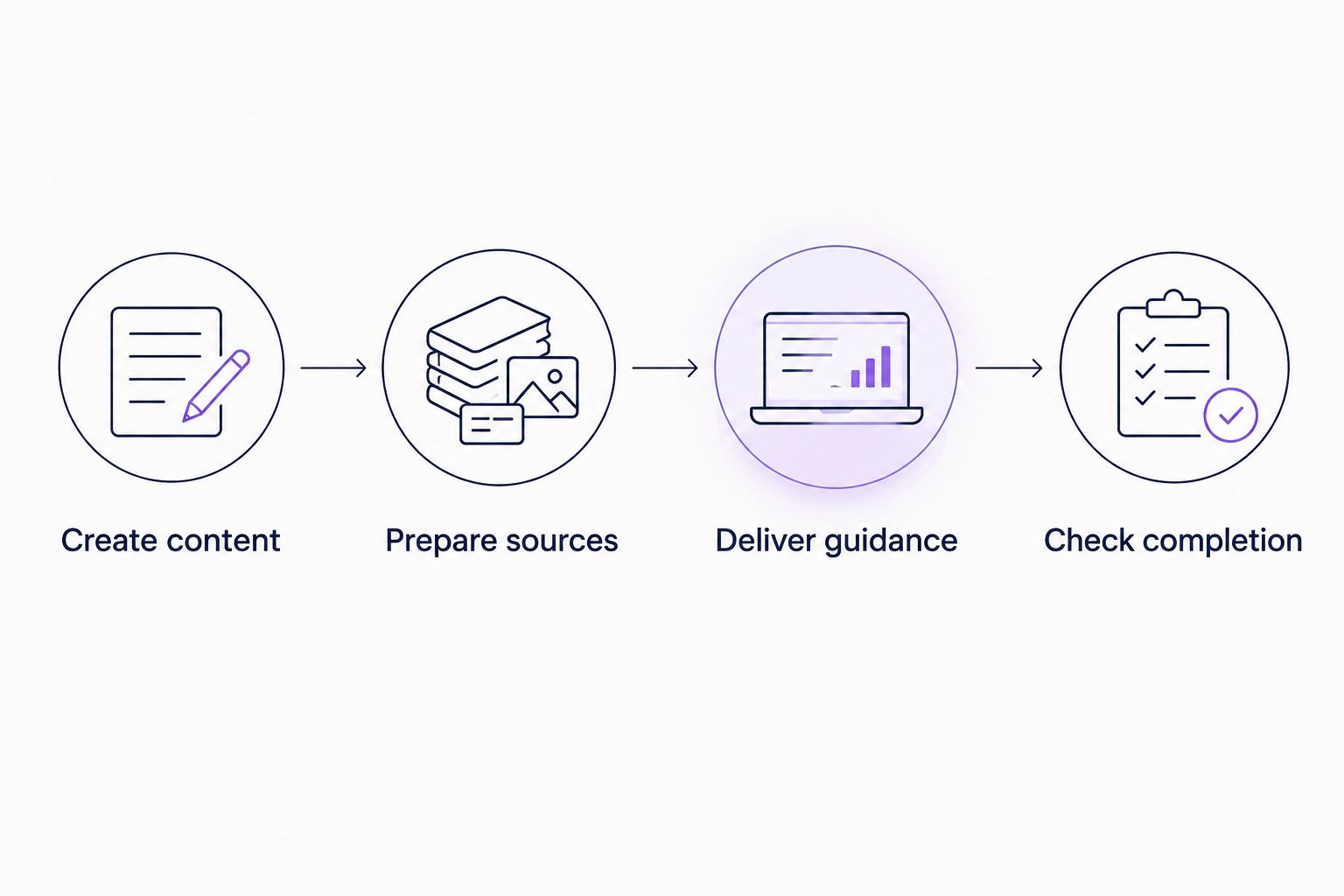
Your team should assign responsibility to each stage. Otherwise, a clear recording can be blamed for a delivery problem, or a useful portal can be blamed for inaccurate source instructions.
Neither product replaces accurate product knowledge
Both workflows depend on correct explanations. A screen recording can show an outdated interface; documentation can describe a process that no longer matches the product.
Treat accuracy as a shared acceptance criterion, not a competitive win. Check terminology, prerequisites, and the completed state against your current application. Have the relevant product owner resolve disagreements between the video and written instructions.
This matters especially when a task differs by user role. An explanation that is correct for an administrator can still be wrong for a user without the same permissions.
For your 2026 review, use 3 representative tasks: an initial setup task, a recurring task, and a task that regularly generates questions. This is a recommended test scope, not a published performance benchmark.
Avoid assigning a winner based on a prepared example alone. The more useful question is whether your own source material produces an explanation your target user can follow.
Pricing: evaluate the workflow and terms separately
Separate the buying decisions before comparing commercial terms. A recording and editing workflow has a different scope from an onboarding deployment that includes portals, widgets, and chatbots.
For ScreenPal, identify the recording and editing capabilities your content creators need. For the onboarding platform, identify the delivery formats your product and customer-success teams need. Then review the current terms for those exact requirements.
Ask both vendors what determines the applicable plan, what changes as your use grows, and which required capabilities are included. Assess predictability from the terms you receive; do not infer a billing structure from the software category.
Also assign ownership. Who creates demonstrations, updates documentation, maintains the user-facing experience, and approves changes? Those responsibilities remain part of the decision even when the software performs its stated function.
Compare scope before comparing commercial terms. Paying for content creation does not resolve an in-app delivery requirement, and buying onboarding delivery does not remove the need for accurate source content.
Final verdict: choose for the bottleneck
Choose Knolbase if you own B2B SaaS onboarding delivery
The onboarding platform fits product, customer-success, and onboarding teams that have videos and documentation and need persona-specific portals, in-app widgets, and chatbots. Evaluate it with your own material and a named user task.
Choose this route when the missing piece is how users receive guidance. Make the demo prove that delivery workflow, including how your team will maintain it.
Choose ScreenPal if you own instructional video production
ScreenPal fits the person responsible for recording and editing product demonstrations. Choose it when the immediate deliverable is an instructional video your users or colleagues can follow.
Keep the evaluation focused on producing that explanation. If you also need personalized onboarding delivery, assess that requirement separately.
| Dimension | Winner |
|---|---|
| Best for B2B SaaS onboarding delivery | Onboarding platform |
| Recording and editing demonstrations | ScreenPal |
| Reusing videos and documentation for onboarding | Onboarding platform |
| Stated in-app widget workflow | Onboarding platform |
| Persona-specific portals | Onboarding platform |
| Chatbots built from product content | Onboarding platform |
| Video-based teaching | Both, at different stages |
| Accurate product explanations | Tie: source accuracy remains essential |
| Commercial predictability | Decide from current terms for your scope |
FAQ
What's the main difference between Knolbase and ScreenPal?
Knolbase turns existing product videos and documentation into personalized onboarding portals, in-app widgets, and chatbots; ScreenPal records and edits videos. Choose by whether you need onboarding delivery or content creation.
Is ScreenPal better for recording onboarding videos?
ScreenPal is the relevant choice for the screen-recording and video-editing task. Evaluate it with an actual product workflow rather than treating recording as equivalent to personalized onboarding delivery.
Which option fits in-app product guidance?
The onboarding platform is the relevant choice because its stated scope includes in-app widgets. Ask to see the placement and maintenance workflow in your own product context.
Do I still need accurate documentation for personalized onboarding?
Yes, accurate documentation remains essential when it becomes source material for onboarding guidance. Check prerequisites, permissions, and instructions against your current product.
Can recording software and an onboarding platform serve different roles?
Yes, recording software can serve content creation while an onboarding platform serves delivery. That distinction does not establish a direct integration between particular products.
How should I compare the commercial terms?
Compare current terms against the exact workflow you need. Identify required recording capabilities or onboarding delivery formats before assessing plan scope and predictability.
What should I bring to an onboarding software demo in 2026?
Bring a real product video, its matching documentation, and a defined user task. Ask to see the resulting guidance and check whether the intended user can follow it.
One last thing
Test the explanation before judging the tool. Ask a colleague unfamiliar with the task to follow your current video and documentation without extra coaching.
If the instructions are unclear, fix the source. If the explanation works but users need it in a different context, evaluate delivery. That distinction gives your team a concrete demo objective instead of a feature checklist.