Choose Knolbase if your B2B SaaS team needs persona-specific onboarding portals, in-app help, and answers from existing product videos and documentation; choose Loom if you need to record and share a screen walkthrough. This 2026 comparison separates onboarding delivery from video creation so you can buy for the workflow you actually need.
- Knolbase vs Loom is an onboarding-delivery versus screen-recording decision, not a like-for-like replacement comparison.
- Knolbase is best for B2B SaaS teams turning videos and documentation into persona-specific onboarding.
- Loom is best for recording and sharing product walkthroughs and asynchronous explanations.
- Evaluate in-app guidance, content reuse, and the user's next task before choosing either workflow.
Why this matters
A product walkthrough and an onboarding experience solve different problems. A walkthrough shows someone how to complete a task. An onboarding experience organizes the guidance that a particular user needs and places help where that user can reach it.
For your 2026 shortlist, start with the failure you need to fix. If your customer-success team struggles to explain a workflow clearly, recording is the immediate job. If your users already have videos and documentation but need relevant help inside the product, onboarding delivery is the job.
Knolbase is best for B2B SaaS onboarding teams that want to turn existing videos and documentation into persona-specific guidance. Loom is the better fit when the deliverable is a new recording rather than a personalized onboarding destination.
Neither choice removes the need for accurate source material. An outdated explanation stays outdated whether you share it as a video or use it to support an onboarding experience.
At a glance
| Dimension | Knolbase | Loom |
|---|---|---|
| Best for | B2B SaaS product, customer-success, and onboarding teams delivering personalized guidance | Teams recording and sharing asynchronous video explanations |
| Standout feature | Turns product videos and documentation into portals, in-app widgets, and chatbots | Screen and camera recording with shareable videos |
| Creating explanations | Starts with existing product videos and documentation | Records a new explanation of a screen-based task |
| Persona-specific delivery | Personalized onboarding portals | A creator can record a walkthrough for a particular audience |
| Help location | Portals, in-app widgets, and chatbots | Shared video destinations |
| Follow-up questions | Chatbot answers from onboarding content | Comments and replies around a shared recording |
| Source quality | Requires accurate, relevant onboarding material | Requires an accurate, relevant explanation |
| Pricing model evaluation | Confirm the charging basis for your onboarding deployment | Evaluate subscription terms and creator-seat requirements |
The table compares core workflows, not every feature or plan entitlement. Use it to decide which product belongs in the evaluation, then test the details that affect your rollout.
Loom wins when you need to create a new explanation
Choose Loom for screen recording when the missing asset is the explanation itself. Its recording and sharing workflow suits a customer-success manager who needs to demonstrate a product task, explain an account-specific issue, or send an asynchronous handoff.
The practical advantage is directness. You can show the relevant screen and narrate what the recipient needs to do. The finished recording becomes a concrete asset that someone can watch and revisit.
The tradeoff is that producing an explanation does not decide how every future user should encounter it. Your team still needs to choose the audience, placement, and next action. A recording can support onboarding without being the whole onboarding experience.
For the onboarding platform, the starting point is existing material: product videos and documentation. That makes content reuse the relevant evaluation, rather than assuming it should replace your recording workflow.
Ask a simple question before purchasing: do you need to create the answer, or deliver an answer you already have? Those are different jobs, and your shortlist should reflect that distinction.
Knolbase wins for persona-specific onboarding delivery
Choose Knolbase onboarding software when different users need different guidance from the same product knowledge. The platform turns existing videos and documentation into personalized onboarding portals, in-app widgets, and chatbots.
Consider an administrator configuring an account and an everyday user completing work inside it. Both use the same product. Their immediate tasks differ, so presenting the same undifferentiated training material does not address the distinction.
Persona-specific delivery gives your evaluation a clear focus: can each audience reach the explanation relevant to its work? The feature-to-outcome pair is straightforward. Personalized onboarding organizes help around the user rather than asking the user to sort through every available explanation.
Loom remains useful when a person records a walkthrough specifically for that audience. That is a genuine strength for a tailored explanation, but it is a different workflow from turning an existing content collection into personalized onboarding destinations.
The tradeoff for personalized delivery is editorial work. Your team must define the personas and decide which material belongs with each task. Software does not settle those decisions for you.
In-app widgets win when the user needs help inside the product
An onboarding portal and an in-app widget offer different access points. A portal provides a destination for guidance. An in-app widget places help within the product experience, where a user is already working.
For a 2026 evaluation, test the actual moment of confusion. Open the product task, identify the question a user would ask, and inspect how the proposed help appears. Do not judge in-app guidance solely from a separate demonstration page.
The onboarding platform's in-app widgets make this a relevant buying criterion. If your requirement is help inside the application, inspect that workflow directly rather than treating a shareable recording as an equivalent delivery mechanism.
Loom is better suited to a different handoff: send a person an explanation they can watch asynchronously. That is useful when the recipient needs a walkthrough, particularly when a human must explain context around a specific situation.
Neither access point is automatically right for every task. A longer explanation can belong in a dedicated destination, while a focused question belongs near the work. Evaluate placement against the user's task, not the appearance of the demonstration.
Loom wins for a human-led asynchronous handoff
Choose Loom when a person needs to explain a particular situation to another person. A recorded walkthrough preserves the speaker's explanation alongside the screen being discussed. Comments give the recipient a place to respond around that shared recording.
This fits a customer-success handoff where the account context matters. The sender can explain what happened, demonstrate the next action, and ask the recipient to review it without scheduling a live call.
The limitation is workflow ownership. Someone still needs to prepare the explanation, send it to the right recipient, and handle questions that remain. Recording changes the communication format; it does not eliminate the communication work.
By contrast, a chatbot built from onboarding content addresses questions through an existing knowledge collection. That is useful for repeatable product guidance, but a content-based answer and a human's account-specific explanation serve different purposes.
When the question requires judgment about a particular customer situation, keep a human responsible for that judgment. When the question asks how the documented product works, evaluate whether content-based answers provide the required guidance.
Both depend on accurate source content
Neither product can make an incorrect product explanation correct. This is the most important tie in the comparison, because the quality of the explanation affects both recorded walkthroughs and onboarding answers.
For a recording, inspect the task being demonstrated. Check that the interface, terminology, and instructions match the current product. Remove explanations that send users toward an obsolete workflow.
For content-based onboarding, inspect the underlying videos and documentation. Resolve contradictory instructions before using them as guidance. A polished delivery experience does not compensate for conflicting source material.
Assign an owner to each important explanation. That owner should know which product change makes the explanation stale and what action to take when it changes.
This is content governance, not a claim about either product's maintenance features. Your team needs the process regardless of the software selected.
Both can support onboarding, but at different stages
Loom supports onboarding by helping your team produce and share explanations. The onboarding platform supports it by turning existing explanations into personalized portals, in-app help, and chatbot answers. The overlap is educational content; the difference is where each workflow starts.
That makes a combined workflow sensible when you need both stages. Record an explanation, review its accuracy, and then decide how to deliver it to the relevant audience. Treat this as a workflow design, not a claim about a native integration between the products.
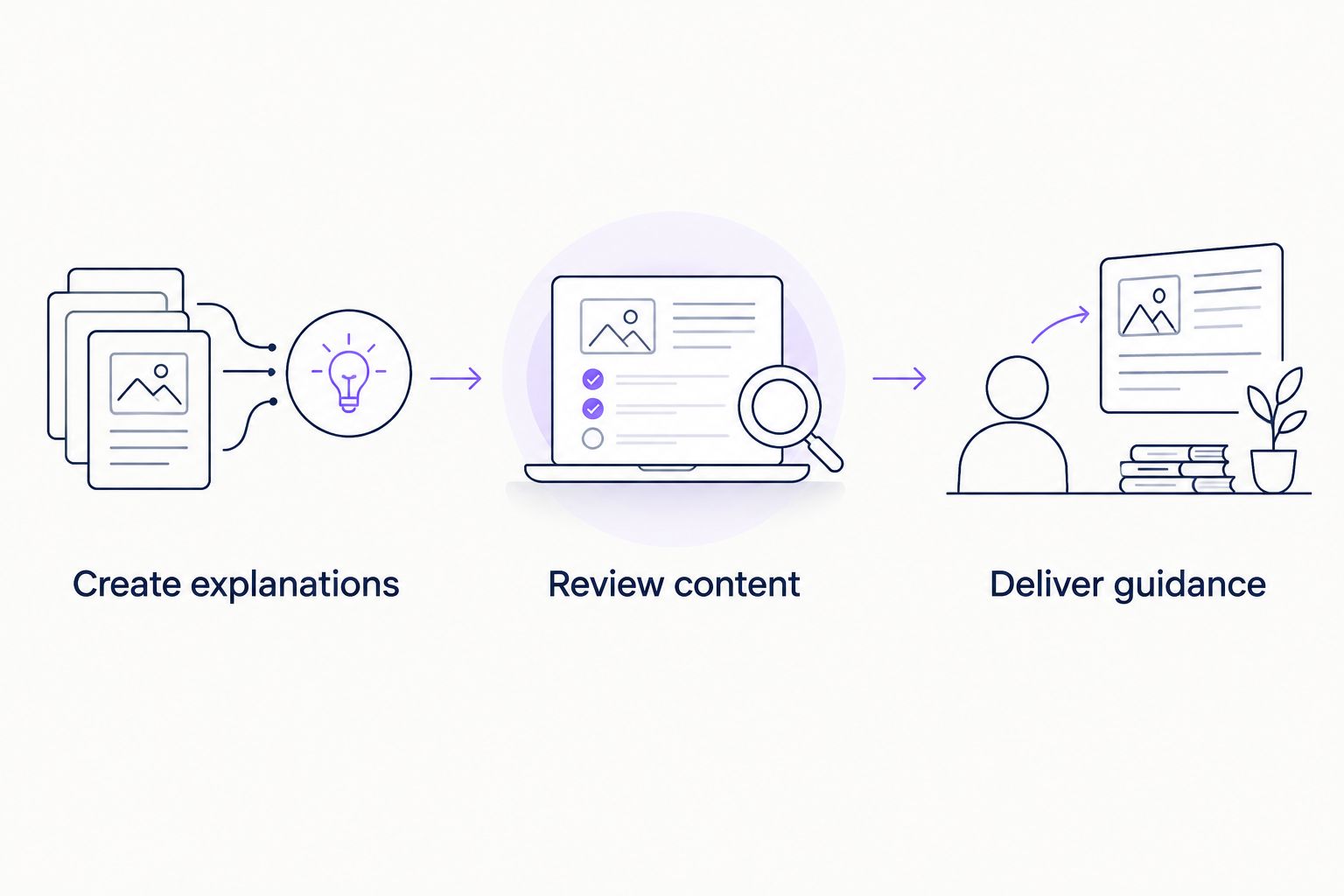
A useful content path has three stages:
- Create explanations: Record or write the instructions needed for a product task.
- Review content: Confirm that the explanation matches the product and the intended audience.
- Deliver guidance: Put the approved explanation where that audience needs it.
Do not purchase an additional delivery layer merely because your team records videos. Purchase it when the audience, placement, or question-answering requirements justify that additional workflow.
Pricing: compare the charging basis with the job
For your 2026 purchasing decision, separate the recording budget from the onboarding-delivery budget. They fund different work, so comparing subscription totals without matching the scope does not answer which purchase you need.
For Loom, evaluate the subscription structure and creator-seat requirements against the people who actually record. Distinguish creators from recipients, and confirm the current terms for the capabilities your team intends to use.
For the onboarding platform, confirm the commercial structure against your deployment. Ask how the agreement treats the people managing content, the audience receiving guidance, and the capabilities included. Treat those as purchasing questions, not assumptions about its pricing model.
A predictable commitment is useful when your deployment is stable. A usage-linked commitment requires a clear definition of billable activity. Whichever structure is offered, ask for a scenario that matches your own rollout rather than comparing unrelated packages.
Buy for the workflow, then evaluate the commercial terms. A recording subscription does not answer a requirement for personalized onboarding, and an onboarding purchase is unnecessary when your immediate requirement is simply to create a walkthrough.
Test the decision with a real onboarding task
Use one product task, two user personas, and three evaluation questions. These are evaluation instructions, not performance benchmarks. Keep the source material consistent so the comparison tests the workflow rather than the quality of different examples.
Choose a task your customer-success team already explains. Define what an administrator needs to know and what an everyday user needs to know, then prepare the relevant video and documentation.
Ask:
- Can the team create a clear explanation of the task?
- Can each persona reach the guidance relevant to its role?
- Can the user get an answer at the point where the task becomes confusing?
Loom belongs in the first question's evaluation. Personalized portals, in-app widgets, and chatbots belong in the second and third. If your team needs both sets of capabilities, test both stages instead of forcing a single-product winner.
For the 2026 demo, request the workflow you plan to deploy. A generic feature tour does not show whether your material serves your personas in your product context.
Evaluate your onboarding workflow
Use your product videos and documentation to assess persona-specific portals, in-app help, and answers.
Final verdict: choose delivery or recording
Choose Knolbase if you own repeatable SaaS onboarding
Best for: B2B SaaS product, customer-success, and onboarding leads. Choose Knolbase onboarding software when you already have product videos and documentation and need to turn them into persona-specific portals, in-app widgets, and chatbot answers.
Your buying question is how users receive relevant guidance. Evaluate the audience, content, and placement together rather than treating the video file as the finished onboarding experience.
Choose Loom if you own asynchronous explanations
Best for: customer-success managers, product specialists, and other walkthrough creators. Choose Loom when you need to capture a screen-based explanation and share it with someone who will review it asynchronously.
Your buying question is how the explanation gets created and communicated. Keep the workflow focused on recording when that solves the actual problem.
| Dimension | Winner |
|---|---|
| Creating a new screen explanation | Loom |
| Persona-specific onboarding delivery | Knolbase |
| Help inside the product | Knolbase |
| Human-led asynchronous handoff | Loom |
| Accurate source content | Tie: both require it |
| Supporting the broader onboarding workflow | Tie: different stages |
| Pricing decision | Match commercial terms to deployment scope |
FAQ
Is Knolbase better than Loom for SaaS onboarding?
Knolbase is the better fit for persona-specific onboarding delivery from existing videos and documentation. Loom is the better fit when your immediate job is recording and sharing a product explanation.
Can Loom be used for customer onboarding?
Loom can support customer onboarding through recorded walkthroughs and asynchronous explanations. Your team still needs to decide which audience receives each recording and where that guidance belongs.
Does Knolbase replace a screen recorder?
Evaluate Knolbase as an onboarding-delivery platform rather than assuming it replaces your recording workflow. Its stated purpose is turning product videos and documentation into personalized portals, in-app widgets, and chatbots.
Can a team use both products in the same onboarding workflow?
A team can separate recording from onboarding delivery and evaluate both products for those different stages. Confirm any technical connection separately rather than assuming a native integration.
Which product is best for in-app onboarding help?
Knolbase is the relevant choice to evaluate for in-app onboarding help because its stated capabilities include in-app widgets. Test the widget against an actual product task and the question a user needs answered.
How should I compare the cost of Knolbase and Loom?
Compare the commercial terms against the workflow you need, not just the subscription total. Confirm recording-seat requirements for Loom and the charging basis for your Knolbase onboarding deployment.
What should I test before choosing onboarding software in 2026?
Test a real product task with distinct user personas and the same source material. Evaluate explanation creation, relevant guidance delivery, and access to answers at the point of confusion.
One last thing
Before adding another onboarding video, ask where the existing answer is failing. If the explanation is missing, create it. If it already exists but users cannot find relevant guidance, fix delivery instead.
That distinction prevents a recording problem from becoming an unnecessary platform purchase—and prevents an onboarding-delivery problem from becoming another folder of videos.